I am managing WordPress server 2Core CPU 8Gb Ram, hosted on Openlitespeed + MariaDB 11.4, PHP 7.4. Redis and OPache are installed. On the WordPress site, Redis Object Cache and Litespeed LSCache are plugins installed and enabled.
Memory Limit: 512MB,
Max Execution time: 120
The site has over 140k posts, browsing the site pages and content is a smooth experience.
But the problem is whenever the editor login to create a post, the CPU usage surge to 90% or more. and the wp-admin/post-new.php become as slows as a snail, sometimes I could take more than minutes before it gets ready, sometimes crashed that publish button will be greyed-out. It gets worse when they open multiple instances of wp-admin/post-new.php.
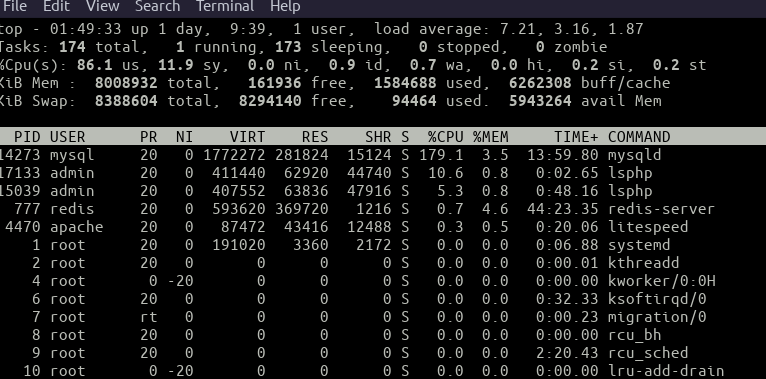
I have tried to disable all plugins, change the theme with the plugin disabled, it doesn’t fix.
It only gets a little bit better if I disable Classic Editor, using the default Gutenberg editor.
My Test and Findings
When I install Query Monitor I discovered that a query is running slow taking up to 25 seconds to complete, on other tabs or instances of wp-admin/post-new.php it could read up to 100 seconds, some case makes the site stop responding.
SELECT DISTINCT meta_key
FROM wp_postmeta
WHERE meta_key NOT BETWEEN '_'
AND '_z'
HAVING meta_key NOT LIKE '\_%'
ORDER BY meta_key LIMIT 30

I thought Installing Redis on the VPS and the Redis Cache Object would give a better performance. This could be true as other parts of the website are fast loading except for the post editor page where the query above is running.
Presently, I have disabled the classic editor, but the user (editors) preferred it. Please what do I need to do more to optimise the site?
Answers:
Thank you for visiting the Q&A section on Magenaut. Please note that all the answers may not help you solve the issue immediately. So please treat them as advisements. If you found the post helpful (or not), leave a comment & I’ll get back to you as soon as possible.
Method 1
After searching the web over the night I found out that the problem is common and the same query I posted above is the culprit. According to WordPress Post Editor Performance, this is caused by Slow meta_form() database query
The safest solution he provided was a piece of code the function.php. I did that and I experience a great deal of changed. see code below:
/**
 * Remove Ancient Custom Fields metabox from post editor
 * because it uses a very slow query meta_key sort query
 * so on sites with large postmeta tables it is super slow
 * and is rarely useful anymore on any site
 */
function wpse391530_remove_post_custom_fields_metabox() {
     foreach ( get_post_types( '', 'names' ) as $post_type ) {
         remove_meta_box( 'postcustom' , $post_type , 'normal' );
     }
}
add_action( 'admin_menu' , 'wpse391530_remove_post_custom_fields_metabox' );
You can read more about the solution on the article link posted above
All methods was sourced from stackoverflow.com or stackexchange.com, is licensed under cc by-sa 2.5, cc by-sa 3.0 and cc by-sa 4.0