I’ve registered post type with following —
$holidayLabels = array(
    'name' => __( 'Holidays'),
    'singular_name' => __( 'Holidays'),
    'all_items' => __( 'All Holidays'),
    'add_new' => __( 'Add New Holiday'),
    'add_new_item' => __( 'Add New Holiday'),
    'edit_item' => __( 'Edit Holiday'),
    'new_item' => __( 'New Holiday'),
    'view_item' => __( 'View Holidays'),
    'not_found' => __( 'No Holidays found'),
    'not_found_in_trash' => __( 'No Holidays found in Trash'),
    'parent_item_colon' => ''

);

$holidayArgs = array(
    'labels'               => $holidayLabels,
    'public'               => true,
    'publicly_queryable'   => true,
    '_builtin'             => false,
    'show_ui'              => true,
    'query_var'            => true,
    'rewrite'              => array( "slug" => "holidays" ),
    'capability_type'      => 'post',
    'hierarchical'         => false,
    //'menu_position'        => 6,
    'supports'             => array( 'title'),
    'has_archive'          => false,
    'show_in_nav_menus'    => false,

);
register_post_type('holidays', $holidayArgs);
And I want to remove permalink that appears below title when I post new holiday or start editing existing one.
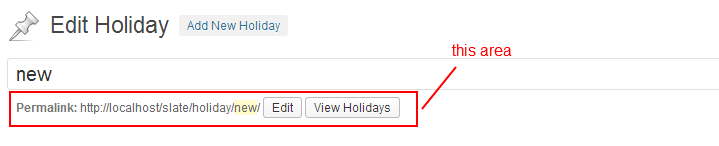
I want to remove this because, holidays will be displayed in separate widget. I don’t want admin to be able to see it as single post anyhow. There’s no template defined for such.
Answers:
Thank you for visiting the Q&A section on Magenaut. Please note that all the answers may not help you solve the issue immediately. So please treat them as advisements. If you found the post helpful (or not), leave a comment & I’ll get back to you as soon as possible.
Method 1
Well, there is another way. And better, I guess.
You should look at register_post_type parameters. You should probably set them like this:
'public' => false,  // it's not public, it shouldn't have it's own permalink, and so on
'publicly_queryable' => true,  // you should be able to query it
'show_ui' => true,  // you should be able to edit it in wp-admin
'exclude_from_search' => true,  // you should exclude it from search results
'show_in_nav_menus' => false,  // you shouldn't be able to add it to menus
'has_archive' => false,  // it shouldn't have archive page
'rewrite' => false,  // it shouldn't have rewrite rules
If post type is not public, then you won’t see this part of editor.
Method 2
You can also hide this area by placing a small JavaScript code to admin_footer hook.
<?php
add_action('admin_footer', function() {
  global $post_type;
  if ($post_type == 'your_custom_post_type') {
    echo '<script> document.getElementById("edit-slug-box").outerHTML = ""; </script>';
  }
});
Method 3
Well, one quick way would be to just hide the container div using CSS.
add_action('admin_head', 'wpds_custom_admin_post_css');
function wpds_custom_admin_post_css() {

    global $post_type;

    if ($post_type == 'post_type') {
        echo "<style>#edit-slug-box {display:none;}</style>";
    }
}
Method 4
I am looking at this filter to achieve something similar:
https://developer.wordpress.org/reference/functions/get_sample_permalink_html/
Returns the HTML of the sample permalink slug editor.
It seems effective. It’s available as far as I can tell from WordPress 2.9.0 up.
Sample code:
add_filter('get_sample_permalink_html', 'my_sample_permalink_html', 10, 5);

function my_sample_permalink_html($html, $post_id, $new_title, $new_slug, $post) {
  return '<p>Custom HTML to replace the permalink editor.</p>';
}
All methods was sourced from stackoverflow.com or stackexchange.com, is licensed under cc by-sa 2.5, cc by-sa 3.0 and cc by-sa 4.0