I know there are a number of topics on this question, but none of the methods worked for me so I’m posting about my specific situation
I have a dataframe that looks like this:
data = pd.DataFrame([[1,0],[0,1],[1,0],[0,1]], columns=["sex", "split"])
data['sex'].replace(0, 'Female')
data['sex'].replace(1, 'Male')
data
What I want to do is replace all 0’s in the sex column with ‘Female’, and all 1’s with ‘Male’, but the values within the dataframe don’t seem to change when I use the code above
Am I using replace() incorrectly? Or is there a better way to do conditional replacement of values?
Answers:
Thank you for visiting the Q&A section on Magenaut. Please note that all the answers may not help you solve the issue immediately. So please treat them as advisements. If you found the post helpful (or not), leave a comment & I’ll get back to you as soon as possible.
Method 1
Yes, you are using it incorrectly, Series.replace() is not inplace operation by default, it returns the replaced dataframe/series, you need to assign it back to your dataFrame/Series for its effect to occur. Or if you need to do it inplace, you need to specify the inplace keyword argument as True Example –
data['sex'].replace(0, 'Female',inplace=True)
data['sex'].replace(1, 'Male',inplace=True)
Also, you can combine the above into a single replace function call by using list for both to_replace argument as well as value argument , Example –
data['sex'].replace([0,1],['Female','Male'],inplace=True)
Example/Demo –
In [10]: data = pd.DataFrame([[1,0],[0,1],[1,0],[0,1]], columns=["sex", "split"])

In [11]: data['sex'].replace([0,1],['Female','Male'],inplace=True)

In [12]: data
Out[12]:
      sex  split
0    Male      0
1  Female      1
2    Male      0
3  Female      1
You can also use a dictionary, Example –
In [15]: data = pd.DataFrame([[1,0],[0,1],[1,0],[0,1]], columns=["sex", "split"])

In [16]: data['sex'].replace({0:'Female',1:'Male'},inplace=True)

In [17]: data
Out[17]:
      sex  split
0    Male      0
1  Female      1
2    Male      0
3  Female      1
Method 2
You can also try using apply with get method of dictionary, seems to be little faster than replace:
data['sex'] = data['sex'].apply({1:'Male', 0:'Female'}.get)
Testing with timeit:
%%timeit
data['sex'].replace([0,1],['Female','Male'],inplace=True)
Result:
The slowest run took 5.83 times longer than the fastest. This could mean that an intermediate result is being cached.
1000 loops, best of 3: 510 µs per loop
Using apply:
%%timeit
data['sex'] = data['sex'].apply({1:'Male', 0:'Female'}.get)
Result:
The slowest run took 5.92 times longer than the fastest. This could mean that an intermediate result is being cached.
1000 loops, best of 3: 331 µs per loop
Note: apply with dictionary should be used if all the possible values of the columns in the dataframe are defined in the dictionary else, it will have empty for those not defined in dictionary.
Method 3
Can try this too!
Create a dictionary of replacement values.
import pandas as pd
data = pd.DataFrame([[1,0],[0,1],[1,0],[0,1]], columns=["sex", "split"])
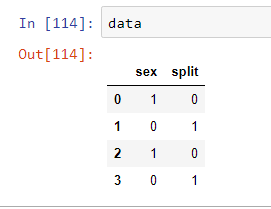
replace_dict= {0:'Female',1:'Male'}
print(replace_dict)

Use the map function for replacing values
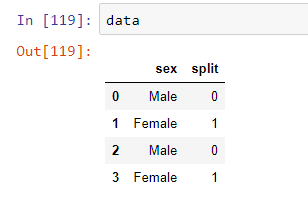
data['sex']=data['sex'].map(replace_dict)
Output after replacing
Method 4
You can also try using Numpy‘s select:
import numpy as np

data['sex'] = np.select(
    [data['sex'].eq(0), data['sex'].eq(1)], ['Female', 'Male'], default=np.nan
)
Output:
    sex     split
0   Male    0
1   Female  1
2   Male    0
3   Female  1
If neither 0 or 1 is found, NaN is returned.
All methods was sourced from stackoverflow.com or stackexchange.com, is licensed under cc by-sa 2.5, cc by-sa 3.0 and cc by-sa 4.0