I have some asyncio code which runs fine in the Python interpreter (CPython 3.6.2). I would now like to run this inside a Jupyter notebook with an IPython kernel.
I can run it with
import asyncio
asyncio.get_event_loop().run_forever()
and while that seems to work it also seems to block the notebook and doesn’t seem to play nice with the notebook.
My understanding is that Jupyter uses Tornado under the hood so I tried to install a Tornado event loop as recommended in the Tornado docs:
from tornado.platform.asyncio import AsyncIOMainLoop
AsyncIOMainLoop().install()
However that gives the following error:
---------------------------------------------------------------------------
AssertionError                            Traceback (most recent call last)
<ipython-input-1-1139449343fc> in <module>()
      1 from tornado.platform.asyncio import AsyncIOMainLoop
----> 2 AsyncIOMainLoop().install()

~AppDataLocalContinuumAnaconda3envsnumismaticlibsite- packagestornadoioloop.py in install(self)
    179         `IOLoop` (e.g.,     :class:`tornado.httpclient.AsyncHTTPClient`).
    180         """
--> 181         assert not IOLoop.initialized()
    182         IOLoop._instance = self
    183

AssertionError:
Finally I found the following page: http://ipywidgets.readthedocs.io/en/stable/examples/Widget%20Asynchronous.html
so I added a cell with the following code:
import asyncio
from ipykernel.eventloops import register_integration

@register_integration('asyncio')
def loop_asyncio(kernel):
    '''Start a kernel with asyncio event loop support.'''
    loop = asyncio.get_event_loop()

    def kernel_handler():
        loop.call_soon(kernel.do_one_iteration)
        loop.call_later(kernel._poll_interval, kernel_handler)

    loop.call_soon(kernel_handler)
    try:
        if not loop.is_running():
            loop.run_forever()
    finally:
        loop.run_until_complete(loop.shutdown_asyncgens())
        loop.close()
and in the next cell I ran:
%gui asyncio
That worked but I don’t really understand why and how it works. Can someone please explain that to me?
Answers:
Thank you for visiting the Q&A section on Magenaut. Please note that all the answers may not help you solve the issue immediately. So please treat them as advisements. If you found the post helpful (or not), leave a comment & I’ll get back to you as soon as possible.
Method 1
EDIT FEB 21st, 2019: Problem Fixed
This is no longer an issue on the latest version of Jupyter Notebook. Authors of Jupyter Notebook detailed the case here.
Answer below was the original response that was marked correct by the op.
This was posted quite a bit ago, but in case other people are looking for an explanation and solution to the problem of running asynchronous code inside Jupyter Notebook;
Jupyter’s Tornado 5.0 update bricked asyncio functionalities after the addition of its own asyncio event loop:
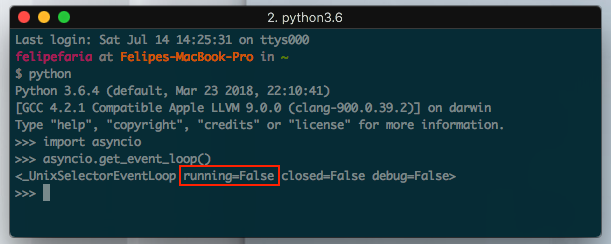

Thus, for any asyncio functionality to run on Jupyter Notebook you cannot invoke a loop.run_until_complete(...), since the loop you will receive from asyncio.get_event_loop() will be active.
Instead, you must either add the task to the current event loop:
import asyncio
loop = asyncio.get_event_loop()
loop.create_task(some_async_function())
Or get the results via run_coroutine_threadsafe:
import asyncio
loop = asyncio.get_event_loop()
asyncio.run_coroutine_threadsafe(some_async_function(), loop)
Method 2
This is no longer an issue in the latest jupyter release!
https://blog.jupyter.org/ipython-7-0-async-repl-a35ce050f7f7
Just write an async function, and then await it directly in a jupyter cell.
async def fn():
  print('hello')
  await asyncio.sleep(1)
  print('world')

await fn()
Method 3
My aha moment with Asyncio in Jupyter looks like this:
import time,asyncio

async def count():
    print("count one")
    await asyncio.sleep(1)
    print("count four")

async def count_further():
    print("count two")
    await asyncio.sleep(1)
    print("count five")

async def count_even_further():
    print("count three")
    await asyncio.sleep(1)
    print("count six")

async def main():
    await asyncio.gather(count(), count_further(), count_even_further())

s = time.perf_counter()
await main()
elapsed = time.perf_counter() - s
print(f"Script executed in {elapsed:0.2f} seconds.")
Output:
count one
count two
count three
count four
count five
count six
Script executed in 1.00 seconds.
Originally from here, but the example was not clear for me at first:
https://realpython.com/async-io-python/
Method 4
I recently ran into the issue of not being able to run asyncio code in a Jupyter notebook. The issue is discussed here: https://github.com/jupyter/notebook/issues/3397
I tried one of the solutions in the discussion and it solved the issue so far.
pip3 install tornado==4.5.3
This replaced tornado version 5.x that was installed by default.
The asyncio code in a Jupyter notebook then ran as expected.
All methods was sourced from stackoverflow.com or stackexchange.com, is licensed under cc by-sa 2.5, cc by-sa 3.0 and cc by-sa 4.0