Target
I have a Pandas data frame, as shown below, with multiple columns and would like to get the total of column, MyColumn.
Data Frame – df:
print df
           X           MyColumn  Y              Z
0          A           84        13.0           69.0
1          B           76         77.0          127.0
2          C           28         69.0           16.0
3          D           28         28.0           31.0
4          E           19         20.0           85.0
5          F           84        193.0           70.0
My attempt:
I have attempted to get the sum of the column using groupby and .sum():
Total = df.groupby['MyColumn'].sum()

print Total
This causes the following error:
TypeError: 'instancemethod' object has no attribute '__getitem__'
Expected Output
I’d have expected the output to be as followed:
319
Or alternatively, I would like df to be edited with a new row entitled TOTAL containing the total:
           X           MyColumn  Y              Z
0          A           84        13.0           69.0
1          B           76         77.0          127.0
2          C           28         69.0           16.0
3          D           28         28.0           31.0
4          E           19         20.0           85.0
5          F           84        193.0           70.0
TOTAL                  319
Answers:
Thank you for visiting the Q&A section on Magenaut. Please note that all the answers may not help you solve the issue immediately. So please treat them as advisements. If you found the post helpful (or not), leave a comment & I’ll get back to you as soon as possible.
Method 1
You should use sum:
Total = df['MyColumn'].sum()
print (Total)
319
Then you use loc with Series, in that case the index should be set as the same as the specific column you need to sum:
df.loc['Total'] = pd.Series(df['MyColumn'].sum(), index = ['MyColumn'])
print (df)
         X  MyColumn      Y      Z
0        A      84.0   13.0   69.0
1        B      76.0   77.0  127.0
2        C      28.0   69.0   16.0
3        D      28.0   28.0   31.0
4        E      19.0   20.0   85.0
5        F      84.0  193.0   70.0
Total  NaN     319.0    NaN    NaN
because if you pass scalar, the values of all rows will be filled:
df.loc['Total'] = df['MyColumn'].sum()
print (df)
         X  MyColumn      Y      Z
0        A        84   13.0   69.0
1        B        76   77.0  127.0
2        C        28   69.0   16.0
3        D        28   28.0   31.0
4        E        19   20.0   85.0
5        F        84  193.0   70.0
Total  319       319  319.0  319.0
Two other solutions are with at, and ix see the applications below:
df.at['Total', 'MyColumn'] = df['MyColumn'].sum()
print (df)
         X  MyColumn      Y      Z
0        A      84.0   13.0   69.0
1        B      76.0   77.0  127.0
2        C      28.0   69.0   16.0
3        D      28.0   28.0   31.0
4        E      19.0   20.0   85.0
5        F      84.0  193.0   70.0
Total  NaN     319.0    NaN    NaN
df.ix['Total', 'MyColumn'] = df['MyColumn'].sum()
print (df)
         X  MyColumn      Y      Z
0        A      84.0   13.0   69.0
1        B      76.0   77.0  127.0
2        C      28.0   69.0   16.0
3        D      28.0   28.0   31.0
4        E      19.0   20.0   85.0
5        F      84.0  193.0   70.0
Total  NaN     319.0    NaN    NaN
Note: Since Pandas v0.20, ix has been deprecated. Use loc or iloc instead.
Method 2
Another option you can go with here:
df.loc["Total", "MyColumn"] = df.MyColumn.sum()

#         X  MyColumn      Y       Z
#0        A     84.0    13.0    69.0
#1        B     76.0    77.0   127.0
#2        C     28.0    69.0    16.0
#3        D     28.0    28.0    31.0
#4        E     19.0    20.0    85.0
#5        F     84.0   193.0    70.0
#Total  NaN    319.0     NaN     NaN
You can also use append() method:
df.append(pd.DataFrame(df.MyColumn.sum(), index = ["Total"], columns=["MyColumn"]))
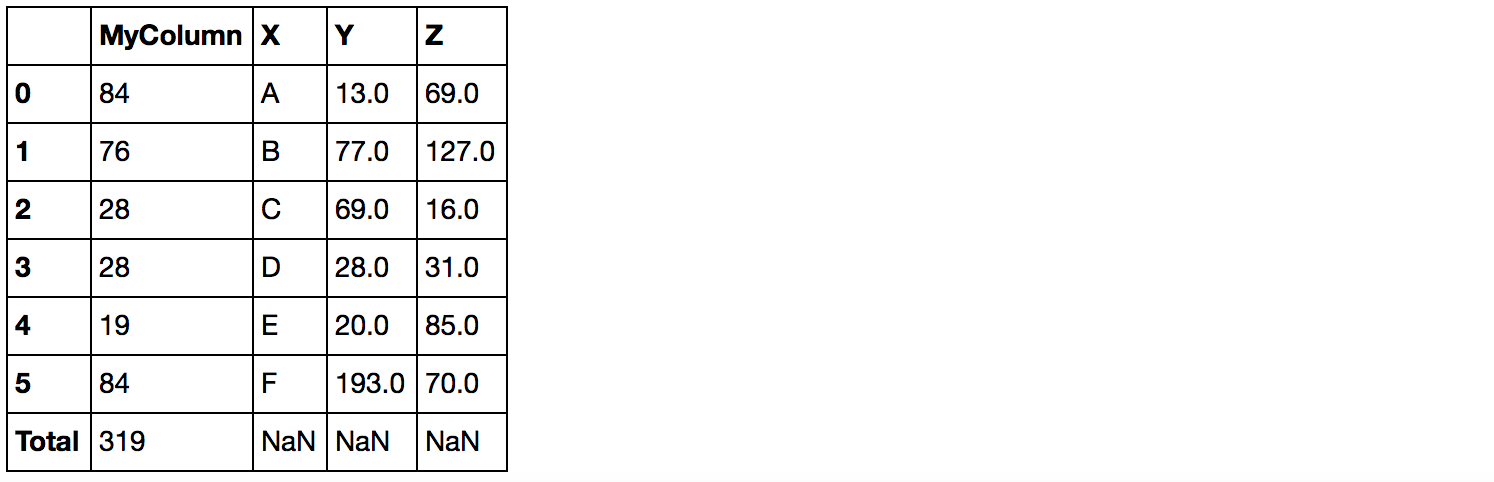
Update:
In case you need to append sum for all numeric columns, you can do one of the followings:
Use append to do this in a functional manner (doesn’t change the original data frame):
# select numeric columns and calculate the sums
sums = df.select_dtypes(pd.np.number).sum().rename('total')

# append sums to the data frame
df.append(sums)
#         X  MyColumn      Y      Z
#0        A      84.0   13.0   69.0
#1        B      76.0   77.0  127.0
#2        C      28.0   69.0   16.0
#3        D      28.0   28.0   31.0
#4        E      19.0   20.0   85.0
#5        F      84.0  193.0   70.0
#total  NaN     319.0  400.0  398.0
Use loc to mutate data frame in place:
df.loc['total'] = df.select_dtypes(pd.np.number).sum()
df
#         X  MyColumn      Y      Z
#0        A      84.0   13.0   69.0
#1        B      76.0   77.0  127.0
#2        C      28.0   69.0   16.0
#3        D      28.0   28.0   31.0
#4        E      19.0   20.0   85.0
#5        F      84.0  193.0   70.0
#total  NaN     638.0  800.0  796.0
Method 3
Similar to getting the length of a dataframe, len(df), the following worked for pandas and blaze:
Total = sum(df['MyColumn'])
or alternatively
Total = sum(df.MyColumn)
print Total
Method 4
There are two ways to sum of a column
dataset = pd.read_csv(“data.csv”)
1: sum(dataset.Column_name)
2: dataset[‘Column_Name’].sum()
If there is any issue in this the please correct me..
Method 5
As other option, you can do something like below
Group   Valuation   amount
    0   BKB Tube    156
    1   BKB Tube    143
    2   BKB Tube    67
    3   BAC Tube    176
    4   BAC Tube    39
    5   JDK Tube    75
    6   JDK Tube    35
    7   JDK Tube    155
    8   ETH Tube    38
    9   ETH Tube    56
Below script, you can use for above data
import pandas as pd
data = pd.read_csv("daata1.csv")
bytreatment = data.groupby('Group')
bytreatment['amount'].sum()
All methods was sourced from stackoverflow.com or stackexchange.com, is licensed under cc by-sa 2.5, cc by-sa 3.0 and cc by-sa 4.0