I’m moving from MatLab to python and playing around with the imshow function.
I can’t seem to get my head around why it doesn’t show the value 128 as grey with I have chosen the cmap to be gray-scale.
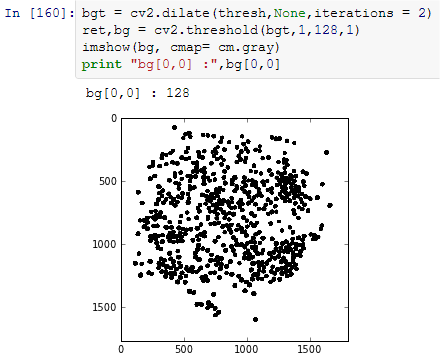
It seems as it uses the grayscale for highest (128) and lowest values.. I want it to use the grayscale for [0:255]. How do I do that?
Answers:
Thank you for visiting the Q&A section on Magenaut. Please note that all the answers may not help you solve the issue immediately. So please treat them as advisements. If you found the post helpful (or not), leave a comment & I’ll get back to you as soon as possible.
Method 1
Use the vmin and vmax parameters:
plt.imshow(bg, cmap=plt.get_cmap('gray'), vmin=0, vmax=255)
Without specifying vmin and vmax, plt.imshow auto-adjusts its range to the min and max of the data.
I do not know of a way to set default vmin and vmax parameters for all imshow plots, but you could use functools.partial to prepare a custom imshow-like command with default parameters set:
import matplotlib.pyplot as plt
import numpy as np
import functools

bwimshow = functools.partial(plt.imshow, vmin=0, vmax=255,
                             cmap=plt.get_cmap('gray'))

dots = np.random.randn(10, 10)*255
bwimshow(dots)
cbar = plt.colorbar()

plt.show()
All methods was sourced from stackoverflow.com or stackexchange.com, is licensed under cc by-sa 2.5, cc by-sa 3.0 and cc by-sa 4.0