I have a graph, computed from some data, drawn in matplotlib. I want to draw a rectangular region around the global maximum of this graph. I tried plt.axhspan, but the rectangle doesn’t seem to appear when I call plt.show()
So, how can a rectangular region be drawn onto a matplotlib graph? Thanks!
Answers:
Thank you for visiting the Q&A section on Magenaut. Please note that all the answers may not help you solve the issue immediately. So please treat them as advisements. If you found the post helpful (or not), leave a comment & I’ll get back to you as soon as possible.
Method 1
The most likely reason is that you used data units for the x arguments when calling axhspan. From the function’s docs (my emphasis):
y coords are in data units and x coords are in axes (relative 0-1)
units.
So any rectangle stretching left of 0 or right of 1 is simply drawn off-plot.
An easy alternative might be to add a Rectangle to your axis (e.g., via plt.gca and add_patch); Rectangle uses data units for both dimensions. The following would add a grey rectangle with width & height of 1 centered on (2,3):
from matplotlib.patches import Rectangle
import matplotlib.pyplot as plt

fig = plt.figure()
plt.xlim(0, 10)
plt.ylim(0, 12)

someX, someY = 2, 5
currentAxis = plt.gca()
currentAxis.add_patch(Rectangle((someX - .5, someY - .5), 4, 6, facecolor="grey"))
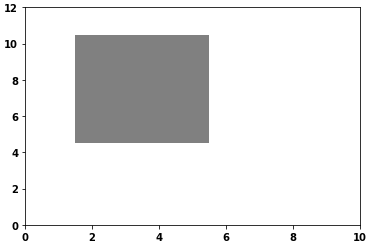
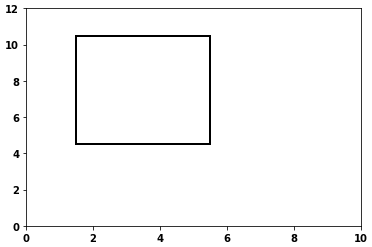
- Without
facecolor
currentAxis.add_patch(Rectangle((someX - .5, someY - .5), 4, 6, facecolor="none", ec='k', lw=2))
Method 2
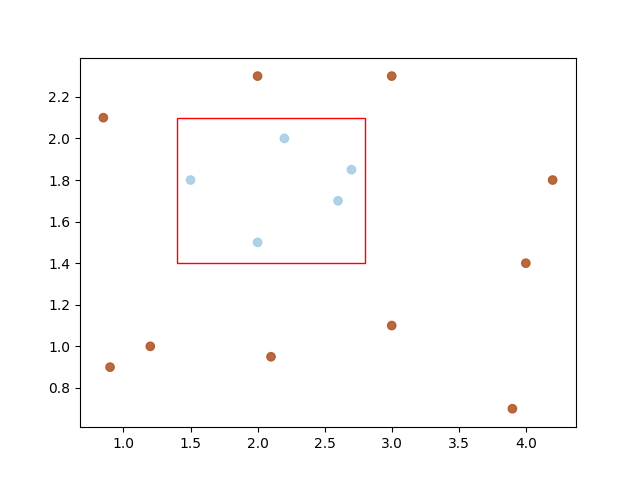
Here’s an example to demonstrate drawing a rectangle bounding box over a scatter-plot:
import matplotlib.pyplot as plt
import matplotlib.patches as patches
import numpy as np

data = np.array([
    [.9, .9], [.85, 2.1], [1.2, 1.], [2.1, .95], [3., 1.1],
    [3.9, .7], [4., 1.4], [4.2, 1.8], [2., 2.3], [3., 2.3],
    [1.5, 1.8], [2., 1.5], [2.2, 2.], [2.6, 1.7], [2.7, 1.85]
])
categories = np.array([0, 0, 0, 0, 0, 0, 0, 0, 0, 0, 1, 1, 1, 1, 1])
color1 = (0.69, 0.34, 0.15, 1.0)
color2 = (0.65, 0.80, 0.89, 1.0)
colormap = np.array([color1, color2])
fig = plt.figure()
ax = fig.add_subplot(111)
ax.scatter(
    x=[data[:, 0]],
    y=[data[:, 1]],
    c=colormap[categories],
    marker='o', alpha=0.9)

margin = .1
min_f0, max_f0 = min(data[10:, 0]) - margin, max(data[10:, 0]) + margin
min_f1, max_f1 = min(data[10:, 1]) - margin, max(data[10:, 1]) + margin
width = max_f0 - min_f0
height = max_f1 - min_f1

ax.add_patch(
    patches.Rectangle(
        xy=(min_f0, min_f1),  # point of origin.
        width=width, height=height, linewidth=1,
        color='red', fill=False))
plt.show()
Out:
All methods was sourced from stackoverflow.com or stackexchange.com, is licensed under cc by-sa 2.5, cc by-sa 3.0 and cc by-sa 4.0