when I do curl to a API call link http://example.com/passkey=wedsmdjsjmdd
curl 'http://example.com/passkey=wedsmdjsjmdd'
I get the employee output data on a csv file format, like:
"Steve","421","0","421","2","","","","","","","","","421","0","421","2"
how can parse through this using python.
I tried:
import csv
cr = csv.reader(open('http://example.com/passkey=wedsmdjsjmdd',"rb"))
for row in cr:
    print row
but it didn’t work and I got an error
http://example.com/passkey=wedsmdjsjmdd No such file or directory:
Thanks!
Answers:
Thank you for visiting the Q&A section on Magenaut. Please note that all the answers may not help you solve the issue immediately. So please treat them as advisements. If you found the post helpful (or not), leave a comment & I’ll get back to you as soon as possible.
Method 1
Using pandas it is very simple to read a csv file directly from a url
import pandas as pd
data = pd.read_csv('https://example.com/passkey=wedsmdjsjmdd')
This will read your data in tabular format, which will be very easy to process
Method 2
You need to replace open with urllib.urlopen or urllib2.urlopen.
e.g.
import csv
import urllib2

url = 'http://winterolympicsmedals.com/medals.csv'
response = urllib2.urlopen(url)
cr = csv.reader(response)

for row in cr:
    print row
This would output the following
Year,City,Sport,Discipline,NOC,Event,Event gender,Medal
1924,Chamonix,Skating,Figure skating,AUT,individual,M,Silver
1924,Chamonix,Skating,Figure skating,AUT,individual,W,Gold
...
The original question is tagged “python-2.x”, but for a Python 3 implementation (which requires only minor changes) see below.
Method 3
You could do it with the requests module as well:
url = 'http://winterolympicsmedals.com/medals.csv'
r = requests.get(url)
text = r.iter_lines()
reader = csv.reader(text, delimiter=',')
Method 4
To increase performance when downloading a large file, the below may work a bit more efficiently:
import requests
from contextlib import closing
import csv

url = "http://download-and-process-csv-efficiently/python.csv"

with closing(requests.get(url, stream=True)) as r:
    reader = csv.reader(r.iter_lines(), delimiter=',', quotechar='"')
    for row in reader:
        # Handle each row here...
        print row
By setting stream=True in the GET request, when we pass r.iter_lines() to csv.reader(), we are passing a generator to csv.reader(). By doing so, we enable csv.reader() to lazily iterate over each line in the response with for row in reader.
This avoids loading the entire file into memory before we start processing it, drastically reducing memory overhead for large files.
Method 5
This question is tagged python-2.x so it didn’t seem right to tamper with the original question, or the accepted answer. However, Python 2 is now unsupported, and this question still has good google juice for “python csv urllib”, so here’s an updated Python 3 solution.
It’s now necessary to decode urlopen‘s response (in bytes) into a valid local encoding, so the accepted answer has to be modified slightly:
import csv, urllib.request

url = 'http://winterolympicsmedals.com/medals.csv'
response = urllib.request.urlopen(url)
lines = [l.decode('utf-8') for l in response.readlines()]
cr = csv.reader(lines)

for row in cr:
    print(row)
Note the extra line beginning with lines =, the fact that urlopen is now in the urllib.request module, and print of course requires parentheses.
It’s hardly advertised, but yes, csv.reader can read from a list of strings.
And since someone else mentioned pandas, here’s a one-liner to display the CSV in a console-friendly output:
python3 -c 'import pandas
df = pandas.read_csv("http://winterolympicsmedals.com/medals.csv")
print(df.to_string())'
(Yes, it’s three lines, but you can copy-paste it as one command. 😉
Method 6
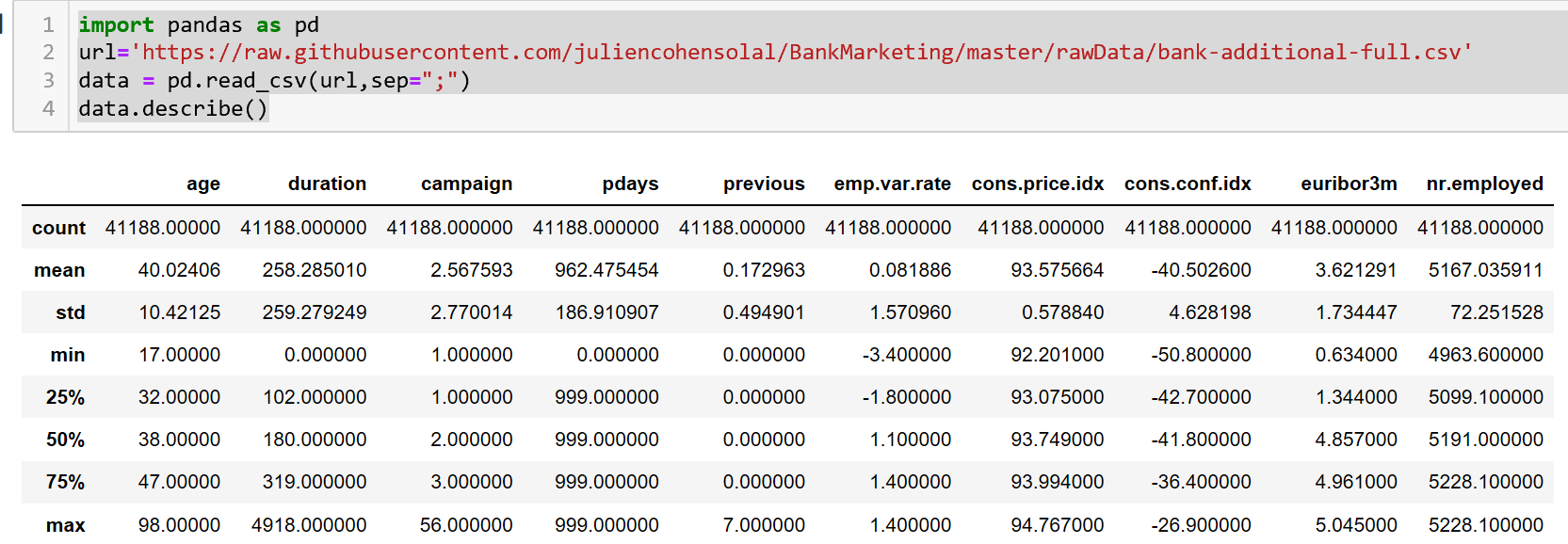
import pandas as pd
url='https://raw.githubusercontent.com/juliencohensolal/BankMarketing/master/rawData/bank-additional-full.csv'
data = pd.read_csv(url,sep=";") # use sep="," for coma separation.
data.describe()
Method 7
I am also using this approach for csv files (Python 3.6.9):
import csv
import io
import requests

r = requests.get(url)
buff = io.StringIO(r.text)
dr = csv.DictReader(buff)
for row in dr:
    print(row)
Method 8
what you were trying to do with the curl command was to download the file to your local hard drive(HD). You however need to specify a path on HD
curl http://example.com/passkey=wedsmdjsjmdd -o ./example.csv
cr = csv.reader(open('./example.csv',"r"))
for row in cr:
    print row
All methods was sourced from stackoverflow.com or stackexchange.com, is licensed under cc by-sa 2.5, cc by-sa 3.0 and cc by-sa 4.0