I want to plot the output of this simple neural network:
model.compile(loss='binary_crossentropy', optimizer='adam', metrics=['accuracy'])
history = model.fit(x_test, y_test, nb_epoch=10, validation_split=0.2, shuffle=True)

model.test_on_batch(x_test, y_test)
model.metrics_names
I have plotted accuracy and loss of training and validation:
print(history.history.keys())
#  "Accuracy"
plt.plot(history.history['acc'])
plt.plot(history.history['val_acc'])
plt.title('model accuracy')
plt.ylabel('accuracy')
plt.xlabel('epoch')
plt.legend(['train', 'validation'], loc='upper left')
plt.show()
# "Loss"
plt.plot(history.history['loss'])
plt.plot(history.history['val_loss'])
plt.title('model loss')
plt.ylabel('loss')
plt.xlabel('epoch')
plt.legend(['train', 'validation'], loc='upper left')
plt.show()
Now I want to add and plot test set’s accuracy from model.test_on_batch(x_test, y_test), but from model.metrics_names I obtain the same value ‘acc’ utilized for plotting accuracy on training data plt.plot(history.history['acc']). How could I plot test set’s accuracy?
Answers:
Thank you for visiting the Q&A section on Magenaut. Please note that all the answers may not help you solve the issue immediately. So please treat them as advisements. If you found the post helpful (or not), leave a comment & I’ll get back to you as soon as possible.
Method 1
import keras
from matplotlib import pyplot as plt
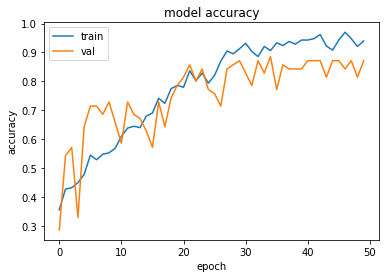
history = model1.fit(train_x, train_y,validation_split = 0.1, epochs=50, batch_size=4)
plt.plot(history.history['acc'])
plt.plot(history.history['val_acc'])
plt.title('model accuracy')
plt.ylabel('accuracy')
plt.xlabel('epoch')
plt.legend(['train', 'val'], loc='upper left')
plt.show()
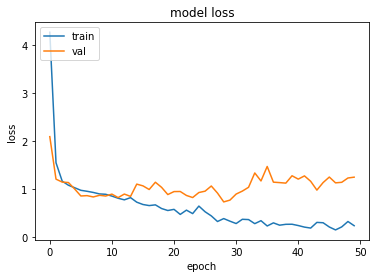
plt.plot(history.history['loss'])
plt.plot(history.history['val_loss'])
plt.title('model loss')
plt.ylabel('loss')
plt.xlabel('epoch')
plt.legend(['train', 'val'], loc='upper left')
plt.show()
Method 2
It is the same because you are training on the test set, not on the train set. Don’t do that, just train on the training set:
history = model.fit(x_test, y_test, nb_epoch=10, validation_split=0.2, shuffle=True)
Change into:
history = model.fit(x_train, y_train, nb_epoch=10, validation_split=0.2, shuffle=True)
Method 3
Try
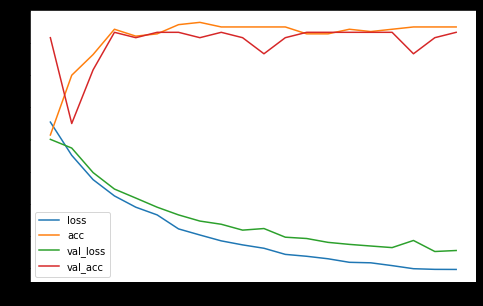
pd.DataFrame(history.history).plot(figsize=(8,5))
plt.show()
This builds a graph with the available metrics of the history for all datasets of the history. Example:
Method 4
Validate the model on the test data as shown below and then plot the accuracy and loss
model.compile(loss='binary_crossentropy', optimizer='adam', metrics=['accuracy'])
history = model.fit(X_train, y_train, nb_epoch=10, validation_data=(X_test, y_test), shuffle=True)
Method 5
You could do it this way also ….
regressor.compile(optimizer = 'adam', loss = 'mean_squared_error',metrics=['accuracy'])
earlyStopCallBack = EarlyStopping(monitor='loss', patience=3)
history=regressor.fit(X_train, y_train, validation_data=(X_test, y_test), epochs = EPOCHS, batch_size = BATCHSIZE, callbacks=[earlyStopCallBack])
For the plotting – I like plotly … so
import plotly.graph_objects as go
from plotly.subplots import make_subplots

# Create figure with secondary y-axis
fig = make_subplots(specs=[[{"secondary_y": True}]])

# Add traces
fig.add_trace(
    go.Scatter( y=history.history['val_loss'], name="val_loss"),
    secondary_y=False,
)

fig.add_trace(
    go.Scatter( y=history.history['loss'], name="loss"),
    secondary_y=False,
)

fig.add_trace(
    go.Scatter( y=history.history['val_accuracy'], name="val accuracy"),
    secondary_y=True,
)

fig.add_trace(
    go.Scatter( y=history.history['accuracy'], name="val accuracy"),
    secondary_y=True,
)

# Add figure title
fig.update_layout(
    title_text="Loss/Accuracy of LSTM Model"
)

# Set x-axis title
fig.update_xaxes(title_text="Epoch")

# Set y-axes titles
fig.update_yaxes(title_text="<b>primary</b> Loss", secondary_y=False)
fig.update_yaxes(title_text="<b>secondary</b> Accuracy", secondary_y=True)

fig.show()
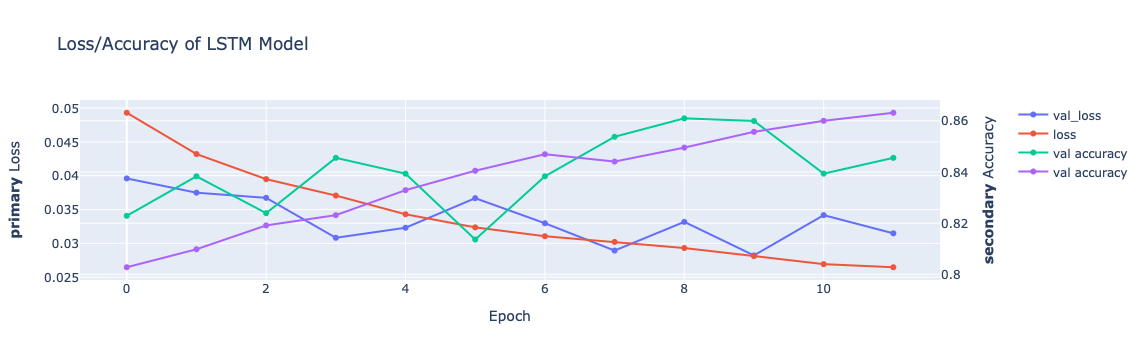
Nothing wrong with either of the proceeding methods. Please note the Plotly graph has two scales , 1 for loss the other for accuracy.
All methods was sourced from stackoverflow.com or stackexchange.com, is licensed under cc by-sa 2.5, cc by-sa 3.0 and cc by-sa 4.0