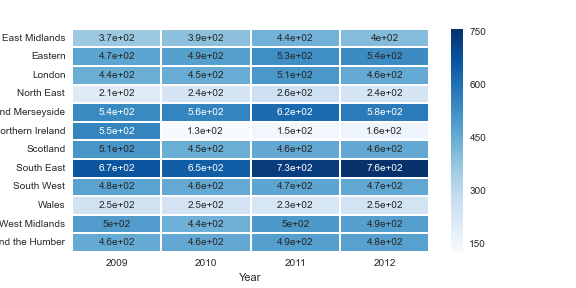
I’m creating a heatmap from a pandas pivot_table as below:
table2 = pd.pivot_table(df,values='control',columns='Year',index='Region',aggfunc=np.sum)
sns.heatmap(table2,annot=True,cmap='Blues')
It creates a heat map as shown below. You can see the numbers are not huge (max 750), but it’s showing them in scientific notation. If I view the table itself this is not the case. Any idea on how I could get it to show the numbers in plain notation?
Answers:
Thank you for visiting the Q&A section on Magenaut. Please note that all the answers may not help you solve the issue immediately. So please treat them as advisements. If you found the post helpful (or not), leave a comment & I’ll get back to you as soon as possible.
Method 1
According to the docs, the param fmt='.2g' is being applied because you’ve set annot=True so you can modify the format being applied to:
sns.heatmap(table2,annot=True,cmap='Blues', fmt='g')
Method 2
According to the docs, the parameter fmt is set to .2g when annot=True. So, for example, if your data is float, you can use:
sns.heatmap(table2, annot=True, cmap='Blues', fmt='.3g')
By that, you’re telling python to show 3 significant figures. To understand the “fmt” better, check out this answer: https://stackoverflow.com/a/65020192/4529605
All methods was sourced from stackoverflow.com or stackexchange.com, is licensed under cc by-sa 2.5, cc by-sa 3.0 and cc by-sa 4.0