I was trying to pass two lists containing integers as arguments to a python code. But sys.argv[i] gets the parameters as a list of string.
Input would look like,
$ python filename.py [2,3,4,5] [1,2,3,4]
I found the following hack to convert the list.
strA = sys.argv[1].replace('[', ' ').replace(']', ' ').replace(',', ' ').split()
strB = sys.argv[2].replace('[', ' ').replace(']', ' ').replace(',', ' ').split()
A = [float(i) for i in strA]
B = [float (i) for i in strB]
Is there a better way to do this?
Answers:
Thank you for visiting the Q&A section on Magenaut. Please note that all the answers may not help you solve the issue immediately. So please treat them as advisements. If you found the post helpful (or not), leave a comment & I’ll get back to you as soon as possible.
Method 1
Don’t reinvent the wheel. Use the argparse module, be explicit and pass in actual lists of parameters
import argparse
# defined command line options
# this also generates --help and error handling
CLI=argparse.ArgumentParser()
CLI.add_argument(
  "--lista",  # name on the CLI - drop the `--` for positional/required parameters
  nargs="*",  # 0 or more values expected => creates a list
  type=int,
  default=[1, 2, 3],  # default if nothing is provided
)
CLI.add_argument(
  "--listb",
  nargs="*",
  type=float,  # any type/callable can be used here
  default=[],
)

# parse the command line
args = CLI.parse_args()
# access CLI options
print("lista: %r" % args.lista)
print("listb: %r" % args.listb)
You can then call it using
$ python my_app.py --listb 5 6 7 8 --lista  1 2 3 4
lista: [1, 2, 3, 4]
listb: [5.0, 6.0, 7.0, 8.0]
Method 2
Command line arguments are always passed as strings. You will need to parse them into your required data type yourself.
>>> input = "[2,3,4,5]"
>>> map(float, input.strip('[]').split(','))
[2.0, 3.0, 4.0, 5.0]
>>> A = map(float, input.strip('[]').split(','))
>>> print(A, type(A))
([2.0, 3.0, 4.0, 5.0], <type 'list'>)
There are libraries like argparse and click that let you define your own argument type conversion but argparse treats "[2,3,4]" the same as [ 2 , 3 , 4 ] so I doubt it will be useful.
edit Jan 2019 This answer seems to get a bit of action still so I’ll add another option taken directly from the argparse docs.
You can use action=append to allow repeated arguments to be collected into a single list.
>>> parser = argparse.ArgumentParser()
>>> parser.add_argument('--foo', action='append')
>>> parser.parse_args('--foo 1 --foo 2'.split())
Namespace(foo=['1', '2'])
In this case you would pass --foo ? once for each list item. Using OPs example: python filename.py --foo 2 --foo 3 --foo 4 --foo 5 would result in foo=[2,3,4,5]
Method 3
I tested this on my end, and my input looks like this:
python foo.py "[1,2,3,4]" "[5,6,7,8,9]"
I’m doing the following to convert the two params of interest:
import ast
import sys

list1 = ast.literal_eval(sys.argv[1])
list2 = ast.literal_eval(sys.argv[2])
Method 4
Why not:
python foo.py 1,2,3,4 5,6,7,8
Much cleaner than trying to eval python and doesn’t require your user to know python format.
import sys

list1 = sys.argv[1].split(',')
list2 = [int(c) for c in sys.argv[2].split(',')]  # if you want ints
Method 5
You can also do the following:
say, you have foo.py :
import json
import sys
data = json.loads(sys.argv[1])
print data, type(data)
Then if you run the above as : python foo.py "[1,2,3]"
Output:
[1, 2, 3] <type 'list'>
Method 6
No, there is no way pass a list in a command line argument. Command line arguments are always string. But there is a better way to convert it to list. You can do it like that:
import ast

A = ast.literal_eval(strA)
B = ast.literal_eval(strB)
Method 7
You can simply use nargs='+' option of argparse
import argparse
parser = argparse.ArgumentParser()
parser.add_argument('--myarg', dest='myarg', required=False, help='--myarg 100 100 100 takes a list of 3 elements, each is of value 100 ', nargs='+', type=int, default=[100,100,100])
You can then pass arguments like this:
python your_file.py --myarg 1 2 3
This will be stored in your program in myarg as [1,2,3]
print(myarg)
Outputs:
[1,2,3]
Method 8
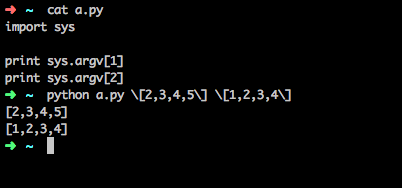
You have to escape:
python some.py [2,3,4,5] [1,2,3,4]
some.py
import sys

print sys.argv[1]
print sys.argv[2]
this gives me:
[2,3,4,5]
[1,2,3,4]
UPDATE:
import sys
import ast

d = ast.literal_eval(sys.argv[1])
b = ast.literal_eval(sys.argv[2])

for a in d:
    print a

for e in b:
    print e
first will give:
2
3
4
5
and second will give
1
2
3
4
All methods was sourced from stackoverflow.com or stackexchange.com, is licensed under cc by-sa 2.5, cc by-sa 3.0 and cc by-sa 4.0