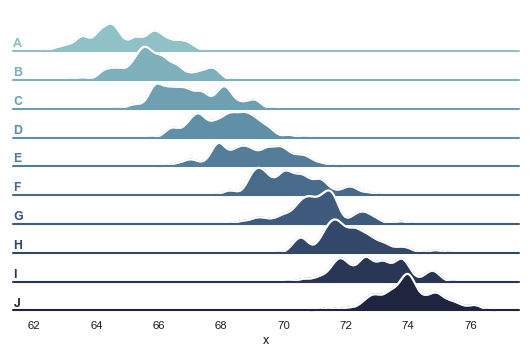
I am working with the FacetGrid example presented here that results in the plot below. In my data set, there is quite a lot of plots, and it would be convenient to have the x axis labels repeated for each facet, not only at the bottom.
For this example, the values 62, ..., 76 should be repeated for each of the A-J facets.
Answers:
Thank you for visiting the Q&A section on Magenaut. Please note that all the answers may not help you solve the issue immediately. So please treat them as advisements. If you found the post helpful (or not), leave a comment & I’ll get back to you as soon as possible.
Method 1
The answer by Bazingaa works for matplotlib version 2.0.2. For newer versions of matplotlib, using ax.tick_params() and setting labelbottom=True seems to work:
for ax in g.axes.flatten():
    ax.tick_params(labelbottom=True)
Method 2
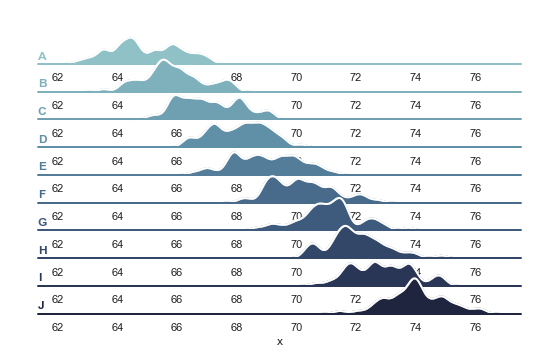
Just add the following lines after your def label(): function. Although the plot doesn’t look that good with the modification you want.
for ax in g.axes.flat:
    _ = plt.setp(ax.get_xticklabels(), visible=True)
Output
All methods was sourced from stackoverflow.com or stackexchange.com, is licensed under cc by-sa 2.5, cc by-sa 3.0 and cc by-sa 4.0