While doing some practice problems using seaborn and a Jupyter notebook, I realized that the distplot() graphs did not have the darker outlines on the individual bins that all of the sample graphs in the documentation have. I tried creating the graphs using Pycharm and noticed the same thing. Thinking it was a seaborn problem, I tried some hist() charts using matplotlib, only to get the same results.
import matplotlib.pyplot as plt
import seaborn as sns
titanic = sns.load_dataset('titanic')
plt.hist(titanic['fare'], bins=30)
yielded the following graph:
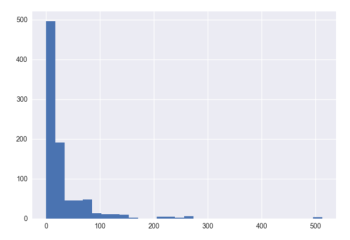
Finally I stumbled across the ‘edgecolor’ parameter on the plt.hist() function, and setting it to black did the trick. Unfortunately I haven’t found a similar parameter to use on the seaborn distplot() function, so I am still unable to get a chart that looks like it should.
I looked into changing the rcParams in matplotlib, but I have no experience with that and the following script I ran seemed to do nothing:
import matplotlib as mpl

mpl.rcParams['lines.linewidth'] = 1
mpl.rcParams['lines.color'] = 'black'
mpl.rcParams['patch.linewidth'] = 1
mpl.rcParams['patch.edgecolor'] = 'black'
mpl.rcParams['axes.linewidth'] = 1
mpl.rcParams['axes.edgecolor'] = 'black'
I was just kind of guessing at the value I was supposed to change, but running my graphs again showed no changes.
I then attempted to go back to the default settings using mpl.rcdefaults()
but once again, no change.
I reinstalled matplotlib using conda but still the graphs look the same. I am running out of ideas on how to change the default edge color for these charts. I am running the latest versions of Python, matplotlib, and seaborn using the Conda build.
Answers:
Thank you for visiting the Q&A section on Magenaut. Please note that all the answers may not help you solve the issue immediately. So please treat them as advisements. If you found the post helpful (or not), leave a comment & I’ll get back to you as soon as possible.
Method 1
As part of the update to matplotlib 2.0 the edges on bar plots are turned off by default. However, you may use the rcParam
plt.rcParams["patch.force_edgecolor"] = True
to turn the edges on globally.
Probably the easiest option is to specifically set the edgecolor when creating a seaborn plot, using the hist_kws argument,
ax = sns.distplot(x, hist_kws=dict(edgecolor="k", linewidth=2))
For matplotlib plots, you can directly use the edgecolor or ec argument.
plt.bar(x,y, edgecolor="k")
plt.hist(x, edgecolor="k")
Equally, for pandas plots,
df.plot(kind='hist',edgecolor="k")
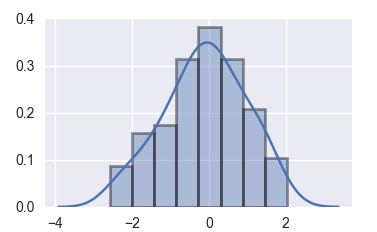
A complete seaborn example:
import  numpy as np
import matplotlib.pyplot as plt
import seaborn as sns

x = np.random.randn(100)
ax = sns.distplot(x, hist_kws=dict(edgecolor="k", linewidth=2))
plt.show()
Method 2
As of Mar, 2021 :
sns.histplot(data, edgecolor='k', linewidth=2)
work.
Using hist_kws=dict(edgecolor="k", linewidth=2) gave an error:
AttributeError: 'PolyCollection' object has no property 'hist_kws'
Method 3
Using the available styles in seaborn could also solve your problem.
Available styles in seaborn are :
- ticks
- dark
- darkgrid
- white
- whitegrid
All methods was sourced from stackoverflow.com or stackexchange.com, is licensed under cc by-sa 2.5, cc by-sa 3.0 and cc by-sa 4.0