I have this small program and it needs to create a small .txt file in their ‘My Documents’ Folder. Here’s the code I have for that:
textfile=open('C:UsersMYNAMEDocuments','w')
lines=['stuff goes here']
textfile.writelines(lines)
textfile.close()
The problem is that if other people use it, how do I change the MYNAME to their account name?
Answers:
Thank you for visiting the Q&A section on Magenaut. Please note that all the answers may not help you solve the issue immediately. So please treat them as advisements. If you found the post helpful (or not), leave a comment & I’ll get back to you as soon as possible.
Method 1
Use os.path.expanduser(path), see http://docs.python.org/library/os.path.html
e.g. expanduser('~/filename')
This works on both Unix and Windows, according to the docs.
Edit: forward slash due to Sven’s comment.
Method 2
This works without any extra libs:
import ctypes.wintypes
CSIDL_PERSONAL = 5       # My Documents
SHGFP_TYPE_CURRENT = 0   # Get current, not default value

buf= ctypes.create_unicode_buffer(ctypes.wintypes.MAX_PATH)
ctypes.windll.shell32.SHGetFolderPathW(None, CSIDL_PERSONAL, None, SHGFP_TYPE_CURRENT, buf)

print(buf.value)
Also works if documents location and/or default save location is changed by user.
Method 3
On Windows, you can use something similar what is shown in the accepted answer to the question: Python, get windows special folders for currently logged-in user.
For the My Documents folder path, useshellcon.CSIDL_PERSONALin the shell.SHGetFolderPath() function call instead of shellcon.CSIDL_MYPICTURES.
So, assuming you have the PyWin32 extensions1 installed, this might work (see caveat in Update section below):
>>> from win32com.shell import shell, shellcon
>>> shell.SHGetFolderPath(0, shellcon.CSIDL_PERSONAL, None, 0)
u'<path\to\folder>'
Update: I just read something that said that CSIDL_PERSONAL won’t return the correct folder if the user has changed the default save folder in the Win7 Documents library. This is referring to what you can do in library’s Properties dialog:
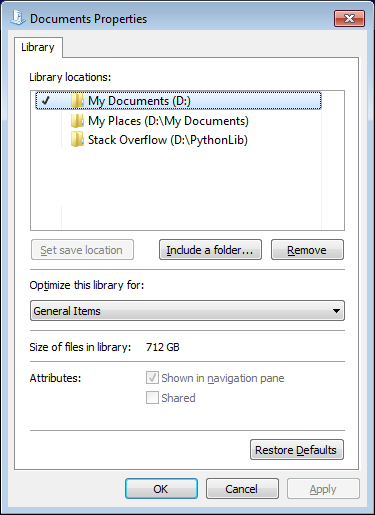
The checkmark means that the path is set as the default save location.
I currently am unware of a way to call the SHLoadLibraryFromKnownFolder() function through PyWin32 (there currently isn’t a shell.SHLoadLibraryFromKnownFolder. However it should be possible to do so using the ctypes module.
1Installers for the latest versions of the Python for Windows Extensions are currently available from: http://sourceforge.net/projects/pywin32
Method 4
Tested On Linux(Ubuntu 18.04.5) and Window 7
import os
os.path.expanduser('~/Documents')
Method 5
You can use pywin32 extensions to access the Win32 API. With use of Win32 API you can get the virtual folder that represents the My Documents desktop item.
from win32com.shell import shell, shellcon
doc_folder = shell.SHGetFolderPath(0, shellcon.CSIDL_PERSONAL, None, 0)
Here you can find the description of CSIDL_PERSONAL:
https://docs.microsoft.com/en-us/windows/win32/shell/csidl
Method 6
For Windows this worked
document_path = os.path.expanduser('~Documents')
returning the correct path ready for coding:
e.g
someExcel_to_process = pd.ExcelFile(document_path+'\SomeExcel.xlsx')
All methods was sourced from stackoverflow.com or stackexchange.com, is licensed under cc by-sa 2.5, cc by-sa 3.0 and cc by-sa 4.0