I’d like to create ellipses in matplotlib with a fill color that has an alpha (opacity) value that depends on the radius;
e.g., a 2D Gaussian.
Is there any way to do this?
It is possible to create rectangular plots with color gradients easily enough (like Gradient facecolor matplotlib bar plot and this) but I can’t figure out how to do the same for circles/ellipses.
Answers:
Thank you for visiting the Q&A section on Magenaut. Please note that all the answers may not help you solve the issue immediately. So please treat them as advisements. If you found the post helpful (or not), leave a comment & I’ll get back to you as soon as possible.
Method 1
Here is function example using the idea from Alex’s post
import matplotlib.pyplot as plt,numpy as np

def gauplot(centers, radiuses, xr=None, yr=None):
        nx, ny = 1000.,1000.
        xgrid, ygrid = np.mgrid[xr[0]:xr[1]:(xr[1]-xr[0])/nx,yr[0]:yr[1]:(yr[1]-yr[0])/ny]
        im = xgrid*0 + np.nan
        xs = np.array([np.nan])
        ys = np.array([np.nan])
        fis = np.concatenate((np.linspace(-np.pi,np.pi,100), [np.nan]) )
        cmap = plt.cm.gray
        cmap.set_bad('white')
        thresh = 3
        for curcen,currad in zip(centers,radiuses):
                curim=(((xgrid-curcen[0])**2+(ygrid-curcen[1])**2)**.5)/currad*thresh
                im[curim<thresh]=np.exp(-.5*curim**2)[curim<thresh]
                xs = np.append(xs, curcen[0] + currad * np.cos(fis))
                ys = np.append(ys, curcen[1] + currad * np.sin(fis))
        plt.imshow(im.T, cmap=cmap, extent=xr+yr)
        plt.plot(xs, ys, 'r-')
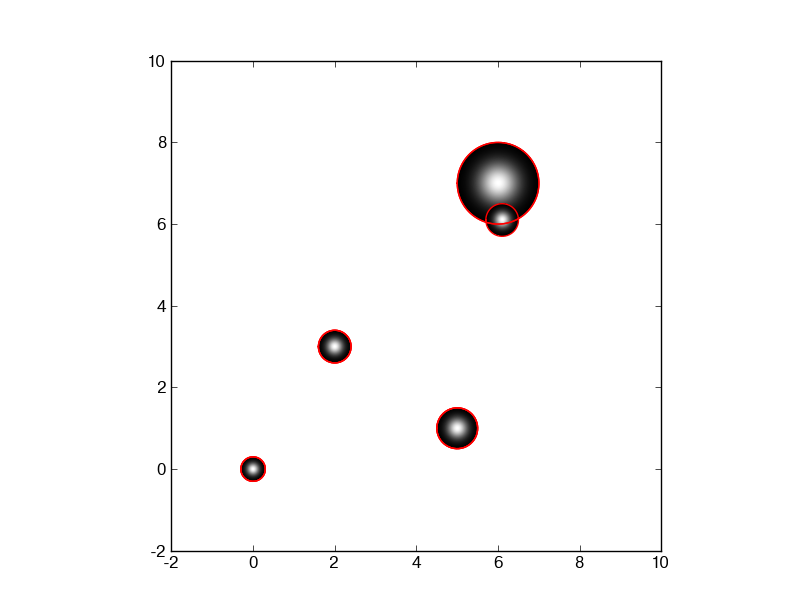
And here is what you get when you run
    gauplot([(0,0), (2,3), (5,1), (6, 7), (6.1, 6.1)], [.3,. 4, .5, 1, .4], [-1,10], [-1,10])
             #           centers of circles           # radii of circles#
Method 2
I don’t think matplotlib currently supports gradient fills for patches – see this email.
john> Hello, I am trying to set a bar (a patched series of rectangles) with a fill pattern instead of just a solid color. Is there an easy way to do this in matplotlib?
john> I am thinking of something like Qt’s QBrush which has cross, vertical, dense, etc. patterns.There is no support for this currently — it wouldn’t be too hard to
add for backends that support this kind of thing. Basically, we need
to specify the API for it, and add support to backends. I have been
wanting to add gradient fills for patches (eg polygons, rectangles)
and it would be good to do both at once.
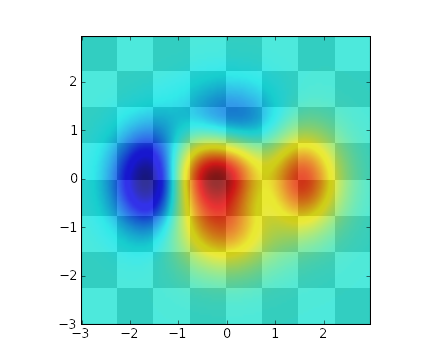
Instead of using patches you could create a mesh, calculate the colours with a function then use imshow with interpolation:
# Taken from http://matplotlib.sourceforge.net/examples/pylab_examples/layer_images.html

def func3(x,y):
    return (1- x/2 + x**5 + y**3)*exp(-x**2-y**2)

# make these smaller to increase the resolution
dx, dy = 0.05, 0.05

x = arange(-3.0, 3.0, dx)
y = arange(-3.0, 3.0, dy)
X,Y = meshgrid(x, y)

xmin, xmax, ymin, ymax = amin(x), amax(x), amin(y), amax(y)
extent = xmin, xmax, ymin, ymax

fig = plt.figure(frameon=False)

Z2 = func3(X, Y)

im2 = imshow(Z2, cmap=cm.jet, alpha=.9, interpolation='bilinear', extent=extent)

show()
This will result in the following (ignore the chequered background):
All methods was sourced from stackoverflow.com or stackexchange.com, is licensed under cc by-sa 2.5, cc by-sa 3.0 and cc by-sa 4.0