How do I access my IP Camera stream?
Code for displaying a standard webcam stream is
import cv2
import numpy as np

cap = cv2.VideoCapture(0)

while(True):
    ret, frame = cap.read()
    cv2.imshow('frame',frame)
    if cv2.waitKey(1) & 0xFF == ord('q'):
        break

cap.release()
cv2.destroyAllWindows()
How do I do the same exact thing but with the IP Camera?
My system:
- Python 2.7.14
- OpenCV 2.4.9
- Teledyne Dalsa Genie Nano XL Camera
You can use video capture Object as
camera = cv2.VideoCapture("IP:PORT/video")
Answers:
Thank you for visiting the Q&A section on Magenaut. Please note that all the answers may not help you solve the issue immediately. So please treat them as advisements. If you found the post helpful (or not), leave a comment & I’ll get back to you as soon as possible.
Method 1
An IP camera can be accessed in opencv by providing the streaming URL of the camera in the constructor of cv2.VideoCapture.
Usually, RTSP or HTTP protocol is used by the camera to stream video.
An example of IP camera streaming URL is as follows:
rtsp://192.168.1.64/1
It can be opened with OpenCV like this:
capture = cv2.VideoCapture('rtsp://192.168.1.64/1')
Most of the IP cameras have a username and password to access the video. In such case, the credentials have to be provided in the streaming URL as follows:
capture = cv2.VideoCapture('rtsp://username:<a href="https://getridbug.com/cdn-cgi/l/email-protection" class="__cf_email__" data-cfemail="7f0f1e0c0c08100d1b3f4e464d514e4947514e51494b">[email protected]</a>/1')
Method 2
This works with my IP camera:
import cv2

#print("Before URL")
cap = cv2.VideoCapture('rtsp://admin:<a href="https://getridbug.com/cdn-cgi/l/email-protection" class="__cf_email__" data-cfemail="20111213141516601119120e1116180e110e121116">[email protected]</a>/H264?ch=1&subtype=0')
#print("After URL")

while True:

    #print('About to start the Read command')
    ret, frame = cap.read()
    #print('About to show frame of Video.')
    cv2.imshow("Capturing",frame)
    #print('Running..')

    if cv2.waitKey(1) & 0xFF == ord('q'):
        break

cap.release()
cv2.destroyAllWindows()
I found the Stream URL in the Camera’s Setup screen:
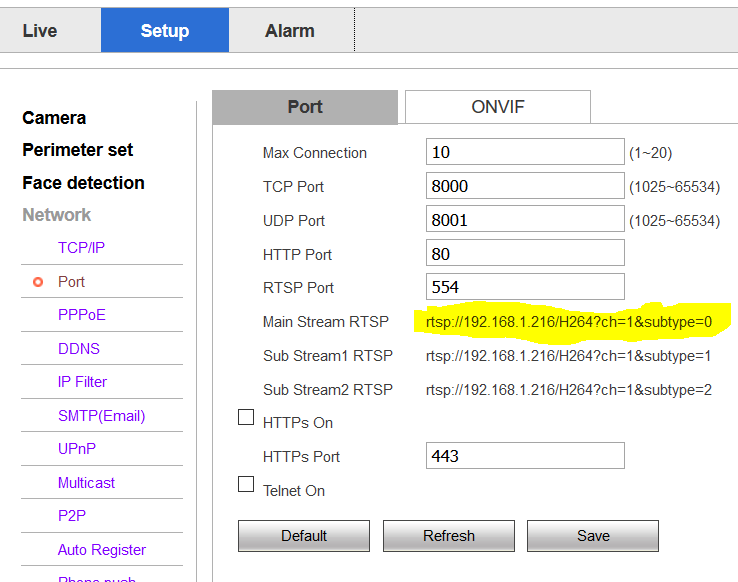
Note that I added the Username (admin) and Password (123456) of the camera and ended it with an @ symbol before the IP address in the URL (admin:[email protected])
Method 3
The easiest way to stream video via IP Camera !
I just edit your example. You must replace your IP and add /video on your link. And go ahead with your project
import cv2

cap = cv2.VideoCapture('http://192.168.18.37:8090/video')

while(True):
    ret, frame = cap.read()
    cv2.imshow('frame',frame)
    if cv2.waitKey(1) & 0xFF == ord('q'):
        cv2.destroyAllWindows()
        break
Method 4
First find out your IP camera’s streaming url, like whether it’s RTSP/HTTP etc.
Code changes will be as follows:
cap = cv2.VideoCapture("ipcam_streaming_url")
For example:
cap = cv2.VideoCapture("http://192.168.18.37:8090/test.mjpeg")
Method 5
To access an Ip Camera, first, I recommend you to install it like you are going to use for the standard application, without any code, using normal software.
After this, you have to know that for different cameras, we have different codes. There is a website where you can see what code you can use to access them:
https://www.ispyconnect.com/sources.aspx
But be careful, for my camera (Intelbras S3020) it does not work. The right way is to ask the company of your camera, and if they are a good company they will provide it.
When you know your code just add it like:
cap = cv2.VideoCapture("http://LOGIN:<a href="https://getridbug.com/cdn-cgi/l/email-protection" class="__cf_email__" data-cfemail="acfcedfffffbe3fee8ece5fc">[email protected]</a>/cgi-bin/mjpg/video.cgi?&subtype=1")
Instead LOGIN you will put your login, and instead PASSWORD you will put your password.
To find out camera’s IP address there is many softwares that you can download and provide the Ip address to you. I use the software from Intelbras, but I also recommend EseeCloud because they work for almost all cameras that I’ve bought:
https://eseecloud.software.informer.com/1.2/
In this example, it shows the protocol http to access the Ip camera, but you can also use rstp, it depends on the camera, as I said.
If you have any further questions just let me know.
Method 6
I answer my own question reporting what therefore seems to be the most comprehensive overall procedure to Access IP Camera in Python OpenCV.
Given an IP camera:
- Find your camera
IPaddress - Find the
portwhere the IP address is accessed - Find the
protocol(HTTP/RTSP etc.) specified by the camera provider
Then, if your camera is protected go ahead and find out:
- your
username - your
password
Then use your data to run the following script:
"""Access IP Camera in Python OpenCV"""

import cv2

stream = cv2.VideoCapture('protocol://IP:port/1')

# Use the next line if your camera has a username and password
# stream = cv2.VideoCapture('protocol://username:<a href="https://getridbug.com/cdn-cgi/l/email-protection" class="__cf_email__" data-cfemail="dbabbaa8a8acb4a9bf9b928b">[email protected]</a>:port/1')

while True:

    r, f = stream.read()
    cv2.imshow('IP Camera stream',f)

    if cv2.waitKey(1) & 0xFF == ord('q'):
        break

cv2.destroyAllWindows()
NOTE: In my original question I specify to being working with Teledyne Dalsa Genie Nano XL Camera. Unfortunately for this kind of cameras this normal way of accessing the IP Camera video stream does not work and the Sapera SDK must be employed in order to grab frames from the device.
Method 7
You can access most IP cameras using the method below.
import cv2

# insert the HTTP(S)/RSTP feed from the camera
url = "http://username:[email protected]_ip:your_port/tmpfs/auto.jpg"

# open the feed
cap = cv2.VideoCapture(url)

while True:
    # read next frame
     ret, frame = cap.read()

    # show frame to user
     cv2.imshow('frame', frame)

    # if user presses q quit program
     if cv2.waitKey(1) & 0xFF == ord("q"):
        break

# close the connection and close all windows
cap.release()
cv2.destroyAllWindows()
Method 8
In pycharm I wrote the code for accessing the IP Camera like:
import cv2

cap=VideoCapture("rtsp://user_name:<a href="https://getridbug.com/cdn-cgi/l/email-protection" class="__cf_email__" data-cfemail="a2d2c3d1d1d5cdd0c6e2ebf2">[email protected]</a>_address:port_number")

ret, frame=cap.read()
You will need to replace user_name, password, IP and port with suitable values
Method 9
For getting the IP Camera video link:
- Open the IP Camera with given
IPandPORTin browser - Right click the video and select “copy image address”
- Use that address to capture video
Method 10
import cv2
from threading import Thread

class Webcam:

    def __init__(self):
        # using video stream from IP Webcam for Android
        url = "http://your_ip:8080/video"
        self.video_capture = cv2.VideoCapture(url)
        self.current_frame = self.video_capture.read()[1]

    # create thread for capturing images
    def start(self):
        Thread(target=self._update_frame, args=()).start()

    def _update_frame(self):
        while(True):
            try:
                self.current_frame = self.video_capture.read()[1]
            except:
                pass

    # get the current frame
    def get_current_frame(self):
        return self.current_frame
and then
from webcam import Webcam
# get image from webcam
image = self.webcam.get_current_frame()
Method 11
Getting the correct URL for your camera seems to be the actual challenge!
I’m putting my working URL here, it might help someone.
The camera is EZVIZ C1C with exact model cs-c1c-d0-1d2wf. The working URL is
rtsp://admin:<a href="https://getridbug.com/cdn-cgi/l/email-protection" class="__cf_email__" data-cfemail="297a736e6b737d6918101b07181f110718071b">[email protected]</a>/h264_stream
where SZGBZT is the verification code found at the bottom of the camera. admin is always admin regardless of any settings or users you have.
The final code will be
video_capture = cv2.VideoCapture('rtsp://admin:<a href="https://getridbug.com/cdn-cgi/l/email-protection" class="__cf_email__" data-cfemail="5e0d04191c040a1e6f676c706f6866706f706c">[email protected]</a>/h264_stream')
Method 12
As mentioned above by @Gustavo GeoDrones you can find your Cam URL using https://www.ispyconnect.com/sources.aspx.
Go to the website, click on the model of your camera and a “Cam Video URL Generator” will appear. Insert your IP, username, etc. and click on “generate”.
Cam URL for my Canon VB-H45 is (of course with my specific username, password and IP):
http://username:<a href="https://getridbug.com/cdn-cgi/l/email-protection" class="__cf_email__" data-cfemail="5121302222263e2335111801">[email protected]</a>/-wvhttp-01-/video.cgi
The final code:
cap = cv2.VideoCapture('http://username:<a href="https://getridbug.com/cdn-cgi/l/email-protection" class="__cf_email__" data-cfemail="3949584a4a4e564b5d797069">[email protected]</a>/-wvhttp-01-/video.cgi')
All methods was sourced from stackoverflow.com or stackexchange.com, is licensed under cc by-sa 2.5, cc by-sa 3.0 and cc by-sa 4.0