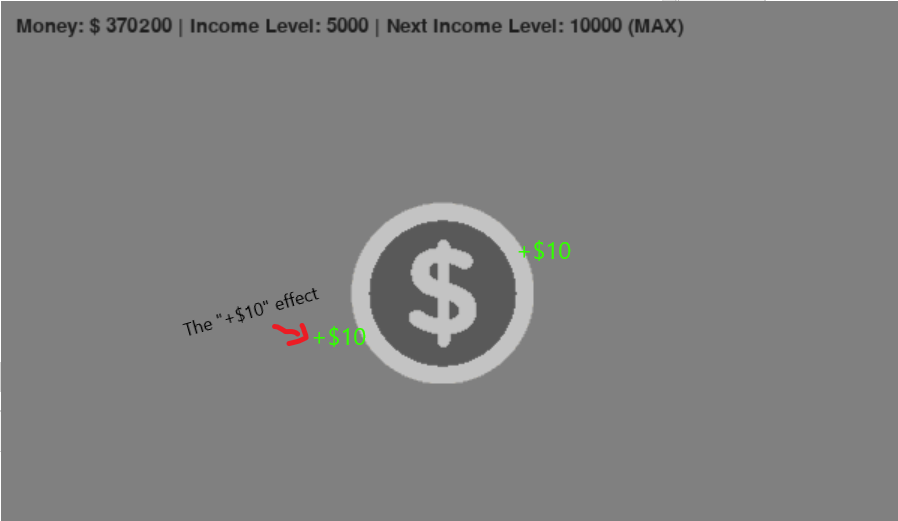
I’m currently making a Python clicking game using Pygame. Right now, there is a coin in the center of the screen that you can click. What I want to add now, it a little green “+$10” icon that appears somewhere next to the coin whenever someone clicks it. This is what I want the game to look like whenever someone clicks the coin:
Here is the code of my coin functions:
def button_collide_mouse(element_x, element_y, x_to_remove, y_to_remove):
    mouse_x, mouse_y = pygame.mouse.get_pos()
    if mouse_x > element_x > mouse_x - x_to_remove and
            mouse_y > element_y > mouse_y - y_to_remove:
        return True

def check_events(coin, settings):
    for event in pygame.event.get():
        # Change button color if mouse is touching it
        if button_collide_mouse(coin.image_x, coin.image_y, 125, 125):
            coin.image = pygame.image.load('pyfiles/images/click_button.png')
            if event.type == pygame.MOUSEBUTTONUP:
                settings.money += settings.income

        else:
            coin.image = pygame.image.load('pyfiles/images/click_button_grey.png')
Using my current code, how can I add that kind of effect?
Answers:
Thank you for visiting the Q&A section on Magenaut. Please note that all the answers may not help you solve the issue immediately. So please treat them as advisements. If you found the post helpful (or not), leave a comment & I’ll get back to you as soon as possible.
Method 1
See How to make image stay on screen in pygame?.
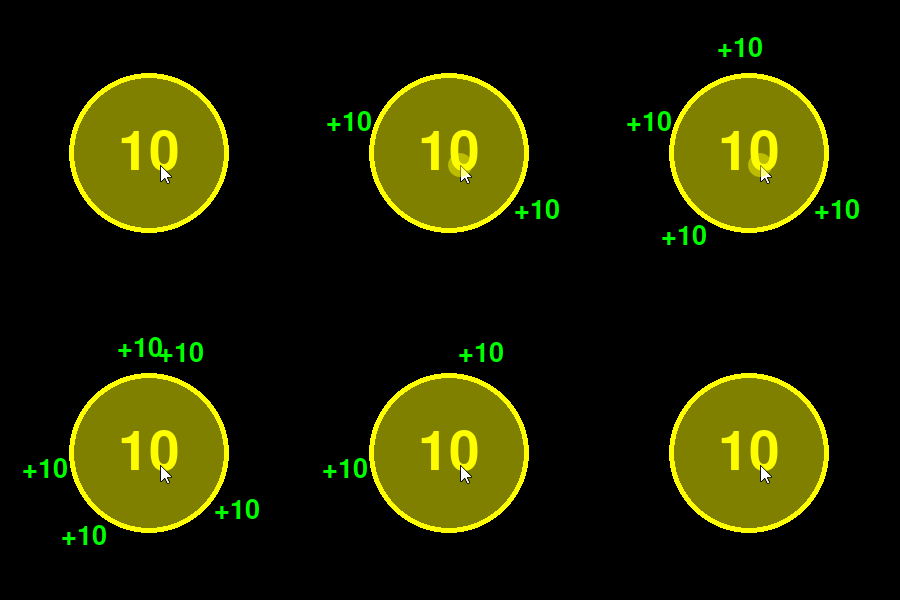
Use pygame.time.get_ticks() to return the number of milliseconds since pygame.init() was called. When the coin is clicked, calculate the point in time after that the text image has to be removed. Add random coordinates and the time to the head of a list:
current_time = pygame.time.get_ticks()
for event in pygame.event.get():
    # [...]

    if event.type == pygame.MOUSEBUTTONDOWN:
       if coin_rect.collidepoint(event.pos):
           pos = ... # random position
           end_time = current_time + 1000 # 1000 milliseconds == 1 scond
           text_pos_and_time.insert(0, (pos, end_time))
Draw the text(s) in the main application loop. Remove the text when the time has expired from the tail of the list:
for i in range(len(text_pos_and_time)):
   pos, text_end_time = text_pos_and_time[i]
   if text_end_time > current_time:
       window.blit(text, text.get_rect(center = pos))
   else:
       del text_pos_and_time[i:]
       break
Minimal example:
import pygame
import random

pygame.init()
window = pygame.display.set_mode((400, 400))
font = pygame.font.SysFont(None, 40)
clock = pygame.time.Clock()

coin = pygame.Surface((160, 160), pygame.SRCALPHA)
pygame.draw.circle(coin, (255, 255, 0), (80, 80), 80, 10)
pygame.draw.circle(coin, (128, 128, 0), (80, 80), 75)
cointext = pygame.font.SysFont(None, 80).render("10", True, (255, 255, 0))
coin.blit(cointext, cointext.get_rect(center = coin.get_rect().center))
coin_rect = coin.get_rect(center = window.get_rect().center)

text = font.render("+10", True, (0, 255, 0))
text_pos_and_time = []

run = True
while run:
    clock.tick(60)
    current_time = pygame.time.get_ticks()
    for event in pygame.event.get():
        if event.type == pygame.QUIT:
            run = False
        if event.type == pygame.MOUSEBUTTONDOWN:
            if coin_rect.collidepoint(event.pos):
                pos = pygame.math.Vector2(coin_rect.center) + pygame.math.Vector2(105, 0).rotate(random.randrange(360))
                text_pos_and_time.insert(0, ((round(pos.x), round(pos.y)), current_time + 1000))

    window.fill(0)
    window.blit(coin, coin_rect)
    for i in range(len(text_pos_and_time)):
        pos, text_end_time = text_pos_and_time[i]
        if text_end_time > current_time:
            window.blit(text, text.get_rect(center = pos))
        else:
            del text_pos_and_time[i:]
            break
    pygame.display.flip()

pygame.quit()
exit()
All methods was sourced from stackoverflow.com or stackexchange.com, is licensed under cc by-sa 2.5, cc by-sa 3.0 and cc by-sa 4.0