So so far here’s my code:
import pygame as pg
pg.init()
clock = pg.time.Clock()
# Generating screen
w_scr = 640
h_scr = 480
size_scr = (w_scr, h_scr)
screen = pg.display.set_mode(size_scr)

# Define color
COLOR_INACTIVE = (100, 80, 255)
COLOR_ACTIVE = (100, 200, 255)
COLOR_LIST_INACTIVE = (255, 100, 100)
COLOR_LIST_ACTIVE = (255, 150, 150)

class DropDown():
    # Test List
    option_list = ["Calibration", "Test"]

    def __init__(self, color_menu, color_option, x, y, w, h):
        self.color_menu = color_menu
        self.color_option = color_option
        self.x = x
        self.y = y
        self.w = w
        self.h = h

    # Draw the initial button 'select mode'
    def draw_main(self, win, text=''):
        pg.draw.rect(win, self.color_menu, (self.x, self.y, self.w, self.h), 0)
        if text != '':
            font = pg.font.SysFont(None, 30)
            msg = font.render(text, 1, (0, 0, 0))
            screen.blit(msg, (self.x + (self.w / 2 - msg.get_width() / 2), self.y + (self.h / 2 - msg.get_height() / 2)))

    # Draw list of option 'calibration' and 'test'
    def draw_opt(self, win, text=[]):
        opt_list =[]
        if draw:
            for i, el in enumerate(text):
                opt_list.append(pg.draw.rect(win, self.color_option, (self.x, self.y + (i+1)*self.h, self.w, self.h), 0))

                # write each option
                font = pg.font.SysFont(None, 30)
                msg = font.render(text[i], 1, (0, 0, 0))
                screen.blit(msg, (self.x + (self.w / 2 - msg.get_width() / 2),
                                    self.y + (i+1)*self.h + (self.h / 2 - msg.get_height() / 2)))

    # Detect when the mouse is within the 'select mode' box
    def choose_main(self, pos):
        if self.x < pos[0] < self.x + self.w and self.y < pos[1] < self.y + self.h:
            return True
        else:
            return False
    # Detect when the mouse is within the option list
    def choose_opt(self, pos):
        if self.x < pos[0] < self.x + self.w and 2*self.y < pos[1] < 2*self.y + self.h:
            return True
        else:
            return False
That’s the definition of necessary class and attributes. Here is how I run it:
# Draw flag initial value
draw = False

# Declare element
list1 = DropDown(COLOR_INACTIVE, COLOR_LIST_INACTIVE, 50, 50, 200, 50)

# Run program
menu = True
while menu:

    screen.fill((255, 255, 255))

    for event in pg.event.get():
        pos = pg.mouse.get_pos()

        if event.type == pg.QUIT:
            pg.quit()
            quit()

        # For the menu
        if event.type == pg.MOUSEMOTION:
            if list1.choose_main(pos):
                list1.color_menu = COLOR_ACTIVE

            else:
                list1.color_menu = COLOR_INACTIVE

        # For the option
        if event.type == pg.MOUSEMOTION:
            if list1.choose_opt(pos):
                list1.color_option = COLOR_LIST_ACTIVE
            else:
                list1.color_option = COLOR_LIST_INACTIVE

        if event.type == pg.MOUSEBUTTONDOWN:
            if event.button == 1 and list1.choose_main(pos):
                if draw == False:
                    draw = True

                elif draw == True:
                    draw = False

    list1.draw_main(screen, "Select Mode")
    list1.draw_opt(screen, ["Calibration", "Test"])

    pg.display.flip()
    clock.tick(30)

pg.quit()
My Problem:
- I don’t know how to select the list when they are available, in other words,
- I don’t know how to develop further from this step
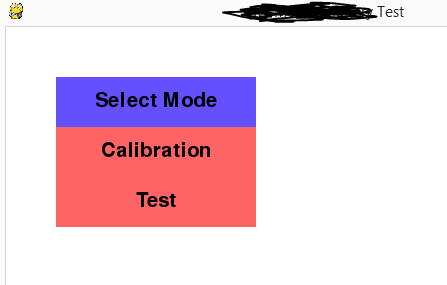
How I think it should work?
while (the option list available = True) -> choose one of them -> select it
But I failed to implement the while loop, it just runs in infinite loop, I’m stuck. So please any help is appreciated 🙂
Note:
I know there are GUI module available for main menu, I’ve also tried them, but couldn’t integrate them correctly due to little to none documentation of the module, I think the closest I can get is by using thorpy, but again there’s an error I couldn’t solve. So I decided to make my own.
If someone who already created dropdown list module successfully would like to share theirs, I would be so thankful.
Answers:
Thank you for visiting the Q&A section on Magenaut. Please note that all the answers may not help you solve the issue immediately. So please treat them as advisements. If you found the post helpful (or not), leave a comment & I’ll get back to you as soon as possible.
Method 1
The menu title, the options and the status of the menus should be attributes of the DropDownclass:
class DropDown():

    def __init__(self, color_menu, color_option, x, y, w, h, font, main, options):
        self.color_menu = color_menu
        self.color_option = color_option
        self.rect = pg.Rect(x, y, w, h)
        self.font = font
        self.main = main
        self.options = options
        self.draw_menu = False
        self.menu_active = False
        self.active_option = -1

    # [...]
list1 = DropDown(
    [COLOR_INACTIVE, COLOR_ACTIVE],
    [COLOR_LIST_INACTIVE, COLOR_LIST_ACTIVE],
    50, 50, 200, 50,
    pg.font.SysFont(None, 30),
    "Select Mode", ["Calibration", "Test"])
The class should have a draw method that draws the entire menu:
class DropDown():
    # [...]

    def draw(self, surf):
        pg.draw.rect(surf, self.color_menu[self.menu_active], self.rect, 0)
        msg = self.font.render(self.main, 1, (0, 0, 0))
        surf.blit(msg, msg.get_rect(center = self.rect.center))

        if self.draw_menu:
            for i, text in enumerate(self.options):
                rect = self.rect.copy()
                rect.y += (i+1) * self.rect.height
                pg.draw.rect(surf, self.color_option[1 if i == self.active_option else 0], rect, 0)
                msg = self.font.render(text, 1, (0, 0, 0))
                surf.blit(msg, msg.get_rect(center = rect.center))
The class should have an update method that receives the events, changes the status of the menus, and returns the index of the selected option:
class DropDown():
    # [...]

    def update(self, event_list):
        mpos = pg.mouse.get_pos()
        self.menu_active = self.rect.collidepoint(mpos)

        self.active_option = -1
        for i in range(len(self.options)):
            rect = self.rect.copy()
            rect.y += (i+1) * self.rect.height
            if rect.collidepoint(mpos):
                self.active_option = i
                break

        if not self.menu_active and self.active_option == -1:
            self.draw_menu = False

        for event in event_list:
            if event.type == pg.MOUSEBUTTONDOWN and event.button == 1:
                if self.menu_active:
                    self.draw_menu = not self.draw_menu
                elif self.draw_menu and self.active_option >= 0:
                    self.draw_menu = False
                    return self.active_option
        return -1
while run:

    event_list = pg.event.get()
    for event in event_list:
        # [...]

    selected_option = list1.update(event_list)
    if selected_option >= 0:
        # [...]

    # [...]
Complete example:
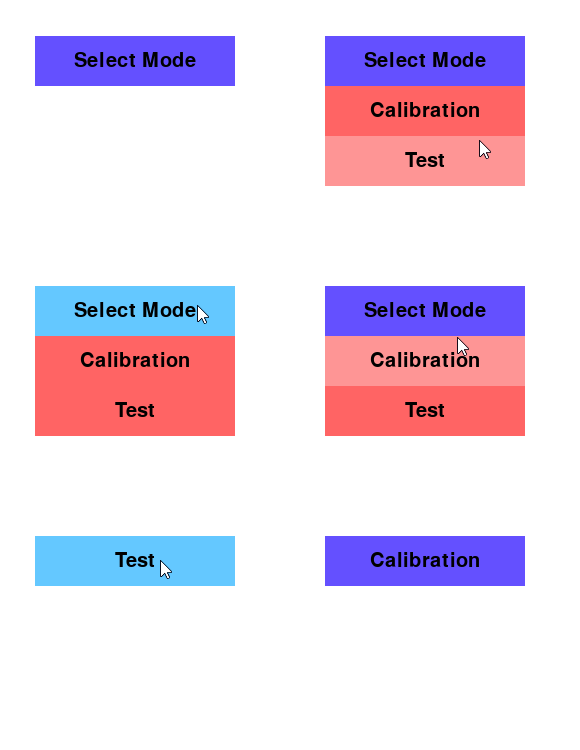
import pygame as pg

class DropDown():

    def __init__(self, color_menu, color_option, x, y, w, h, font, main, options):
        self.color_menu = color_menu
        self.color_option = color_option
        self.rect = pg.Rect(x, y, w, h)
        self.font = font
        self.main = main
        self.options = options
        self.draw_menu = False
        self.menu_active = False
        self.active_option = -1

    def draw(self, surf):
        pg.draw.rect(surf, self.color_menu[self.menu_active], self.rect, 0)
        msg = self.font.render(self.main, 1, (0, 0, 0))
        surf.blit(msg, msg.get_rect(center = self.rect.center))

        if self.draw_menu:
            for i, text in enumerate(self.options):
                rect = self.rect.copy()
                rect.y += (i+1) * self.rect.height
                pg.draw.rect(surf, self.color_option[1 if i == self.active_option else 0], rect, 0)
                msg = self.font.render(text, 1, (0, 0, 0))
                surf.blit(msg, msg.get_rect(center = rect.center))

    def update(self, event_list):
        mpos = pg.mouse.get_pos()
        self.menu_active = self.rect.collidepoint(mpos)

        self.active_option = -1
        for i in range(len(self.options)):
            rect = self.rect.copy()
            rect.y += (i+1) * self.rect.height
            if rect.collidepoint(mpos):
                self.active_option = i
                break

        if not self.menu_active and self.active_option == -1:
            self.draw_menu = False

        for event in event_list:
            if event.type == pg.MOUSEBUTTONDOWN and event.button == 1:
                if self.menu_active:
                    self.draw_menu = not self.draw_menu
                elif self.draw_menu and self.active_option >= 0:
                    self.draw_menu = False
                    return self.active_option
        return -1

pg.init()
clock = pg.time.Clock()
screen = pg.display.set_mode((640, 480))

COLOR_INACTIVE = (100, 80, 255)
COLOR_ACTIVE = (100, 200, 255)
COLOR_LIST_INACTIVE = (255, 100, 100)
COLOR_LIST_ACTIVE = (255, 150, 150)

list1 = DropDown(
    [COLOR_INACTIVE, COLOR_ACTIVE],
    [COLOR_LIST_INACTIVE, COLOR_LIST_ACTIVE],
    50, 50, 200, 50,
    pg.font.SysFont(None, 30),
    "Select Mode", ["Calibration", "Test"])

run = True
while run:
    clock.tick(30)

    event_list = pg.event.get()
    for event in event_list:
        if event.type == pg.QUIT:
            run = False

    selected_option = list1.update(event_list)
    if selected_option >= 0:
        list1.main = list1.options[selected_option]

    screen.fill((255, 255, 255))
    list1.draw(screen)
    pg.display.flip()

pg.quit()
exit()
See also UI elements
All methods was sourced from stackoverflow.com or stackexchange.com, is licensed under cc by-sa 2.5, cc by-sa 3.0 and cc by-sa 4.0