I’m drawing a table with pyplot like this:
    sub_axes.table(cellText=table_vals,
          colWidths = [0.15, 0.25],
          rowLabels=row_labels,
          loc='right')
I’d like to change the fontsize of table’s content, and found there is a fontsize property,
please ref definition of ‘table’.
So it becomes:
    sub_axes.table(cellText=table_vals,
          colWidths = [0.15, 0.25],
          rowLabels=row_labels,
          fontsize=12,
          loc='right')
But when I execute the code, I got an error:
TypeError: table() got an unexpected keyword argument 'fontsize'
Is this property deprecated? And how can I change the fontsize of table with pyplot?
Answers:
Thank you for visiting the Q&A section on Magenaut. Please note that all the answers may not help you solve the issue immediately. So please treat them as advisements. If you found the post helpful (or not), leave a comment & I’ll get back to you as soon as possible.
Method 1
I think the documentation is either hinting at a parameter-to-be (notice fontsize is not a link like the other parameters) or perhaps is a bit misleading at the moment. There is no fontsize parameter.
Digging through the source code, I found the Table.set_fontsize method:
table = sub_axes.table(cellText=table_vals,
                       colWidths = [0.15, 0.25],
                       rowLabels=row_labels,
                       loc='right')
table.set_fontsize(14)
table.scale(1.5, 1.5)  # may help
Here is an example with a grossly exaggerated fontsize just to show the effect.
import matplotlib.pyplot as plt
# Based on http://stackoverflow.com/a/8531491/190597 (Andrey Sobolev)

fig = plt.figure()
ax = fig.add_subplot(111)
y = [1, 2, 3, 4, 5, 4, 3, 2, 1, 1, 1, 1, 1, 1, 1, 1]
col_labels = ['col1', 'col2', 'col3']
row_labels = ['row1', 'row2', 'row3']
table_vals = [[11, 12, 13], [21, 22, 23], [31, 32, 33]]

the_table = plt.table(cellText=table_vals,
                      colWidths=[0.1] * 3,
                      rowLabels=row_labels,
                      colLabels=col_labels,
                      loc='center right')
the_table.auto_set_font_size(False)
the_table.set_fontsize(24)
the_table.scale(2, 2)

plt.plot(y)
plt.show()
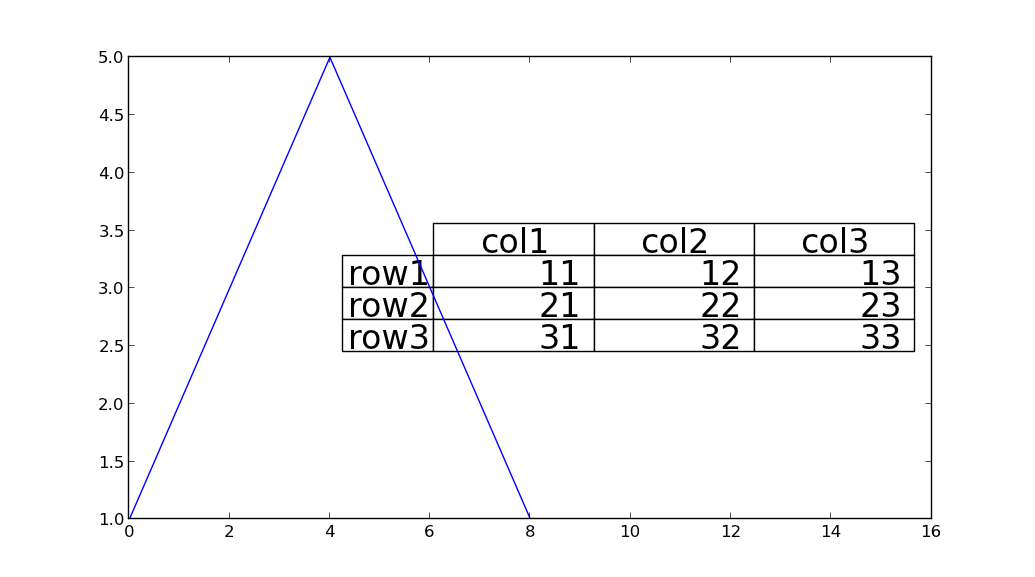
Method 2
Set the auto_set_font_size to False, then set_fontsize(24)
the_table.auto_set_font_size(False)
the_table.set_fontsize(24)
All methods was sourced from stackoverflow.com or stackexchange.com, is licensed under cc by-sa 2.5, cc by-sa 3.0 and cc by-sa 4.0