How do I convert data from a Scikit-learn Bunch object to a Pandas DataFrame?
from sklearn.datasets import load_iris
import pandas as pd
data = load_iris()
print(type(data))
data1 = pd. # Is there a Pandas method to accomplish this?
Answers:
Thank you for visiting the Q&A section on Magenaut. Please note that all the answers may not help you solve the issue immediately. So please treat them as advisements. If you found the post helpful (or not), leave a comment & I’ll get back to you as soon as possible.
Method 1
Manually, you can use pd.DataFrame constructor, giving a numpy array (data) and a list of the names of the columns (columns).
To have everything in one DataFrame, you can concatenate the features and the target into one numpy array with np.c_[...] (note the []):
import numpy as np
import pandas as pd
from sklearn.datasets import load_iris

# save load_iris() sklearn dataset to iris
# if you'd like to check dataset type use: type(load_iris())
# if you'd like to view list of attributes use: dir(load_iris())
iris = load_iris()

# np.c_ is the numpy concatenate function
# which is used to concat iris['data'] and iris['target'] arrays
# for pandas column argument: concat iris['feature_names'] list
# and string list (in this case one string); you can make this anything you'd like..
# the original dataset would probably call this ['Species']
data1 = pd.DataFrame(data= np.c_[iris['data'], iris['target']],
                     columns= iris['feature_names'] + ['target'])
Method 2
from sklearn.datasets import load_iris
import pandas as pd

data = load_iris()
df = pd.DataFrame(data=data.data, columns=data.feature_names)
df.head()
This tutorial maybe of interest: http://www.neural.cz/dataset-exploration-boston-house-pricing.html
Method 3
TOMDLt’s solution is not generic enough for all the datasets in scikit-learn. For example it does not work for the boston housing dataset. I propose a different solution which is more universal. No need to use numpy as well.
from sklearn import datasets
import pandas as pd

boston_data = datasets.load_boston()
df_boston = pd.DataFrame(boston_data.data,columns=boston_data.feature_names)
df_boston['target'] = pd.Series(boston_data.target)
df_boston.head()
As a general function:
def sklearn_to_df(sklearn_dataset):
    df = pd.DataFrame(sklearn_dataset.data, columns=sklearn_dataset.feature_names)
    df['target'] = pd.Series(sklearn_dataset.target)
    return df

df_boston = sklearn_to_df(datasets.load_boston())
Method 4
Took me 2 hours to figure this out
import numpy as np
import pandas as pd
from sklearn.datasets import load_iris

iris = load_iris()
##iris.keys()


df= pd.DataFrame(data= np.c_[iris['data'], iris['target']],
                 columns= iris['feature_names'] + ['target'])

df['species'] = pd.Categorical.from_codes(iris.target, iris.target_names)
Get back the species for my pandas
Method 5
Just as an alternative that I could wrap my head around much easier:
data = load_iris()
df = pd.DataFrame(data['data'], columns=data['feature_names'])
df['target'] = data['target']
df.head()
Basically instead of concatenating from the get go, just make a data frame with the matrix of features and then just add the target column with data[‘whatvername’] and grab the target values from the dataset
Method 6
New Update
You can use the parameter as_frame=True to get pandas dataframes.
If as_frame parameter available (eg. load_iris)
from sklearn import datasets
X,y = datasets.load_iris(return_X_y=True) # numpy arrays

dic_data = datasets.load_iris(as_frame=True)
print(dic_data.keys())

df = dic_data['frame'] # pandas dataframe data + target
df_X = dic_data['data'] # pandas dataframe data only
ser_y = dic_data['target'] # pandas series target only
dic_data['target_names'] # numpy array
If as_frame parameter NOT available (eg. load_boston)
from sklearn import datasets

fnames = [ i for i in dir(datasets) if 'load_' in i]
print(fnames)

fname = 'load_boston'
loader = getattr(datasets,fname)()
df = pd.DataFrame(loader['data'],columns= loader['feature_names'])
df['target'] = loader['target']
df.head(2)
Method 7
Otherwise use seaborn data sets which are actual pandas data frames:
import seaborn
iris = seaborn.load_dataset("iris")
type(iris)
# <class 'pandas.core.frame.DataFrame'>
Compare with scikit learn data sets:
from sklearn import datasets
iris = datasets.load_iris()
type(iris)
# <class 'sklearn.utils.Bunch'>
dir(iris)
# ['DESCR', 'data', 'feature_names', 'filename', 'target', 'target_names']
Method 8
This is easy method worked for me.
boston = load_boston()
boston_frame = pd.DataFrame(data=boston.data, columns=boston.feature_names)
boston_frame["target"] = boston.target
But this can applied to load_iris as well.
Method 9
This works for me.
dataFrame = pd.dataFrame(data = np.c_[ [iris['data'],iris['target'] ],
columns=iris['feature_names'].tolist() + ['target'])
Method 10
Other way to combine features and target variables can be using np.column_stack (details)
import numpy as np
import pandas as pd
from sklearn.datasets import load_iris

data = load_iris()
df = pd.DataFrame(np.column_stack((data.data, data.target)), columns = data.feature_names+['target'])
print(df.head())
Result:
   sepal length (cm)  sepal width (cm)  petal length (cm)  petal width (cm)     target
0                5.1               3.5                1.4               0.2     0.0
1                4.9               3.0                1.4               0.2     0.0
2                4.7               3.2                1.3               0.2     0.0
3                4.6               3.1                1.5               0.2     0.0
4                5.0               3.6                1.4               0.2     0.0
If you need the string label for the target, then you can use replace by convertingtarget_names to dictionary and add a new column:
df['label'] = df.target.replace(dict(enumerate(data.target_names)))
print(df.head())
Result:
   sepal length (cm)  sepal width (cm)  petal length (cm)  petal width (cm)     target  label
0                5.1               3.5                1.4               0.2     0.0     setosa
1                4.9               3.0                1.4               0.2     0.0     setosa
2                4.7               3.2                1.3               0.2     0.0     setosa
3                4.6               3.1                1.5               0.2     0.0     setosa
4                5.0               3.6                1.4               0.2     0.0     setosa
Method 11
Many of the solutions are either missing column names or the species target names. This solution provides target_name labels.
@Ankit-mathanker‘s solution works, however it iterates the Dataframe Series ‘target_names’ to substitute the iris species for integer identifiers.
Based on the adage ‘Don’t iterate a Dataframe if you don’t have to,’ the following solution utilizes pd.replace() to more concisely accomplish the replacement.
import pandas as pd
from sklearn.datasets import load_iris

iris = load_iris()
df = pd.DataFrame(iris['data'], columns = iris['feature_names'])
df['target'] = pd.Series(iris['target'], name = 'target_values')
df['target_name'] = df['target'].replace([0,1,2],
['iris-' + species for species in iris['target_names'].tolist()])

df.head(3)
| sepal length (cm) | sepal width (cm) | petal length (cm) | petal width (cm) | target | target_name | |
|---|---|---|---|---|---|---|
| 0 | 5.1 | 3.5 | 1.4 | 0.2 | 0 | iris-setosa |
| 1 | 4.9 | 3.0 | 1.4 | 0.2 | 0 | iris-setosa |
| 2 | 4.7 | 3.2 | 1.3 | 0.2 | 0 | iris-setosa |
Method 12
As of version 0.23, you can directly return a DataFrame using the as_frame argument.
For example, loading the iris data set:
from sklearn.datasets import load_iris
iris = load_iris(as_frame=True)
df = iris.data
In my understanding using the provisionally release notes, this works for the breast_cancer, diabetes, digits, iris, linnerud, wine and california_houses data sets.
Method 13
Here’s another integrated method example maybe helpful.
from sklearn.datasets import load_iris
iris_X, iris_y = load_iris(return_X_y=True, as_frame=True)
type(iris_X), type(iris_y)
The data iris_X are imported as pandas DataFrame and
the target iris_y are imported as pandas Series.
Method 14
Basically what you need is the “data”, and you have it in the scikit bunch, now you need just the “target” (prediction) which is also in the bunch.
So just need to concat these two to make the data complete
  data_df = pd.DataFrame(cancer.data,columns=cancer.feature_names)
  target_df = pd.DataFrame(cancer.target,columns=['target'])

  final_df = data_df.join(target_df)
Method 15
The API is a little cleaner than the responses suggested. Here, using as_frame and being sure to include a response column as well.
import pandas as pd
from sklearn.datasets import load_wine

features, target = load_wine(as_frame=True).data, load_wine(as_frame=True).target
df = features
df['target'] = target

df.head(2)
Method 16
Working off the best answer and addressing my comment, here is a function for the conversion
def bunch_to_dataframe(bunch):
  fnames = bunch.feature_names
  features = fnames.tolist() if isinstance(fnames, np.ndarray) else fnames
  features += ['target']
  return pd.DataFrame(data= np.c_[bunch['data'], bunch['target']],
                 columns=features)
Method 17
This snippet is only syntactic sugar built upon what TomDLT and rolyat have already contributed and explained. The only differences would be that load_iris will return a tuple instead of a dictionary and the columns names are enumerated.
df = pd.DataFrame(np.c_[load_iris(return_X_y=True)])
Method 18
Whatever TomDLT answered it may not work for some of you because
data1 = pd.DataFrame(data= np.c_[iris['data'], iris['target']],
                 columns= iris['feature_names'] + ['target'])
because iris[‘feature_names’] returns you a numpy array. In numpy array you can’t add an array and a list [‘target’] by just + operator. Hence you need to convert it into a list first and then add.
You can do
data1 = pd.DataFrame(data= np.c_[iris['data'], iris['target']],
                 columns= list(iris['feature_names']) + ['target'])
This will work fine tho..
Method 19
I took couple of ideas from your answers and I don’t know how to make it shorter 🙂
import pandas as pd
from sklearn.datasets import load_iris
iris = load_iris()
df = pd.DataFrame(iris.data, columns=iris['feature_names'])
df['target'] = iris['target']
This gives a Pandas DataFrame with feature_names plus target as columns and RangeIndex(start=0, stop=len(df), step=1).
I would like to have a shorter code where I can have ‘target’ added directly.
Method 20
You can use pd.DataFrame constructor, giving a numpy array (data) and a list of the names of the columns (columns). To have everything in one DataFrame, you can concatenate the features and the target into one numpy array with np.c_[…] (note the square brackets and not parenthesis). Also, you can have some trouble if you don’t convert the feature names (iris[‘feature_names’]) to a list before concatenation:
import numpy as np
import pandas as pd
from sklearn.datasets import load_iris

iris = load_iris()

df = pd.DataFrame(data= np.c_[iris['data'], iris['target']],
                     columns= list(iris['feature_names']) + ['target'])
Method 21
There might be a better way but here is what I have done in the past and it works quite well:
items = data.items()                          #Gets all the data from this Bunch - a huge list
mydata = pd.DataFrame(items[1][1])            #Gets the Attributes
mydata[len(mydata.columns)] = items[2][1]     #Adds a column for the Target Variable
mydata.columns = items[-1][1] + [items[2][0]] #Gets the column names and updates the dataframe
Now mydata will have everything you need – attributes, target variable and columnnames
Method 22
import pandas as pd
from sklearn.datasets import load_iris
iris = load_iris()
X = iris['data']
y = iris['target']
iris_df = pd.DataFrame(X, columns = iris['feature_names'])
iris_df.head()
Method 23
One of the best ways:
data = pd.DataFrame(digits.data)
Digits is the sklearn dataframe and I converted it to a pandas DataFrame
Method 24
from sklearn.datasets import load_iris
import pandas as pd

iris_dataset = load_iris()

datasets = pd.DataFrame(iris_dataset['data'], columns =
           iris_dataset['feature_names'])
target_val = pd.Series(iris_dataset['target'], name =
            'target_values')

species = []
for val in target_val:
    if val == 0:
        species.append('iris-setosa')
    if val == 1:
        species.append('iris-versicolor')
    if val == 2:
        species.append('iris-virginica')
species = pd.Series(species)

datasets['target'] = target_val
datasets['target_name'] = species
datasets.head()
Method 25
Plenty of good responses to this question; I’ve added my own below.
import pandas as pd
from sklearn.datasets import load_iris

df = pd.DataFrame(
    # load all 4 dimensions of the dataframe EXCLUDING species data
    load_iris()['data'],
    # set the column names for the 4 dimensions of data
    columns=load_iris()['feature_names']
)

# we create a new column called 'species' with 150 rows of numerical data 0-2 signifying a species type.
# Our column `species` should have data such `[0, 0, 1, 2, 1, 0]` etc.
df['species'] = load_iris()['target']
# we map the numerical data to string data for species type
df['species'] = df['species'].map({
    0 : 'setosa',
    1 : 'versicolor',
    2 : 'virginica'
})

df.head()
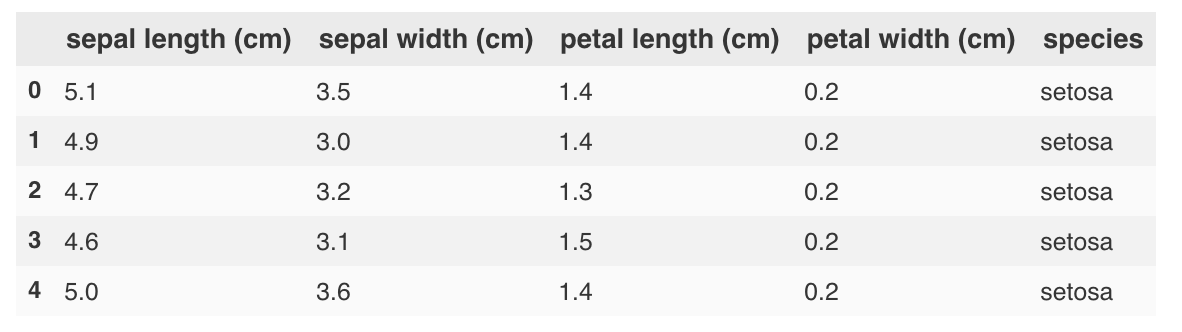
Breakdown
- For some reason the
load_iris['feature_names]has only 4 columns (sepal length, sepal width, petal length, petal width); moreover, theload_iris['data']only contains data for thosefeature_namesmentioned above. - Instead, the species column names are stored in
load_iris()['target_names'] == array(['setosa', 'versicolor', 'virginica']. - On top of this, the species row data is stored in
load_iris()['target'].nunique() == 3 - Our goal was simply to add a new column called
speciesthat used themapfunction to convert numerical data0-2into 3 types of string data signifying the iris species.
All methods was sourced from stackoverflow.com or stackexchange.com, is licensed under cc by-sa 2.5, cc by-sa 3.0 and cc by-sa 4.0