I have a dataframe that looks like this:
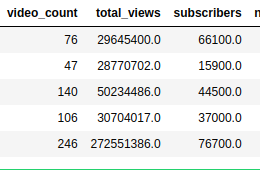
I have used a barplot to represent the subscribers for each row. This is what I did:
data = channels.sort_values('subscribers', ascending=False).head(5)
chart = sns.barplot(x = 'name', y='subscribers',data=data)
chart.set_xticklabels(chart.get_xticklabels(), rotation=90)
for p in chart.patches:
    chart.annotate("{:,.2f}".format(p.get_height(), '.2f'), (p.get_x() + p.get_width() / 2., p.get_height()), ha = 'center', va = 'center', xytext = (0, 10), textcoords = 'offset points')
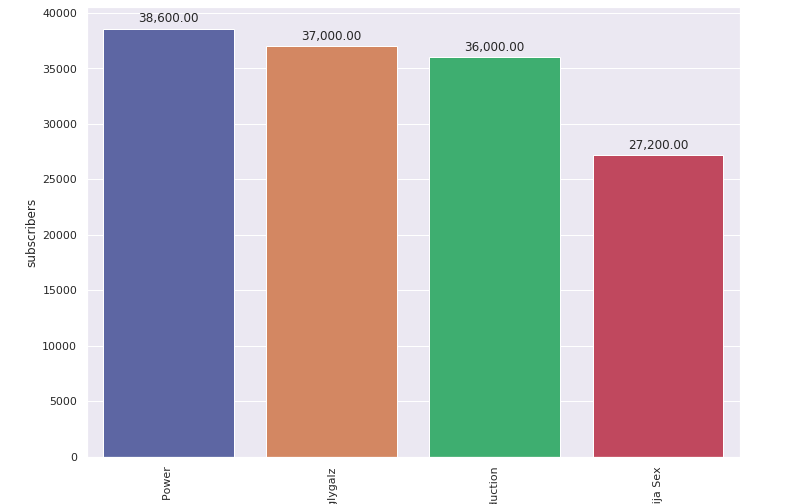
Now I want to show the ‘video_count’ for each user on this same plot. The goal is to compare how the number of subscribers relate to the number of videos. How can I depict this on the chart?
Answers:
Thank you for visiting the Q&A section on Magenaut. Please note that all the answers may not help you solve the issue immediately. So please treat them as advisements. If you found the post helpful (or not), leave a comment & I’ll get back to you as soon as possible.
Method 1
Data
- The data needs to be converted to a long format using
.melt - Because of the scale of values,
'log'is used for theyscale - All of the categories in
'cats'are included for the example.- Select only the desired columns before melting, or use
dfl = dfl[dfl.cats.isin(['sub', 'vc'])to filter for the desired'cats'.
- Select only the desired columns before melting, or use
import pandas as pd
import matplotlib.pyplot as plt
import seaborn as sns

# setup dataframe
data = {'vc': [76, 47, 140, 106, 246],
        'tv': [29645400, 28770702, 50234486, 30704017, 272551386],
        'sub': [66100, 15900, 44500, 37000, 76700],
        'name': ['a', 'b', 'c', 'd', 'e']}
df = pd.DataFrame(data)

    vc        tv    sub name
0   76  29645400  66100    a
1   47  28770702  15900    b
2  140  50234486  44500    c

# convert to long form
dfl = (df.melt(id_vars='name', var_name='cats', value_name='values')
       .sort_values('values', ascending=False).reset_index(drop=True))

  name cats     values
0    e   tv  272551386
1    c   tv   50234486
2    d   tv   30704017
Updated as of matplotlib v3.4.2
- Use
matplotlib.pyplot.bar_label .bar_labelworks formatplotlib,seaborn, andpandasplots.- See How to add value labels on a bar chart for additional details and examples with
.bar_label. - Tested with
seaborn v0.11.1, which is usingmatplotlibas the plot engine.
# plot
fig, ax = plt.subplots(figsize=(12, 6))
sns.barplot(x='name', y='values', data=dfl, hue='cats', ax=ax)
ax.set_xticklabels(ax.get_xticklabels(), rotation=0)
ax.set_yscale('log')

for c in ax.containers:
    # set the bar label
    ax.bar_label(c, fmt='%.0f', label_type='edge', padding=1)

# pad the spacing between the number and the edge of the figure
ax.margins(y=0.1)
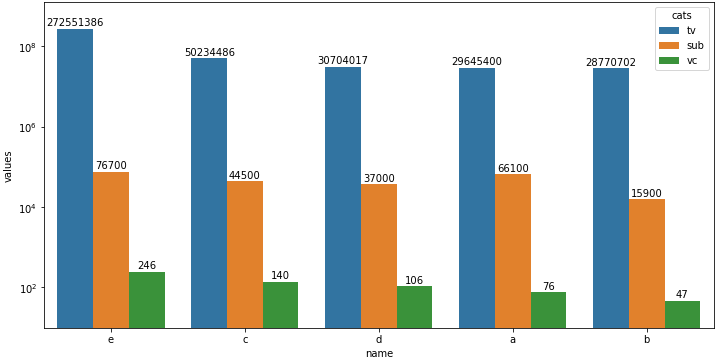
Plot with seaborn v0.11.1
- Using
matplotlibbefore version 3.4.2 - Note that using
.annotateand.patchesis much more verbose than with.bar_label.
# plot
fig, ax = plt.subplots(figsize=(12, 6))
sns.barplot(x='name', y='values', data=dfl, hue='cats', ax=ax)
ax.set_xticklabels(chart.get_xticklabels(), rotation=0)
ax.set_yscale('log')

for p in ax.patches:
    ax.annotate(f"{p.get_height():.0f}", (p.get_x() + p.get_width() / 2., p.get_height()),
                ha='center', va='center', xytext =(0, 7), textcoords='offset points')
All methods was sourced from stackoverflow.com or stackexchange.com, is licensed under cc by-sa 2.5, cc by-sa 3.0 and cc by-sa 4.0