Lets say I have a dataframe df as
A B
1 V2
3 W42
1 S03
2 T02
3 U71
I want to have a new column (either at it the end of df or replace column B with it, as it doesn’t matter) that only extracts the int from the column B. That is I want column C to look like
C
2
42
3
2
71
So if there is a 0 in front of the number, such as for 03, then I want to return 3 not 03
How can I do this?
Answers:
Thank you for visiting the Q&A section on Magenaut. Please note that all the answers may not help you solve the issue immediately. So please treat them as advisements. If you found the post helpful (or not), leave a comment & I’ll get back to you as soon as possible.
Method 1
You can convert to string and extract the integer using regular expressions.
df['B'].str.extract('(d+)').astype(int)
Method 2
Assuming there is always exactly one leading letter
df['B'] = df['B'].str[1:].astype(int)
Method 3
First set up the data
df = pd.DataFrame({'A': [1, 3, 1, 2, 3], 'B' : ['V2', 'W42', 'S03', 'T02', 'U71']})

df.head()
Then do the extraction and cast it back to ints
df['C'] = df['B'].str.extract('(d+)').astype(int)

df.head()
Method 4
I wrote a little loop to do this , as I didn’t have my strings in a DataFrame, but in a list. This way, you can also add a little if statement to account for floats :
output= ''
input = 'whatever.007'

for letter in input :
        try :
            int(letter)
            output += letter

        except ValueError :
                pass

        if letter == '.' :
            output += letter
output = float(output)
or you can int(output) if you like.
Method 5
Preparing the DF to have the same one as yours:
df = pd.DataFrame({'A': [1, 3, 1, 2, 3], 'B' : ['V2', 'W42', 'S03', 'T02', 'U71']})

df.head()
Now Manipulate it to get your desired outcome:
df['C'] = df['B'].apply(lambda x: re.search(r'd+', x).group())

df.head()


    A   B   C
0   1   V2  2
1   3   W42 42
2   1   S03 03
3   2   T02 02
4   3   U71 71
Method 6
This is another way of doing it if you don’t want to use regualr expressions:
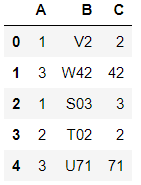
I used map() function to apply what is needed on each element of the column.
So like this:
letters = "abcdefghijklmnopqrstuvwxyz"
df['C'] = list(map(lambda x: int(x.lower().strip(letters))   ,  df['B']))
Output will be like this:
Method 7
I Used apply and it works just fine too:
df = pd.DataFrame({'A': [1, 3, 1, 2, 3], 'B' : ['V2', 'W42', 'S03', 'T02', 'U71']})
df['C'] = df['B'].apply(lambda x: int(x[1:]))
df['C']
Output:
0     2
1    42
2     3
3     2
4    71
Name: C, dtype: int64
Method 8
That’s correct, just as @Lokesh A. R. has answered above, but this won’t work in all cases.
When you get the error pattern contains no capture groups this is what you should do. According to the
docs you to add parentheses to specify capture group.
df["B"].str.extract('(d+)')
All methods was sourced from stackoverflow.com or stackexchange.com, is licensed under cc by-sa 2.5, cc by-sa 3.0 and cc by-sa 4.0