How can I prevent a specific plot to be shown in Jupyter notebook? I have several plots in a notebook but I want a subset of them to be saved to a file and not shown on the notebook as this slows considerably.
A minimal working example for a Jupyter notebook is:
%matplotlib inline
from numpy.random import randn
from matplotlib.pyplot import plot, figure
a=randn(3)
b=randn(3)
for i in range(10):
    fig=figure()
    plot(b)
    fname='s%03d.png'%i
    fig.savefig(fname)
    if(i%5==0):
        figure()
        plot(a)
As you can see I have two types of plots, a and b. I want a’s to be plotted and shown and I don’t want the b plots to be shown, I just want them them to be saved in a file. Hopefully this will speed things a bit and won’t pollute my notebook with figures I don’t need to see.
Thank you for your time
Answers:
Thank you for visiting the Q&A section on Magenaut. Please note that all the answers may not help you solve the issue immediately. So please treat them as advisements. If you found the post helpful (or not), leave a comment & I’ll get back to you as soon as possible.
Method 1
Perhaps just clear the axis, for example:
fig= plt.figure()
plt.plot(range(10))
fig.savefig("save_file_name.pdf")
plt.close()
will not plot the output in inline mode. I can’t work out if is really clearing the data though.
Method 2
I was able to prevent my figures from displaying by turning interactive mode off using the function
plt.ioff()
Method 3
To prevent any output from a jupyter notebook cell you may start the cell with
%%capture
This might be usefull in cases all other methods shown here fail.
Method 4
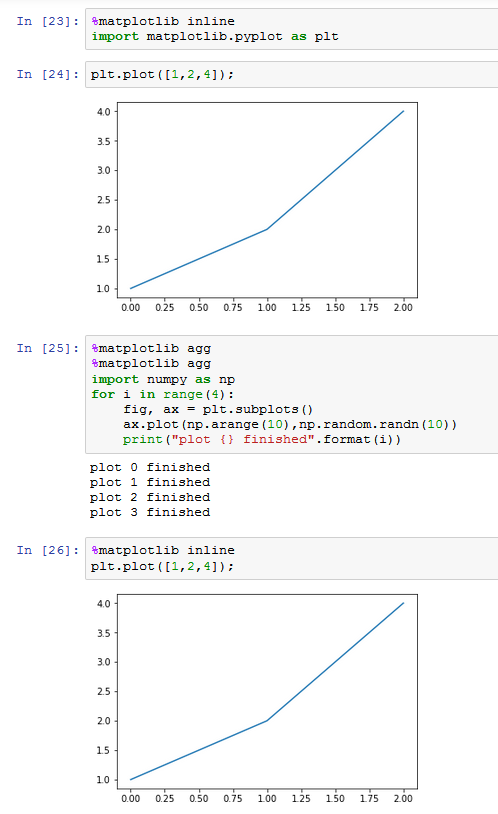
From IPython 6.0 on, there is another option to turn the inline output off (temporarily or persistently). This has been introduced in this pull request.
You would use the “agg” backend to not show any inline output.
%matplotlib agg
It seems though that if you had activated the inline backend first, this needs to be called twice to take effect.
%matplotlib agg
%matplotlib agg
Here is how it would look in action
Method 5
I’m a beginner though,off the inline mode when you don’t want to see the output in your notebook by:
%matplotlib auto
or:
%matplotlib
to use it back:
%matplotlib inline
more better solution would be to use:
plt.ioff()
which says inline mode off.
hope it helps.
Method 6
On Jupyter 6.0, I use the following snippet to selectively not display the matplot lib figures.
import matplotlib as mpl

...

backend_ =  mpl.get_backend()
mpl.use("Agg")  # Prevent showing stuff

# Your code

mpl.use(backend_) # Reset backend
Method 7
Building off @importanceofbeingernest’s answer, one may call some function in a loop, and at each iteration, want to render a plot. However, between the each plot, you may want to render additional stuff.
Concretely:
- Iterate a list of IDs
- Call a function so a plot is rendered for each “ID”
- Between each plot, render some markdown
# <cell begins>
def render(id):
   fig, axes = plt.subplots(2, 1)
   plt.suptitle(f'Metrics for {id}')

   df.ColA.plot.bar(ax=axes[0])
   df.ColB.plot.bar(ax=axes[1])

   return fig

# <cell ends>

# -------------------------------------

# <cell begins>
%matplotlib agg

for id in df.ID.value_counts().index:
   fig = render(id)

   display(fig)
   display(Markdown('---'))

# <cell ends>
All methods was sourced from stackoverflow.com or stackexchange.com, is licensed under cc by-sa 2.5, cc by-sa 3.0 and cc by-sa 4.0