I come from a sql background and I use the following data processing step frequently:
- Partition the table of data by one or more fields
- For each partition, add a rownumber to each of its rows that ranks the row by one or more other fields, where the analyst specifies ascending or descending
EX:
df = pd.DataFrame({'key1' : ['a','a','a','b','a'],
           'data1' : [1,2,2,3,3],
           'data2' : [1,10,2,3,30]})
df
     data1        data2     key1
0    1            1         a
1    2            10        a
2    2            2         a
3    3            3         b
4    3            30        a
I’m looking for how to do the PANDAS equivalent to this sql window function:
RN = ROW_NUMBER() OVER (PARTITION BY Key1 ORDER BY Data1 ASC, Data2 DESC)


    data1        data2     key1    RN
0    1            1         a       1
1    2            10        a       2
2    2            2         a       3
3    3            3         b       1
4    3            30        a       4
I’ve tried the following which I’ve gotten to work where there are no ‘partitions’:
def row_number(frame,orderby_columns, orderby_direction,name):
    frame.sort_index(by = orderby_columns, ascending = orderby_direction, inplace = True)
    frame[name] = list(xrange(len(frame.index)))
I tried to extend this idea to work with partitions (groups in pandas) but the following didn’t work:
df1 = df.groupby('key1').apply(lambda t: t.sort_index(by=['data1', 'data2'], ascending=[True, False], inplace = True)).reset_index()

def nf(x):
    x['rn'] = list(xrange(len(x.index)))

df1['rn1'] = df1.groupby('key1').apply(nf)
But I just got a lot of NaNs when I do this.
Ideally, there’d be a succinct way to replicate the window function capability of sql (i’ve figured out the window based aggregates…that’s a one liner in pandas)…can someone share with me the most idiomatic way to number rows like this in PANDAS?
Answers:
Thank you for visiting the Q&A section on Magenaut. Please note that all the answers may not help you solve the issue immediately. So please treat them as advisements. If you found the post helpful (or not), leave a comment & I’ll get back to you as soon as possible.
Method 1
you can also use sort_values(), groupby() and finally cumcount() + 1:
df['RN'] = df.sort_values(['data1','data2'], ascending=[True,False])
             .groupby(['key1'])
             .cumcount() + 1
print(df)
yields:
   data1  data2 key1  RN
0      1      1    a   1
1      2     10    a   2
2      2      2    a   3
3      3      3    b   1
4      3     30    a   4
PS tested with pandas 0.18
Method 2
Use groupby.rank function.
Here the working example.
df = pd.DataFrame({'C1':['a', 'a', 'a', 'b', 'b'], 'C2': [1, 2, 3, 4, 5]})
df

C1 C2
a  1
a  2
a  3
b  4
b  5

df["RANK"] = df.groupby("C1")["C2"].rank(method="first", ascending=True)
df

C1 C2 RANK
a  1  1
a  2  2
a  3  3
b  4  1
b  5  2
Method 3
You can do this by using groupby twice along with the rank method:
In [11]: g = df.groupby('key1')
Use the min method argument to give values which share the same data1 the same RN:
In [12]: g['data1'].rank(method='min')
Out[12]:
0    1
1    2
2    2
3    1
4    4
dtype: float64

In [13]: df['RN'] = g['data1'].rank(method='min')
And then groupby these results and add the rank with respect to data2:
In [14]: g1 = df.groupby(['key1', 'RN'])

In [15]: g1['data2'].rank(ascending=False) - 1
Out[15]:
0    0
1    0
2    1
3    0
4    0
dtype: float64

In [16]: df['RN'] += g1['data2'].rank(ascending=False) - 1

In [17]: df
Out[17]:
   data1  data2 key1  RN
0      1      1    a   1
1      2     10    a   2
2      2      2    a   3
3      3      3    b   1
4      3     30    a   4
It feels like there ought to be a native way to do this (there may well be!…).
Method 4
You can use transform and Rank together Here is an example
df = pd.DataFrame({'C1' : ['a','a','a','b','b'],
           'C2' : [1,2,3,4,5]})
df['Rank'] = df.groupby(by=['C1'])['C2'].transform(lambda x: x.rank())
df
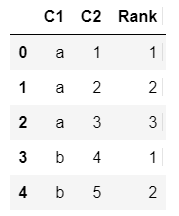
Have a look at Pandas Rank method for more information
Method 5
pandas.lib.fast_zip() can create a tuple array from a list of array. You can use this function to create a tuple series, and then rank it:
values = {'key1' : ['a','a','a','b','a','b'],
          'data1' : [1,2,2,3,3,3],
          'data2' : [1,10,2,3,30,20]}

df = pd.DataFrame(values, index=list("abcdef"))

def rank_multi_columns(df, cols, **kw):
    data = []
    for col in cols:
        if col.startswith("-"):
            flag = -1
            col = col[1:]
        else:
            flag = 1
        data.append(flag*df[col])
    values = pd.lib.fast_zip(data)
    s = pd.Series(values, index=df.index)
    return s.rank(**kw)

rank = df.groupby("key1").apply(lambda df:rank_multi_columns(df, ["data1", "-data2"]))

print rank
the result:
a    1
b    2
c    3
d    2
e    4
f    1
dtype: float64
All methods was sourced from stackoverflow.com or stackexchange.com, is licensed under cc by-sa 2.5, cc by-sa 3.0 and cc by-sa 4.0