I have a Python program which performs a set of operations and prints the response on STDOUT. Now I am writing a GUI which will call that already existing code and I want to print the same contents in the GUI instead of STDOUT. I will be using the Text widget for this purpose. I do not want to modify my existing code which does the task (This code is used by some other programs as well).
Can someone please point me to how I can use this existing task definition and use its STDOUT result and insert it into a text widget? In the main GUI program I want to call this task definition and print its results to STDOUT. Is there a way to use this information?
Answers:
Thank you for visiting the Q&A section on Magenaut. Please note that all the answers may not help you solve the issue immediately. So please treat them as advisements. If you found the post helpful (or not), leave a comment & I’ll get back to you as soon as possible.
Method 1
You can probably solve this by replacing sys.stdout with your own file-like object that writes to the text widget.
For example:
import Tkinter as tk
import sys

class ExampleApp(tk.Tk):
    def __init__(self):
        tk.Tk.__init__(self)
        toolbar = tk.Frame(self)
        toolbar.pack(side="top", fill="x")
        b1 = tk.Button(self, text="print to stdout", command=self.print_stdout)
        b2 = tk.Button(self, text="print to stderr", command=self.print_stderr)
        b1.pack(in_=toolbar, side="left")
        b2.pack(in_=toolbar, side="left")
        self.text = tk.Text(self, wrap="word")
        self.text.pack(side="top", fill="both", expand=True)
        self.text.tag_configure("stderr", foreground="#b22222")

        sys.stdout = TextRedirector(self.text, "stdout")
        sys.stderr = TextRedirector(self.text, "stderr")

    def print_stdout(self):
        '''Illustrate that using 'print' writes to stdout'''
        print "this is stdout"

    def print_stderr(self):
        '''Illustrate that we can write directly to stderr'''
        sys.stderr.write("this is stderrn")

class TextRedirector(object):
    def __init__(self, widget, tag="stdout"):
        self.widget = widget
        self.tag = tag

    def write(self, str):
        self.widget.configure(state="normal")
        self.widget.insert("end", str, (self.tag,))
        self.widget.configure(state="disabled")

app = ExampleApp()
app.mainloop()
Method 2
In python, whenever you call print(‘examplestring’), you’re indirectly calling sys.stdout.write(‘examplestring’)
:
from tkinter import *
root=Tk()
textbox=Text(root)
textbox.pack()
button1=Button(root, text='output', command=lambda : print('printing to GUI'))
button1.pack()
Method 1: Print out on GUI
def redirector(inputStr):
    textbox.insert(INSERT, inputStr)

sys.stdout.write = redirector #whenever sys.stdout.write is called, redirector is called.

root.mainloop()
Infact we’re calling print -(callsfor)-> sys.stdout.write -(callsfor)-> redirector
Method 2: Writing a decorator – print out on both CLI and GUI
def decorator(func):
    def inner(inputStr):
        try:
            textbox.insert(INSERT, inputStr)
            return func(inputStr)
        except:
            return func(inputStr)
    return inner

sys.stdout.write=decorator(sys.stdout.write)
#print=decorator(print)  #you can actually write this but not recommended

root.mainloop()
What a decorator does is it actually assign the func sys.stdout.write to func inner
sys.stdout.write=inner
and func inner adds an extra line of code before calling back the actual sys.stdout.write
This is in a way updating the older func sys.stdout.write to have new feature.
You will notice that I used a try-except such that if there’s any error in printing to the textbox, I would at least retain the original func of sys.stdout.write to the CLI
Method 3: Bryan Oakley’s example
...
    sys.stdout = TextRedirector(self.text, "stdout")
...
class TextRedirector(object):
    def __init__(self, widget, tag="stdout"):
        self.widget = widget
        self.tag = tag

    def write(self, str):
        self.widget.configure(state="normal")
        self.widget.insert("end", str, (self.tag,))
        self.widget.configure(state="disabled")
What he did was that he assigned sys.stdout to Class TextRedirector with a Method .write(str)
so calling
print(‘string’) -calls for-> sys.stdout.write(‘string’) -callsfor-> TextRedirector.write(‘string’)
Method 3
You can call the CLI program using subprocess.Popen, grab the stdout it produces, and display it in the text widget.
Something along the lines of (untested):
import subprocess

with subprocess.Popen(your_CLI_program, stdout=subprocess.PIPE) as cli
    line = cli.stdout.readline()

    #process the output of your_CLI_program
    print (line)
Note that this will block until the CLI program finishes executing, freezing your GUI. To get around the blocking, you can put this code in a threading.Thread and let the GUI update while waiting for the thread to finish.
Method 4
In fact, I think this problem is not limited to tkinter. Any framework can be applied because it is actually redirecting sys.stdout.
I created a class (RedirectStdMsg) to do this.
tl;dr
original = sys.stdout
sys.stdout = everything_you_like
...
sys.stdout = original  # restore
import sys
from typing import TextIO
from typing import Callable
# import tkinter as tk

class RedirectStdMsg:
    __slots__ = ('original', 'output_device',)

    def __init__(self, sys_std: TextIO):
        self.output_device = None
        self.original = sys_std

    def __call__(self, output_device=Callable[[str], None]):
        self.output_device = output_device
        return self

    def __enter__(self):
        if self.output_device is None:
            raise AttributeError('output_device is empty')
        self.start(self.output_device)

    def __exit__(self, exc_type, exc_val, exc_tb):
        if exc_val:
            self.write(str(exc_val))
        self.stop()

    def start(self, output_device):
        self.output_device = output_device
        std_name = self.original.name.translate(str.maketrans({'<': '', '>': ''}))
        exec(f'sys.{std_name} = self')  # just like: ``sys.stderr = self``

    def stop(self):
        std_name = self.original.name.translate(str.maketrans({'<': '', '>': ''}))
        exec(f'sys.{std_name} = self.original')
        self.output_device = None

    def write(self, message: str):
        """ When sys.{stderr, stdout ...}.write is called, it will redirected here"""
        if self.output_device is None:
            self.original.write(message)
            self.original.flush()
            return
        self.output_device(message)
Test
test tk class
modified from @Bryan Oakley
class ExampleApp(tk.Tk):
    def __init__(self, **options):
        tk.Tk.__init__(self)
        toolbar = tk.Frame(self)
        toolbar.pack(side="top", fill="x")
        b1 = tk.Button(self, text="print to stdout", command=self.print_stdout)
        b2 = tk.Button(self, text="print to stderr", command=self.print_stderr)
        b1.pack(in_=toolbar, side="left")
        b2.pack(in_=toolbar, side="left")
        self.text = tk.Text(self, wrap="word")
        self.text.pack(side="top", fill="both", expand=True)
        self.text.tag_configure("stderr", foreground="#b22222")

        self.re_stdout = options.get('stdout')
        self.re_stderr = options.get('stderr')

        if self.re_stderr or self.re_stderr:
            tk.Button(self, text='Start redirect', command=self.start_redirect).pack(in_=toolbar, side="left")
            tk.Button(self, text='Stop redirect', command=self.stop_redirect).pack(in_=toolbar, side="left")

    def start_redirect(self):
        self.re_stdout.start(TextRedirector(self.text, "stdout").write) if self.re_stdout else ...
        self.re_stderr.start(TextRedirector(self.text, "stderr").write) if self.re_stderr else ...

    def stop_redirect(self):
        self.re_stdout.stop() if self.re_stdout else ...
        self.re_stderr.stop() if self.re_stderr else ...

    @staticmethod
    def print_stdout():
        """Illustrate that using 'print' writes to stdout"""
        print("this is stdout")

    @staticmethod
    def print_stderr():
        """Illustrate that we can write directly to stderr"""
        sys.stderr.write("this is stderrn")


class TextRedirector(object):
    def __init__(self, widget, tag="stdout"):
        self.widget = widget
        self.tag = tag

    def write(self, msg):
        self.widget.configure(state="normal")
        self.widget.insert("end", msg, (self.tag,))
        self.widget.configure(state="disabled")
test cases
def test_tk_without_stop_btn():
    app = ExampleApp()
    with RedirectStdMsg(sys.stdout)(TextRedirector(app.text, "stdout").write),
            RedirectStdMsg(sys.stderr)(TextRedirector(app.text, "stderr").write):
        app.mainloop()


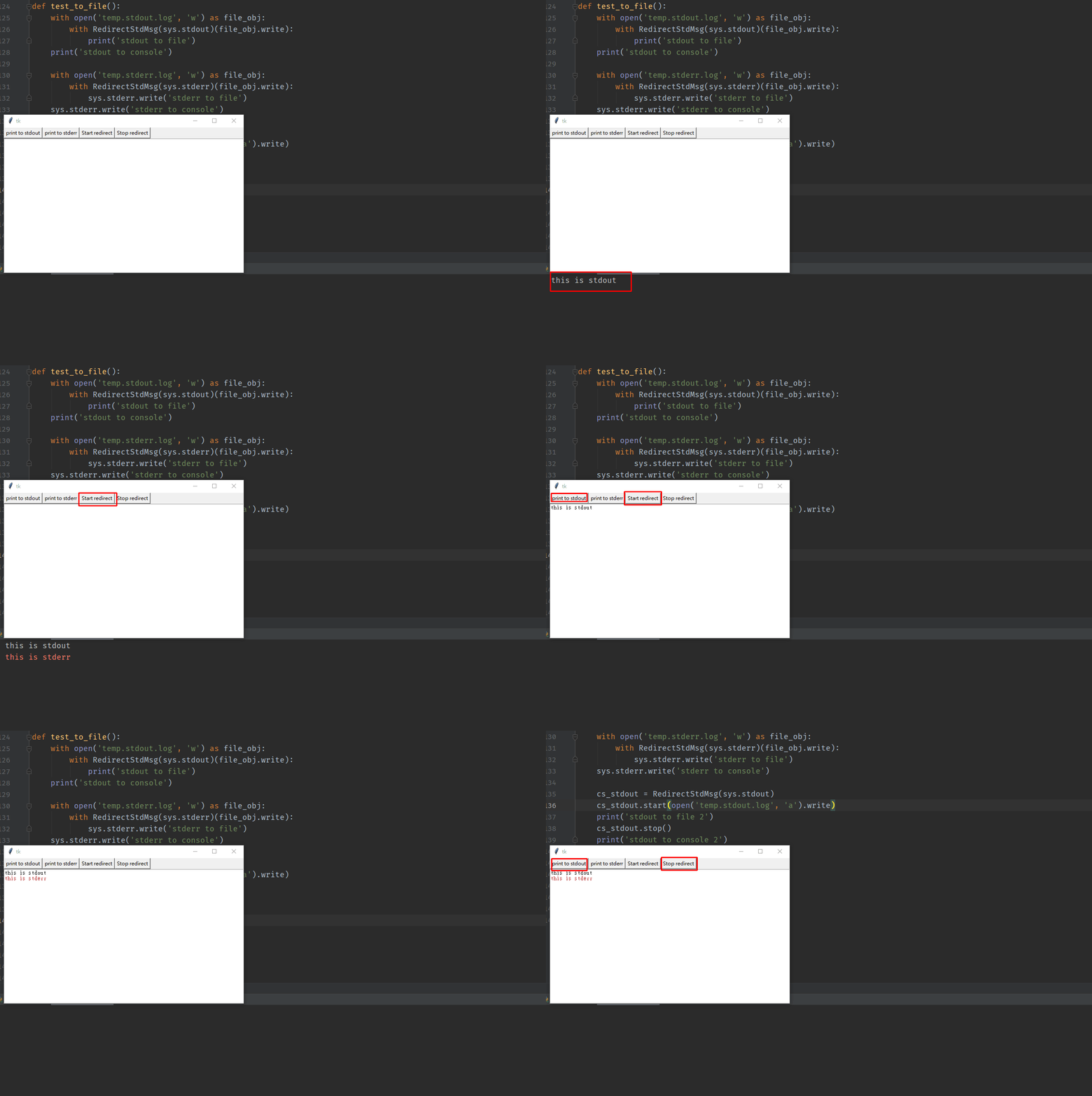
def test_tk_have_stop_btn():
    director_out = RedirectStdMsg(sys.stdout)
    director_err = RedirectStdMsg(sys.stderr)
    app = ExampleApp(stdout=director_out, stderr=director_err)
    app.mainloop()


def test_to_file():

    # stdout test
    with open('temp.stdout.log', 'w') as file_obj:
        with RedirectStdMsg(sys.stdout)(file_obj.write):
            print('stdout to file')
    print('stdout to console')


    # stderr test
    with open('temp.stderr.log', 'w') as file_obj:
        with RedirectStdMsg(sys.stderr)(file_obj.write):
            sys.stderr.write('stderr to file')
    sys.stderr.write('stderr to console')

    # another way
    cs_stdout = RedirectStdMsg(sys.stdout)
    cs_stdout.start(open('temp.stdout.log', 'a').write)
    print('stdout to file 2')
    ...
    cs_stdout.stop()
    print('stdout to console 2')


if __name__ == '__main__':
    test_to_file()
    test_tk_without_stop_btn()
    test_tk_have_stop_btn()
this is test_tk_have_stop_btn():
Method 5
The function which normally prints to stdout should instead put the text into text widget.
All methods was sourced from stackoverflow.com or stackexchange.com, is licensed under cc by-sa 2.5, cc by-sa 3.0 and cc by-sa 4.0