I have a huge dataframe which has values and blanks/NA’s in it. I want to remove the blanks from the dataframe and move the next values up in the column. Consider below sample dataframe.
import pandas as pd
import numpy as np
df = pd.DataFrame(np.random.randn(5,4))
df.iloc[1,2] = np.NaN
df.iloc[0,1] = np.NaN
df.iloc[2,1] = np.NaN
df.iloc[2,0] = np.NaN
df

       0           1           2         3
0   1.857476      NaN      -0.462941   -0.600606
1   0.000267   -0.540645    NaN        0.492480
2   NaN           NaN      -0.803889   0.527973
3   0.566922    0.036393   -1.584926   2.278294
4   -0.243182   -0.221294   1.403478   1.574097
I want my output to be as below
       0             1             2           3
0   1.857476    -0.540645     -0.462941   -0.600606
1   0.000267     0.036393     -0.803889    0.492480
2   0.566922    -0.221294     -1.584926    0.527973
3   -0.243182                  1.403478    2.278294
4                                          1.574097
I want the NaN to be removed and the next value to move up. df.shift was not helpful. I tried with multiple loops and if statements and achieved the desired result but is there any better way to get it done.
Answers:
Thank you for visiting the Q&A section on Magenaut. Please note that all the answers may not help you solve the issue immediately. So please treat them as advisements. If you found the post helpful (or not), leave a comment & I’ll get back to you as soon as possible.
Method 1
You can use apply with dropna:
np.random.seed(100)
df = pd.DataFrame(np.random.randn(5,4))
df.iloc[1,2] = np.NaN
df.iloc[0,1] = np.NaN
df.iloc[2,1] = np.NaN
df.iloc[2,0] = np.NaN
print (df)
          0         1         2         3
0 -1.749765       NaN  1.153036 -0.252436
1  0.981321  0.514219       NaN -1.070043
2       NaN       NaN -0.458027  0.435163
3 -0.583595  0.816847  0.672721 -0.104411
4 -0.531280  1.029733 -0.438136 -1.118318

df1 = df.apply(lambda x: pd.Series(x.dropna().values))
print (df1)
          0         1         2         3
0 -1.749765  0.514219  1.153036 -0.252436
1  0.981321  0.816847 -0.458027 -1.070043
2 -0.583595  1.029733  0.672721  0.435163
3 -0.531280       NaN -0.438136 -0.104411
4       NaN       NaN       NaN -1.118318
And then if need replace to empty space, what create mixed values – strings with numeric – some functions can be broken:
df1 = df.apply(lambda x: pd.Series(x.dropna().values)).fillna('')
print (df1)
          0         1         2         3
0  -1.74977  0.514219   1.15304 -0.252436
1  0.981321  0.816847 -0.458027 -1.070043
2 -0.583595   1.02973  0.672721  0.435163
3  -0.53128           -0.438136 -0.104411
4                               -1.118318
Method 2
A numpy approach
The idea is to sort the columns by np.isnan so that np.nans are put last. I use kind='mergesort' to preserve the order within non np.nan. Finally, I slice the array and reassign it. I follow this up with a fillna
v = df.values
i = np.arange(v.shape[1])
a = np.isnan(v).argsort(0, kind='mergesort')
v[:] = v[a, i]
print(df.fillna(''))

          0         1         2         3
0   1.85748 -0.540645 -0.462941 -0.600606
1  0.000267  0.036393 -0.803889  0.492480
2  0.566922 -0.221294  -1.58493  0.527973
3 -0.243182             1.40348  2.278294
4                                1.574097
If you didn’t want to alter the dataframe in place
v = df.values
i = np.arange(v.shape[1])
a = np.isnan(v).argsort(0, kind='mergesort')
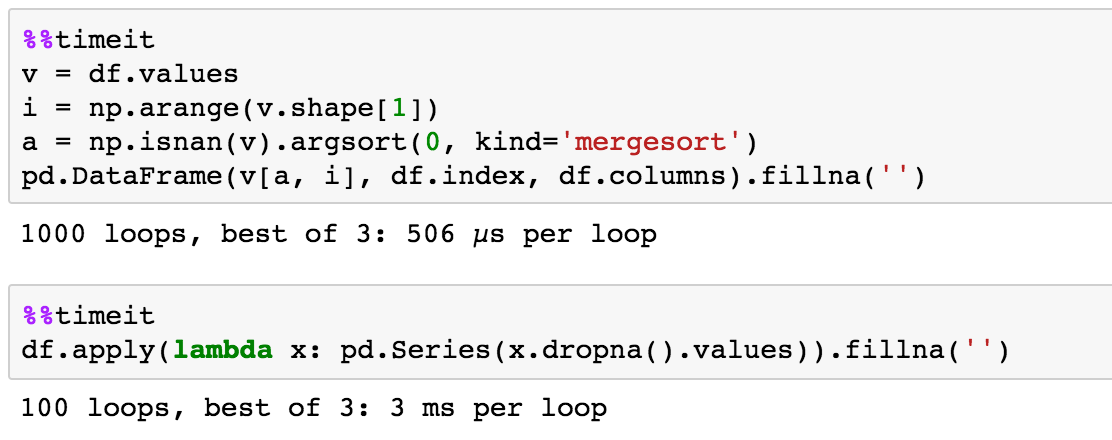
pd.DataFrame(v[a, i], df.index, df.columns).fillna('')
The point of this is to leverage numpys quickness
naive time test
Method 3
Adding on to solution by piRSquared:
This shifts all the values to the left instead of up.
If not all values are numbers, use pd.isnull
v = df.values
a = [[n]*v.shape[1] for n in range(v.shape[0])]
b = pd.isnull(v).argsort(axis=1, kind = 'mergesort')
# a is a matrix used to reference the row index,
# b is a matrix used to reference the column index
# taking an entry from a and the respective entry from b (Same index),
# we have a position that references an entry in v
v[a, b]
A bit of explanation:
a is a list of length v.shape[0], and it looks something like this:
[[0, 0, 0, 0],
 [1, 1, 1, 1],
 [2, 2, 2, 2],
 [3, 3, 3, 3],
 [4, 4, 4, 4],
 ...
what happens here is that, v is m x n, and I have made both a and b m x n, and so what we are doing is, pairing up every entry i,j in a and b to get the element at row with value of element at i,j in a and column with value of element at i,j, in b. So if we have a and b both look like the matrix above, then v[a,b] returns a matrix where the first row contains n copies of v[0][0], second row contains n copies of v[1][1] and so on.
In solution piRSquared, his i is a list not a matrix. So the list is used for v.shape[0] times, aka once for every row. Similarly, we could have done:
a = [[n] for n in range(v.shape[0])]
# which looks like
# [[0],[1],[2],[3]...]
# since we are trying to indicate the row indices of the matrix v as opposed to
# [0, 1, 2, 3, ...] which refers to column indices
Let me know if anything is unclear,
Thanks 🙂
Method 4
As a pandas beginner I wasn’t immediately able to follow the reasoning behind @jezrael’s
df.apply(lambda x: pd.Series(x.dropna().values))
but I figured out that it works by resetting the index of the column. df.apply (by default) works column-by-column, treating each column as a series. Using df.dropna() removes NaNs but doesn’t change the index of the remaining numbers, so when this column is added back to the dataframe the numbers go back to their original positions as their indices are still the same, and the empty spaces are filled with NaN, recreating the original dataframe and achieving nothing.
By resetting the index of the column, in this case by changing the series to an array (using .values) and back to a series (using pd.Series), only the empty spaces after all the numbers (i.e. at the bottom of the column) are filled with NaN. The same can be accomplished by
df.apply(lambda x: x.dropna().reset_index(drop = True))
(drop = True) for reset_index keeps the old index from becoming a new column.
I would have posted this as a comment on @jezrael’s answer but my rep isn’t high enough!
All methods was sourced from stackoverflow.com or stackexchange.com, is licensed under cc by-sa 2.5, cc by-sa 3.0 and cc by-sa 4.0