I have an existing plot that was created with pandas like this:
df['myvar'].plot(kind='bar')
The y axis is format as float and I want to change the y axis to percentages. All of the solutions I found use ax.xyz syntax and I can only place code below the line above that creates the plot (I cannot add ax=ax to the line above.)
How can I format the y axis as percentages without changing the line above?
Here is the solution I found but requires that I redefine the plot:
import matplotlib.pyplot as plt
import numpy as np
import matplotlib.ticker as mtick

data = [8,12,15,17,18,18.5]
perc = np.linspace(0,100,len(data))

fig = plt.figure(1, (7,4))
ax = fig.add_subplot(1,1,1)

ax.plot(perc, data)

fmt = '%.0f%%' # Format you want the ticks, e.g. '40%'
xticks = mtick.FormatStrFormatter(fmt)
ax.xaxis.set_major_formatter(xticks)

plt.show()
Link to the above solution: Pyplot: using percentage on x axis
Answers:
Thank you for visiting the Q&A section on Magenaut. Please note that all the answers may not help you solve the issue immediately. So please treat them as advisements. If you found the post helpful (or not), leave a comment & I’ll get back to you as soon as possible.
Method 1
This is a few months late, but I have created PR#6251 with matplotlib to add a new PercentFormatter class. With this class you just need one line to reformat your axis (two if you count the import of matplotlib.ticker):
import ...
import matplotlib.ticker as mtick

ax = df['myvar'].plot(kind='bar')
ax.yaxis.set_major_formatter(mtick.PercentFormatter())
PercentFormatter() accepts three arguments, xmax, decimals, symbol. xmax allows you to set the value that corresponds to 100% on the axis. This is nice if you have data from 0.0 to 1.0 and you want to display it from 0% to 100%. Just do PercentFormatter(1.0).
The other two parameters allow you to set the number of digits after the decimal point and the symbol. They default to None and '%', respectively. decimals=None will automatically set the number of decimal points based on how much of the axes you are showing.
Update
PercentFormatter was introduced into Matplotlib proper in version 2.1.0.
Method 2
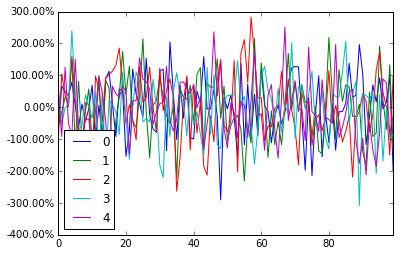
pandas dataframe plot will return the ax for you, And then you can start to manipulate the axes whatever you want.
import pandas as pd
import numpy as np

df = pd.DataFrame(np.random.randn(100,5))

# you get ax from here
ax = df.plot()
type(ax)  # matplotlib.axes._subplots.AxesSubplot

# manipulate
vals = ax.get_yticks()
ax.set_yticklabels(['{:,.2%}'.format(x) for x in vals])
Method 3
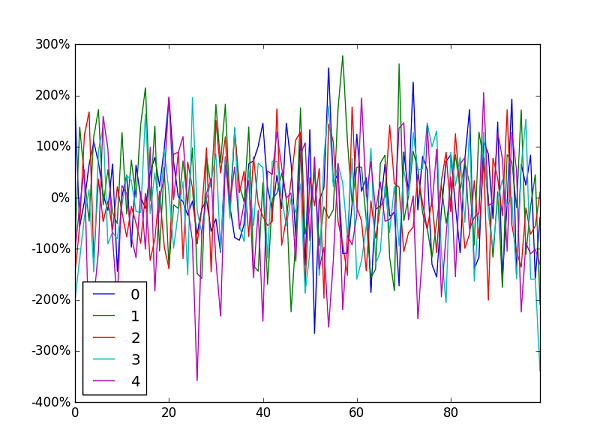
Jianxun‘s solution did the job for me but broke the y value indicator at the bottom left of the window.
I ended up using FuncFormatterinstead (and also stripped the uneccessary trailing zeroes as suggested here):
import pandas as pd
import numpy as np
from matplotlib.ticker import FuncFormatter

df = pd.DataFrame(np.random.randn(100,5))

ax = df.plot()
ax.yaxis.set_major_formatter(FuncFormatter(lambda y, _: '{:.0%}'.format(y)))
Generally speaking I’d recommend using FuncFormatter for label formatting: it’s reliable, and versatile.
Method 4
For those who are looking for the quick one-liner:
plt.gca().set_yticklabels([f'{x:.0%}' for x in plt.gca().get_yticks()])
this assumes
- import:
from matplotlib import pyplot as plt - Python >=3.6 for f-String formatting. For older versions, replace
f'{x:.0%}'with'{:.0%}'.format(x)
Method 5
I’m late to the game but I just realize this: ax can be replaced with plt.gca() for those who are not using axes and just subplots.
Echoing @Mad Physicist answer, using the package PercentFormatter it would be:
import matplotlib.ticker as mtick

plt.gca().yaxis.set_major_formatter(mtick.PercentFormatter(1))
#if you already have ticks in the 0 to 1 range. Otherwise see their answer
Method 6
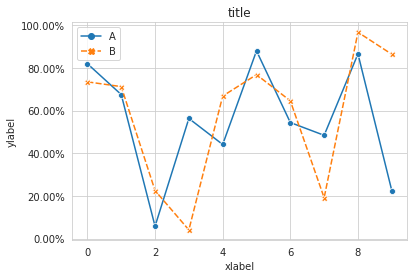
I propose an alternative method using seaborn
Working code:
import pandas as pd
import seaborn as sns
data=np.random.rand(10,2)*100
df = pd.DataFrame(data, columns=['A', 'B'])
ax= sns.lineplot(data=df, markers= True)
ax.set(xlabel='xlabel', ylabel='ylabel', title='title')
#changing ylables ticks
y_value=['{:,.2f}'.format(x) + '%' for x in ax.get_yticks()]
ax.set_yticklabels(y_value)
Method 7
Based on the answer of @erwanp, you can use the formatted string literals of Python 3,
x = '2'
percentage = f'{x}%' # 2%
inside the FuncFormatter() and combined with a lambda expression.
All wrapped:
ax.yaxis.set_major_formatter(FuncFormatter(lambda y, _: f'{y}%'))
Method 8
You can do this in one line without importing anything:
plt.gca().yaxis.set_major_formatter(plt.FuncFormatter('{}%'.format))
If you want integer percentages, you can do:
plt.gca().yaxis.set_major_formatter(plt.FuncFormatter('{:.0f}%'.format))
You can use either ax.yaxis or plt.gca().yaxis. FuncFormatter is still part of matplotlib.ticker, but you can also do plt.FuncFormatter as a shortcut.
Method 9
Another one line solution if the yticks are between 0 and 1:
plt.yticks(plt.yticks()[0], ['{:,.0%}'.format(x) for x in plt.yticks()[0]])
All methods was sourced from stackoverflow.com or stackexchange.com, is licensed under cc by-sa 2.5, cc by-sa 3.0 and cc by-sa 4.0