Continuation from previous question: Tensorflow – TypeError: ‘int’ object is not iterable
My training data is a list of lists each comprised of 1000 floats. For example, x_train[0] =
[0.0, 0.0, 0.1, 0.25, 0.5, ...]
Here is my model:
model = Sequential()

model.add(LSTM(128, activation='relu',
               input_shape=(1000, 1), return_sequences=True))
model.add(Dropout(0.2))
model.add(LSTM(128, activation='relu'))
model.add(Dropout(0.2))
model.add(Dense(32, activation='relu'))
model.add(Dropout(0.2))
model.add(Dense(1, activation='sigmoid'))

opt = tf.keras.optimizers.Adam(lr=1e-3, decay=1e-5)

model.compile(optimizer='rmsprop',
              loss='binary_crossentropy',
              metrics=['accuracy'])

model.fit(x_train, y_train, epochs=3, validation_data=(x_test, y_test))
Here is the error I’m getting:
Traceback (most recent call last):
      File "C:UsersbencuDesktopProjectFilesCodeProgram.py", line 88, in FitModel
        model.fit(x_train, y_train, epochs=3, validation_data=(x_test, y_test))
      File "C:UsersbencuAppDataLocalProgramsPythonPython37libsite-packagestensorflow_corepythonkerasenginetraining.py", line 728, in fit
        use_multiprocessing=use_multiprocessing)
      File "C:UsersbencuAppDataLocalProgramsPythonPython37libsite-packagestensorflow_corepythonkerasenginetraining_v2.py", line 224, in fit
        distribution_strategy=strategy)
      File "C:UsersbencuAppDataLocalProgramsPythonPython37libsite-packagestensorflow_corepythonkerasenginetraining_v2.py", line 547, in _process_training_inputs
        use_multiprocessing=use_multiprocessing)
      File "C:UsersbencuAppDataLocalProgramsPythonPython37libsite-packagestensorflow_corepythonkerasenginetraining_v2.py", line 606, in _process_inputs
        use_multiprocessing=use_multiprocessing)
      File "C:UsersbencuAppDataLocalProgramsPythonPython37libsite-packagestensorflow_corepythonkerasenginedata_adapter.py", line 479, in __init__
        batch_size=batch_size, shuffle=shuffle, **kwargs)
      File "C:UsersbencuAppDataLocalProgramsPythonPython37libsite-packagestensorflow_corepythonkerasenginedata_adapter.py", line 321, in __init__
        dataset_ops.DatasetV2.from_tensors(inputs).repeat()
      File "C:UsersbencuAppDataLocalProgramsPythonPython37libsite-packagestensorflow_corepythondataopsdataset_ops.py", line 414, in from_tensors
        return TensorDataset(tensors)
      File "C:UsersbencuAppDataLocalProgramsPythonPython37libsite-packagestensorflow_corepythondataopsdataset_ops.py", line 2335, in __init__
        element = structure.normalize_element(element)
      File "C:UsersbencuAppDataLocalProgramsPythonPython37libsite-packagestensorflow_corepythondatautilstructure.py", line 111, in normalize_element
        ops.convert_to_tensor(t, name="component_%d" % i))
      File "C:UsersbencuAppDataLocalProgramsPythonPython37libsite-packagestensorflow_corepythonframeworkops.py", line 1184, in convert_to_tensor
        return convert_to_tensor_v2(value, dtype, preferred_dtype, name)
      File "C:UsersbencuAppDataLocalProgramsPythonPython37libsite-packagestensorflow_corepythonframeworkops.py", line 1242, in convert_to_tensor_v2
        as_ref=False)
      File "C:UsersbencuAppDataLocalProgramsPythonPython37libsite-packagestensorflow_corepythonframeworkops.py", line 1296, in internal_convert_to_tensor
        ret = conversion_func(value, dtype=dtype, name=name, as_ref=as_ref)
      File "C:UsersbencuAppDataLocalProgramsPythonPython37libsite-packagestensorflow_corepythonframeworktensor_conversion_registry.py", line 52, in _default_conversion_function
        return constant_op.constant(value, dtype, name=name)
      File "C:UsersbencuAppDataLocalProgramsPythonPython37libsite-packagestensorflow_corepythonframeworkconstant_op.py", line 227, in constant
        allow_broadcast=True)
      File "C:UsersbencuAppDataLocalProgramsPythonPython37libsite-packagestensorflow_corepythonframeworkconstant_op.py", line 235, in _constant_impl
        t = convert_to_eager_tensor(value, ctx, dtype)
      File "C:UsersbencuAppDataLocalProgramsPythonPython37libsite-packagestensorflow_corepythonframeworkconstant_op.py", line 96, in convert_to_eager_tensor
        return ops.EagerTensor(value, ctx.device_name, dtype)
    ValueError: Failed to convert a NumPy array to a Tensor (Unsupported object type float).
I’ve tried googling the error myself, I found something about using the tf.convert_to_tensor function. I tried passing my training and testing lists through this but the function won’t take them.
Answers:
Thank you for visiting the Q&A section on Magenaut. Please note that all the answers may not help you solve the issue immediately. So please treat them as advisements. If you found the post helpful (or not), leave a comment & I’ll get back to you as soon as possible.
Method 1
TL;DR Several possible errors, most fixed with x = np.asarray(x).astype('float32').
Others may be faulty data preprocessing; ensure everything is properly formatted (categoricals, nans, strings, etc). Below shows what the model expects:
[print(i.shape, i.dtype) for i in model.inputs]
[print(o.shape, o.dtype) for o in model.outputs]
[print(l.name, l.input_shape, l.dtype) for l in model.layers]
The problem’s rooted in using lists as inputs, as opposed to Numpy arrays; Keras/TF doesn’t support former. A simple conversion is: x_array = np.asarray(x_list).
The next step’s to ensure data is fed in expected format; for LSTM, that’d be a 3D tensor with dimensions (batch_size, timesteps, features) – or equivalently, (num_samples, timesteps, channels). Lastly, as a debug pro-tip, print ALL the shapes for your data. Code accomplishing all of the above, below:
Sequences = np.asarray(Sequences)
Targets   = np.asarray(Targets)
show_shapes()

Sequences = np.expand_dims(Sequences, -1)
Targets   = np.expand_dims(Targets, -1)
show_shapes()
# OUTPUTS
Expected: (num_samples, timesteps, channels)
Sequences: (200, 1000)
Targets:   (200,)

Expected: (num_samples, timesteps, channels)
Sequences: (200, 1000, 1)
Targets:   (200, 1)
As a bonus tip, I notice you’re running via main(), so your IDE probably lacks a Jupyter-like cell-based execution; I strongly recommend the Spyder IDE. It’s as simple as adding # In[], and pressing Ctrl + Enter below:
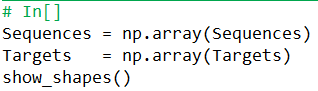
Function used:
def show_shapes(): # can make yours to take inputs; this'll use local variable values
    print("Expected: (num_samples, timesteps, channels)")
    print("Sequences: {}".format(Sequences.shape))
    print("Targets:   {}".format(Targets.shape))
Method 2
After trying everything above with no success, I found that my problem was that one of the columns from my data had boolean values. Converting everything into np.float32 solved the issue!
import numpy as np

X = np.asarray(X).astype(np.float32)
Method 3
This should do the trick:
x_train = np.asarray(x_train).astype(np.float32)
y_train = np.asarray(y_train).astype(np.float32)
Method 4
This is a HIGHLY misleading error, as this is basically a general error, which might have NOTHING to do with floats.
For example in my case it was caused by a string column of the pandas dataframe having some np.NaN values in it. Go figure!
Fixed it by replacing them with empty strings:
df.fillna(value='', inplace=True)
Or to be more specific doing this ONLY for the string (eg ‘object’) columns:
cols = df.select_dtypes(include=['object'])
for col in cols.columns.values:
    df[col] = df[col].fillna('')
Method 5
I had many different inputs and target variables and didn’t know which one was causing the problem.
To find out on which variable it breaks you can add a print value in the library package using the path is specified in your stack strace:
      File "C:UsersbencuAppDataLocalProgramsPythonPython37libsite-packagestensorflow_corepythonframeworkconstant_op.py", line 96, in convert_to_eager_tensor
        return ops.EagerTensor(value, ctx.device_name,
Adding a print statement in this part of the code allowed me to see which input was causing the problem:
constant_op.py:
  ....
      dtype = dtype.as_datatype_enum
    except AttributeError:
      dtype = dtypes.as_dtype(dtype).as_datatype_enum
  ctx.ensure_initialized()
  print(value) # <--------------------- PUT PRINT HERE
  return ops.EagerTensor(value, ctx.device_name, dtype)
After observing which value was problematic conversion from int to astype(np.float32) resolved the problem.
Method 6
Try with it for convert np.float32 to tf.float32 (datatype that read keras and tensorflow):
tf.convert_to_tensor(X_train, dtype=tf.float32)
Method 7
Could also happen due to a difference in versions (I had to move back from tensorflow 2.1.0 to 2.0.0.beta1 in order to solve this issue).
Method 8
You may want to check data types in input data set or array and than convert it to float32:
train_X[:2, :].view()
#array([[4.6, 3.1, 1.5, 0.2],
#       [5.9, 3.0, 5.1, 1.8]], dtype=object)
train_X = train_X.astype(np.float32)
#array([[4.6, 3.1, 1.5, 0.2],
#       [5.9, 3. , 5.1, 1.8]], dtype=float32)
Method 9
You’d better use this, it is because of the uncompatible version of keras
from keras import backend as K
X_train1 = K.cast_to_floatx(X_train)
y_train1 = K.cast_to_floatx(y_train)
Method 10
Use this if you are using a DataFrame and has multiple columns type:
numeric_list = df.select_dtypes(include=[np.number]).columns
df[numeric_list] = df[numeric_list].astype(np.float32)
Method 11
In my case, it didn’t work to cast to np.float32.
For me, everything ran normally during training (probably because I was using tf.data.Dataset.from_generator as input for fit()), but when I was trying to call predict() on 1 instance (using a np.array), the error shows up.
As a solution, I had to reshape the array x_array.reshape(1, -1) before calling predict and it worked.
Method 12
I avoided this problem by enforcing floating-point format during data import:
df = pd.read_csv(‘titanic.csv’, dtype=’float’)
Method 13
Just had the same issue and it ended up being because I was trying to pass an array of array objects, not an array of arrays as expected. Hope this helps someone in the future!
Method 14
try
X_train =t ensorflow.convert_to_tensor(X_train, dtype=tensorflow.float32)
y_train = tensorflow.convert_to_tensor(y_train, dtype=tensorflow.float32)
X_test = tensorflow.convert_to_tensor(X_test, dtype=tensorflow.float32)
y_test = tensorflow.convert_to_tensor(y_test, dtype=tensorflow.float32)
Method 15
As answered by most people above, converting data in np.float32 / float32 by various means already told here.
While doing so if you get another error which is “ValueError: setting an array element with a sequence“.
In that case, try converting your data into type list and then converting it into type tensor as you were trying earlier.
All methods was sourced from stackoverflow.com or stackexchange.com, is licensed under cc by-sa 2.5, cc by-sa 3.0 and cc by-sa 4.0