There are a number of ways of getting callbacks when Text or Entry widgets are changed in Tkinter, but I haven’t found one for Listbox‘s (it doesn’t help that much of the event documentation I can find is old or incomplete). Is there some way of generating an event for this?
Answers:
Thank you for visiting the Q&A section on Magenaut. Please note that all the answers may not help you solve the issue immediately. So please treat them as advisements. If you found the post helpful (or not), leave a comment & I’ll get back to you as soon as possible.
Method 1
def onselect(evt):
    # Note here that Tkinter passes an event object to onselect()
    w = evt.widget
    index = int(w.curselection()[0])
    value = w.get(index)
    print('You selected item %d: "%s"' % (index, value))

lb = Listbox(frame, name='lb')
lb.bind('<<ListboxSelect>>', onselect)
Method 2
You can bind to the <<ListboxSelect>> event. This event will be generated whenever the selection changes, whether it changes from a button click, via the keyboard, or any other method.
Here’s a simple example which updates a label whenever you select something from the listbox:
import tkinter as tk

root = tk.Tk()
label = tk.Label(root)
listbox = tk.Listbox(root)
label.pack(side="bottom", fill="x")
listbox.pack(side="top", fill="both", expand=True)

listbox.insert("end", "one", "two", "three", "four", "five")

def callback(event):
    selection = event.widget.curselection()
    if selection:
        index = selection[0]
        data = event.widget.get(index)
        label.configure(text=data)
    else:
        label.configure(text="")

listbox.bind("<<ListboxSelect>>", callback)

root.mainloop()
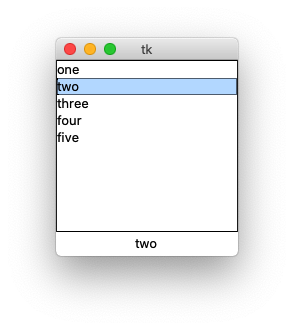
This event is mentioned in the canonical man page for listbox. All predefined virtual events can be found on the bind man page.
Method 3
I had the problem that I needed to get the last selected item in a listbox with selectmode=MULTIPLE. In case someone else has the same problem, here is what I did:
lastselectionList = []
def onselect(evt):
    # Note here that Tkinter passes an event object to onselect()
    global lastselectionList
    w = evt.widget
    if lastselectionList: #if not empty
    #compare last selectionlist with new list and extract the difference
        changedSelection = set(lastselectionList).symmetric_difference(set(w.curselection()))
        lastselectionList = w.curselection()
    else:
    #if empty, assign current selection
        lastselectionList = w.curselection()
        changedSelection = w.curselection()
    #changedSelection should always be a set with only one entry, therefore we can convert it to a lst and extract first entry
    index = int(list(changedSelection)[0])
    value = w.get(index)
    tkinter.messagebox.showinfo("You selected ", value)
listbox = tk.Listbox(frame,selectmode=tk.MULTIPLE)
listbox.bind('<<ListboxSelect>>', onselect)
listbox.pack()
All methods was sourced from stackoverflow.com or stackexchange.com, is licensed under cc by-sa 2.5, cc by-sa 3.0 and cc by-sa 4.0