I’m looking to see how to do two things in Seaborn with using a bar chart to display values that are in the dataframe, but not in the graph
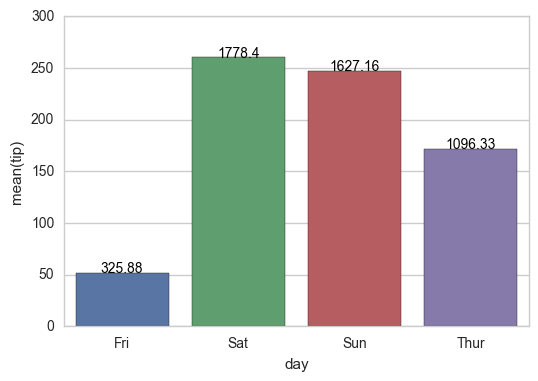
1) I’m looking to display the values of one field in a dataframe while graphing another. For example, below, I’m graphing ‘tip’, but I would like to place the value of ‘total_bill’ centered above each of the bars (i.e.325.88 above Friday,
1778.40 above Saturday, etc.)
2) Is there a way to scale the colors of the bars, with the lowest value of ‘total_bill’ having the lightest color (in this case Friday) and the highest value of ‘total_bill’ having the darkest. Obviously, I’d stick with one color (i.e. blue) when I do the scaling.
Thanks! I’m sure this is easy, but i’m missing it..
While I see that others think that this is a duplicate of another problem (or two), I am missing the part of how I use a value that is not in the graph as the basis for the label or the shading. How do I say, use total_bill as the basis. I’m sorry, but I just can’t figure it out based on those answers.
Starting with the following code,
import pandas as pd
import seaborn as sns
%matplotlib inline
df=pd.read_csv("https://raw.githubusercontent.com/wesm/pydata-    book/master/ch08/tips.csv", sep=',')
groupedvalues=df.groupby('day').sum().reset_index()
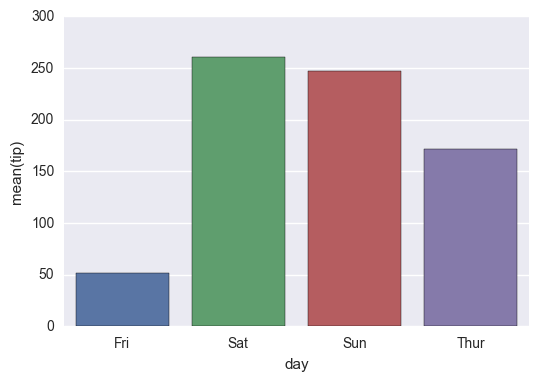
g=sns.barplot(x='day',y='tip',data=groupedvalues)
I get the following result:
Interim Solution:
for index, row in groupedvalues.iterrows():
    g.text(row.name,row.tip, round(row.total_bill,2), color='black', ha="center")
On the shading, using the example below, I tried the following:
import pandas as pd
import seaborn as sns
%matplotlib inline
df=pd.read_csv("https://raw.githubusercontent.com/wesm/pydata-book/master/ch08/tips.csv", sep=',')
groupedvalues=df.groupby('day').sum().reset_index()

pal = sns.color_palette("Greens_d", len(data))
rank = groupedvalues.argsort().argsort()
g=sns.barplot(x='day',y='tip',data=groupedvalues)

for index, row in groupedvalues.iterrows():
    g.text(row.name,row.tip, round(row.total_bill,2), color='black', ha="center")
But that gave me the following error:
AttributeError: ‘DataFrame’ object has no attribute ‘argsort’
So I tried a modification:
import pandas as pd
import seaborn as sns
%matplotlib inline
df=pd.read_csv("https://raw.githubusercontent.com/wesm/pydata-book/master/ch08/tips.csv", sep=',')
groupedvalues=df.groupby('day').sum().reset_index()

pal = sns.color_palette("Greens_d", len(data))
rank=groupedvalues['total_bill'].rank(ascending=True)
g=sns.barplot(x='day',y='tip',data=groupedvalues,palette=np.array(pal[::-1])[rank])
and that leaves me with
IndexError: index 4 is out of bounds for axis 0 with size 4
Answers:
Thank you for visiting the Q&A section on Magenaut. Please note that all the answers may not help you solve the issue immediately. So please treat them as advisements. If you found the post helpful (or not), leave a comment & I’ll get back to you as soon as possible.
Method 1
New in matplotlib 3.4.0
There is now a built-in Axes.bar_label to automatically label bar containers:
-
For single-group bar plots, pass the single bar container:
ax = sns.barplot(x='day', y='tip', data=groupedvalues)
ax.bar_label(ax.containers[0])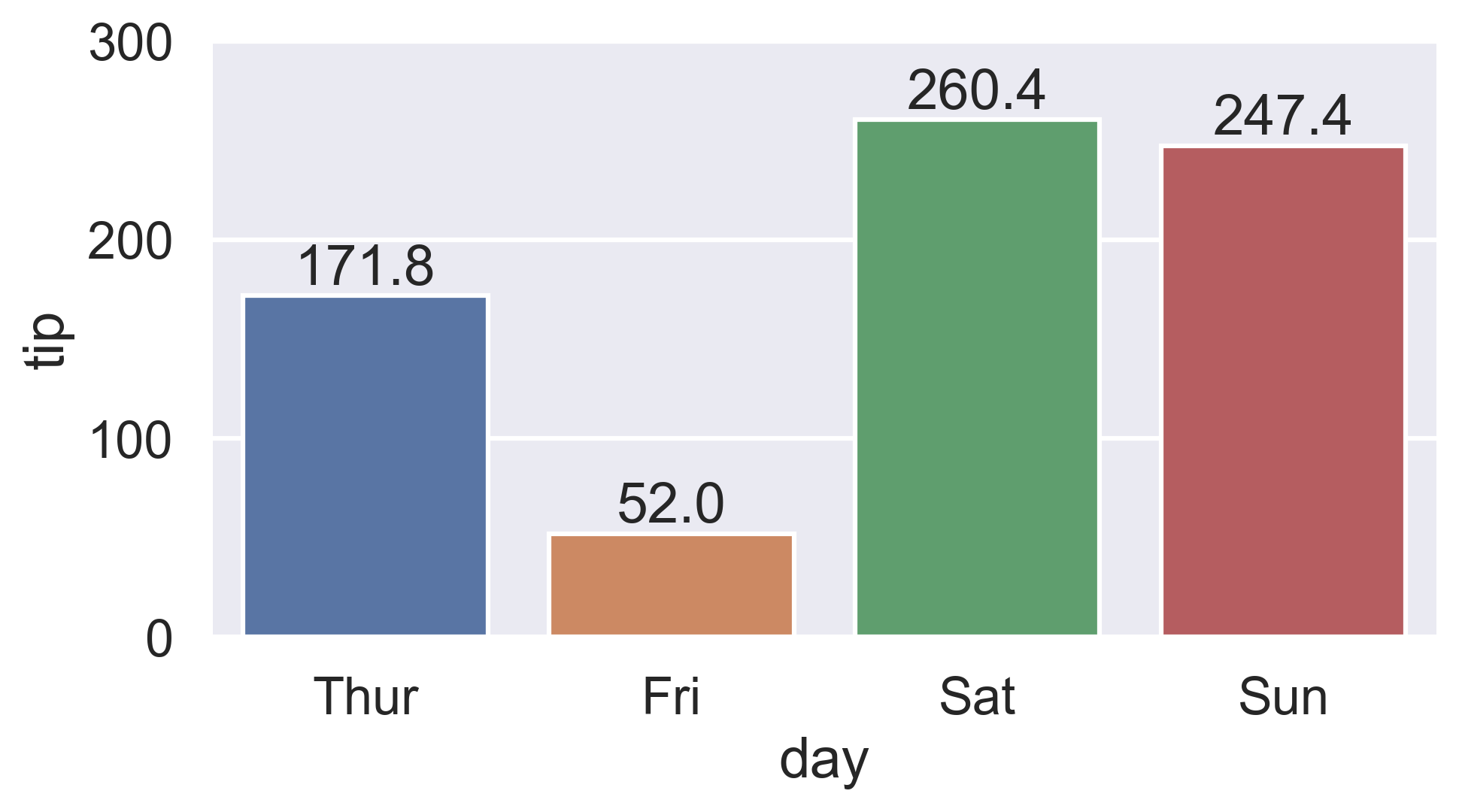
-
For multi-group bar plots (with
hue), iterate the multiple bar containers:ax = sns.barplot(x='day', y='tip', hue='sex', data=df) for container in ax.containers: ax.bar_label(container)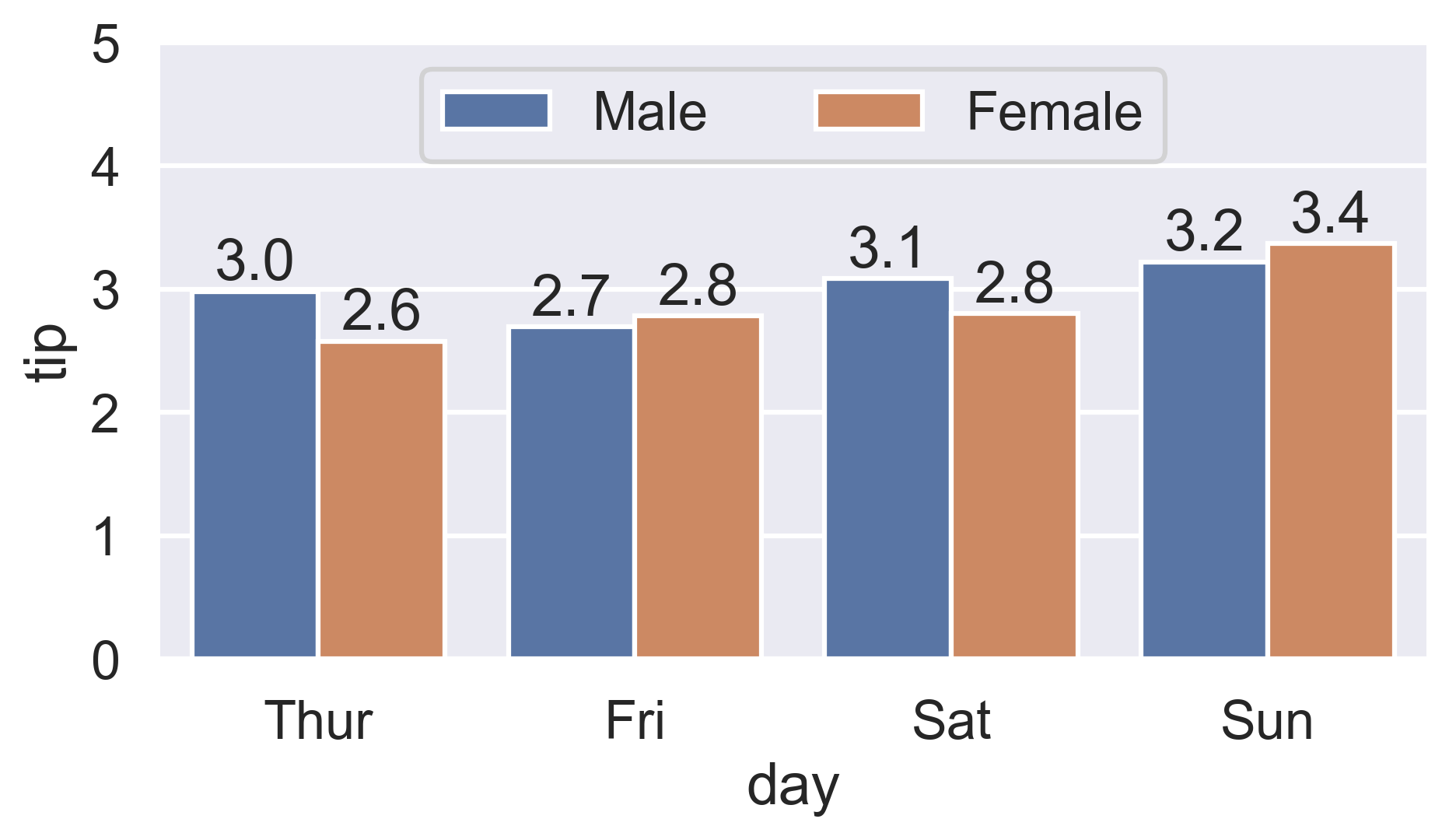
More details:
- How to label count plots (
sns.countplotandsns.catplot) - How to label percentage counts (
fmtparam) - How to label with commas as thousands separators (
labelsparam) - How to label thresholded bar plots
- How to label horizontal bar plots
Color-ranked version
Is there a way to scale the colors of the bars, with the lowest value of
total_billhaving the lightest color (in this case Friday) and the highest value oftotal_billhaving the darkest?
-
Find the rank of each
total_billvalue:-
Either use
Series.sort_values:ranks = groupedvalues.total_bill.sort_values().index # Int64Index([1, 0, 3, 2], dtype='int64') -
Or condense Ernest’s
Series.rankversion by chainingSeries.sub:ranks = groupedvalues.total_bill.rank().sub(1).astype(int).array # [1, 0, 3, 2]
-
Either use
-
Then reindex the color palette using
ranks:palette = sns.color_palette('Blues_d', len(ranks)) ax = sns.barplot(x='day', y='tip', palette=np.array(palette)[ranks], data=groupedvalues)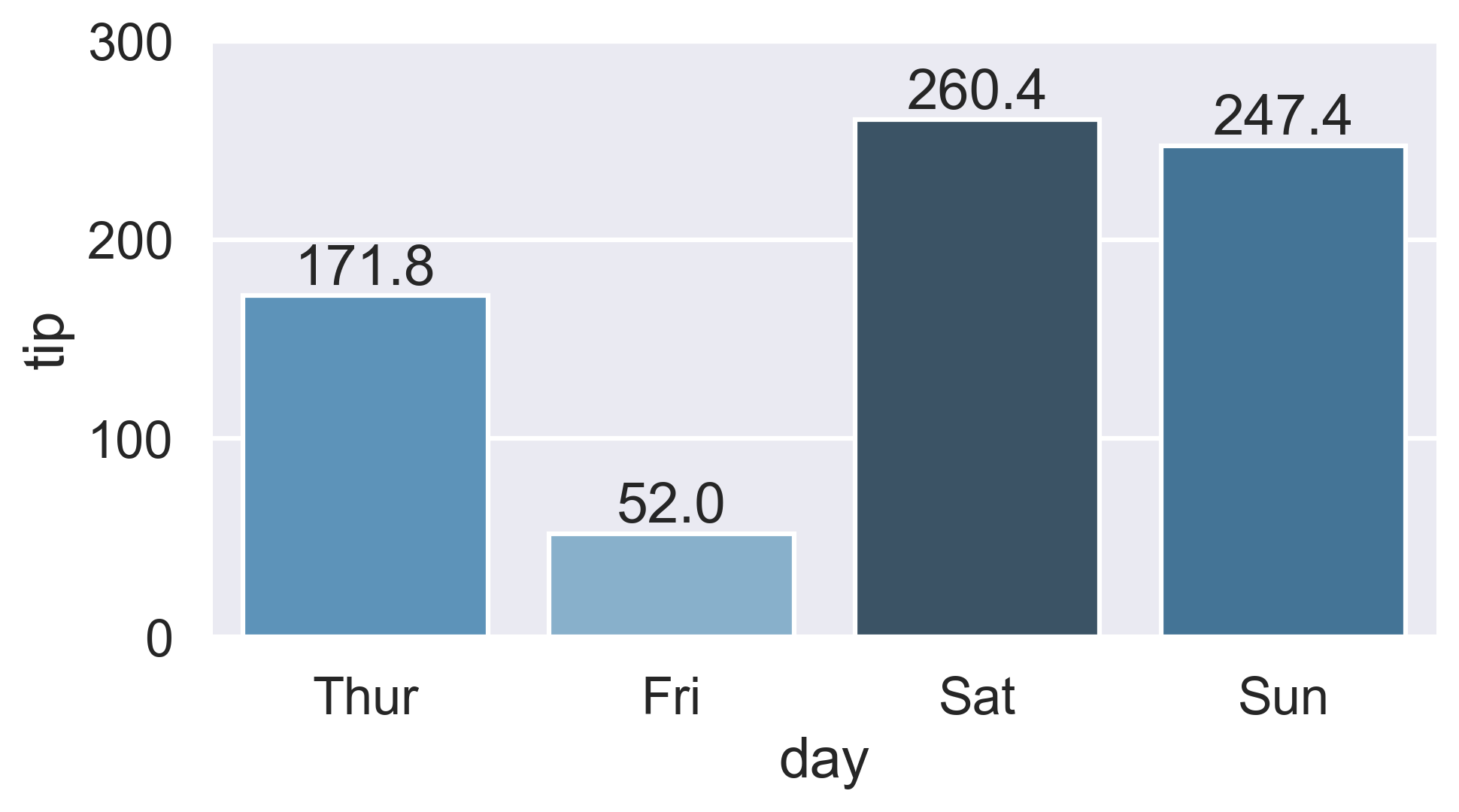
Method 2
Works with single ax or with matrix of ax (subplots)
from matplotlib import pyplot as plt
import numpy as np

def show_values_on_bars(axs):
    def _show_on_single_plot(ax):
        for p in ax.patches:
            _x = p.get_x() + p.get_width() / 2
            _y = p.get_y() + p.get_height()
            value = '{:.2f}'.format(p.get_height())
            ax.text(_x, _y, value, ha="center")

    if isinstance(axs, np.ndarray):
        for idx, ax in np.ndenumerate(axs):
            _show_on_single_plot(ax)
    else:
        _show_on_single_plot(axs)

fig, ax = plt.subplots(1, 2)
show_values_on_bars(ax)
Method 3
Let’s stick to the solution from the linked question (Changing color scale in seaborn bar plot). You want to use argsort to determine the order of the colors to use for colorizing the bars. In the linked question argsort is applied to a Series object, which works fine, while here you have a DataFrame. So you need to select one column of that DataFrame to apply argsort on.
import seaborn as sns
import matplotlib.pyplot as plt
import numpy as np

df = sns.load_dataset("tips")
groupedvalues=df.groupby('day').sum().reset_index()

pal = sns.color_palette("Greens_d", len(groupedvalues))
rank = groupedvalues["total_bill"].argsort().argsort()
g=sns.barplot(x='day',y='tip',data=groupedvalues, palette=np.array(pal[::-1])[rank])

for index, row in groupedvalues.iterrows():
    g.text(row.name,row.tip, round(row.total_bill,2), color='black', ha="center")

plt.show()
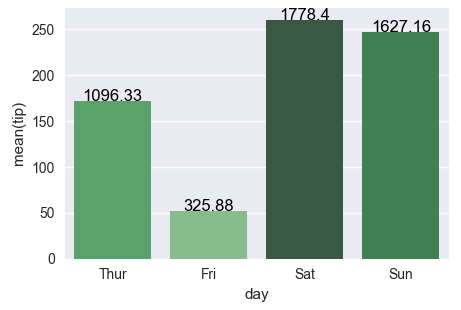
The second attempt works fine as well, the only issue is that the rank as returned by rank() starts at 1 instead of zero. So one has to subtract 1 from the array. Also for indexing we need integer values, so we need to cast it to int.
rank = groupedvalues['total_bill'].rank(ascending=True).values
rank = (rank-1).astype(np.int)
Method 4
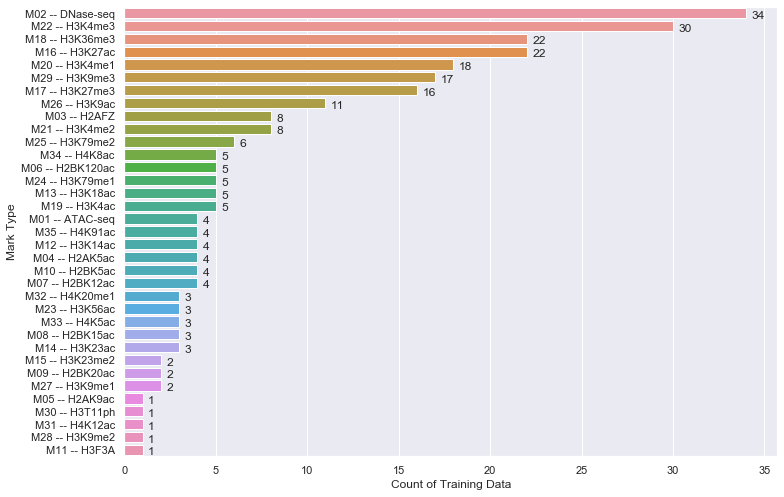
Just in case if anyone is interested in labeling horizontal barplot graph, I modified Sharon’s answer as below:
def show_values_on_bars(axs, h_v="v", space=0.4):
    def _show_on_single_plot(ax):
        if h_v == "v":
            for p in ax.patches:
                _x = p.get_x() + p.get_width() / 2
                _y = p.get_y() + p.get_height()
                value = int(p.get_height())
                ax.text(_x, _y, value, ha="center")
        elif h_v == "h":
            for p in ax.patches:
                _x = p.get_x() + p.get_width() + float(space)
                _y = p.get_y() + p.get_height()
                value = int(p.get_width())
                ax.text(_x, _y, value, ha="left")

    if isinstance(axs, np.ndarray):
        for idx, ax in np.ndenumerate(axs):
            _show_on_single_plot(ax)
    else:
        _show_on_single_plot(axs)
Two parameters explained:
h_v – Whether the barplot is horizontal or vertical. "h" represents the horizontal barplot, "v" represents the vertical barplot.
space – The space between value text and the top edge of the bar. Only works for horizontal mode.
Example:
show_values_on_bars(sns_t, "h", 0.3)
Method 5
plt.figure(figsize=(15,10))
graph = sns.barplot(x='name_column_x_axis', y="name_column_x_axis", data = dataframe_name ,  color="salmon")
for p in graph.patches:
        graph.annotate('{:.0f}'.format(p.get_height()), (p.get_x()+0.3, p.get_height()),
                    ha='center', va='bottom',
                    color= 'black')
Method 6
Hope this helps for item #2:
a) You can sort by total bill then reset the index to this column
b) Use palette=”Blue” to use this color to scale your chart from light blue to dark blue (if dark blue to light blue then use palette=”Blues_d”)
import pandas as pd
import seaborn as sns
%matplotlib inline

df=pd.read_csv("https://raw.githubusercontent.com/wesm/pydata-book/master/ch08/tips.csv", sep=',')
groupedvalues=df.groupby('day').sum().reset_index()
groupedvalues=groupedvalues.sort_values('total_bill').reset_index()
g=sns.barplot(x='day',y='tip',data=groupedvalues, palette="Blues")
Method 7
A simple way to do so is to add the below code (for Seaborn):
for p in splot.patches:
    splot.annotate(format(p.get_height(), '.1f'),
                   (p.get_x() + p.get_width() / 2., p.get_height()),
                   ha = 'center', va = 'center',
                   xytext = (0, 9),
                   textcoords = 'offset points')
Example :
splot = sns.barplot(df['X'], df['Y'])
# Annotate the bars in plot
for p in splot.patches:
    splot.annotate(format(p.get_height(), '.1f'),
                   (p.get_x() + p.get_width() / 2., p.get_height()),
                   ha = 'center', va = 'center',
                   xytext = (0, 9),
                   textcoords = 'offset points')
plt.show()
Method 8
import seaborn as sns

fig = plt.figure(figsize = (12, 8))
ax = plt.subplot(111)

ax = sns.barplot(x="Knowledge_type", y="Percentage", hue="Distance", data=knowledge)

for p in ax.patches:
    ax.annotate(format(p.get_height(), '.2f'), (p.get_x() + p.get_width() / 2., p.get_height()),
       ha = 'center', va = 'center', xytext = (0, 10), textcoords = 'offset points')
All methods was sourced from stackoverflow.com or stackexchange.com, is licensed under cc by-sa 2.5, cc by-sa 3.0 and cc by-sa 4.0