I have a simple image that I’m showing with imshow in matplotlib. I’d like to apply a custom colormap so that values between 0-5 are white, 5-10 are red (very simple colors), etc. I’ve tried following this tutorial:
http://assorted-experience.blogspot.com/2007/07/custom-colormaps.html with the following code:
cdict = {
'red'  :  ((0., 0., 0.), (0.5, 0.25, 0.25), (1., 1., 1.)),
'green':  ((0., 1., 1.), (0.7, 0.0, 0.5), (1., 1., 1.)),
'blue' :  ((0., 1., 1.), (0.5, 0.0, 0.0), (1., 1., 1.))
}

my_cmap = mpl.colors.LinearSegmentedColormap('my_colormap', cdict, 3)

plt.imshow(num_stars, extent=(min(x), max(x), min(y), max(y)), cmap=my_cmap)
plt.show()
But this ends up showing strange colors, and I only need 3-4 colors that I want to define. How do I do this?
Answers:
Thank you for visiting the Q&A section on Magenaut. Please note that all the answers may not help you solve the issue immediately. So please treat them as advisements. If you found the post helpful (or not), leave a comment & I’ll get back to you as soon as possible.
Method 1
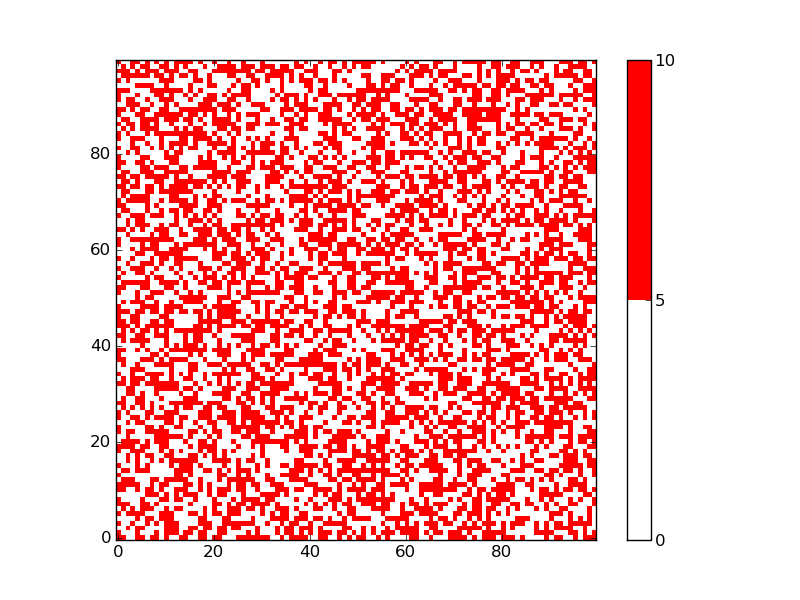
You can use a ListedColormap to specify the white and red as the only colors in the color map, and the bounds determine where the transition is from one color to the next:
import matplotlib.pyplot as plt
from matplotlib import colors
import numpy as np

np.random.seed(101)
zvals = np.random.rand(100, 100) * 10

# make a color map of fixed colors
cmap = colors.ListedColormap(['white', 'red'])
bounds=[0,5,10]
norm = colors.BoundaryNorm(bounds, cmap.N)

# tell imshow about color map so that only set colors are used
img = plt.imshow(zvals, interpolation='nearest', origin='lower',
                    cmap=cmap, norm=norm)

# make a color bar
plt.colorbar(img, cmap=cmap, norm=norm, boundaries=bounds, ticks=[0, 5, 10])

plt.savefig('redwhite.png')
plt.show()
The resulting figure has only two colors:
I proposed essentially the same thing for a somewhat different question: 2D grid data visualization in Python
The solution is inspired by a matplotlib example. The example explains that the bounds must be one more than the number of colors used.
The BoundaryNorm is a normalization that maps a series of values to integers, which are then used to assign the corresponding colors. cmap.N, in the example above, just defines the number of colors.
All methods was sourced from stackoverflow.com or stackexchange.com, is licensed under cc by-sa 2.5, cc by-sa 3.0 and cc by-sa 4.0