From the pandas documentation, I’ve gathered that unique-valued indices make certain operations efficient, and that non-unique indices are occasionally tolerated.
From the outside, it doesn’t look like non-unique indices are taken advantage of in any way. For example, the following ix query is slow enough that it seems to be scanning the entire dataframe
In [23]: import numpy as np
In [24]: import pandas as pd
In [25]: x = np.random.randint(0, 10**7, 10**7)
In [26]: df1 = pd.DataFrame({'x':x})
In [27]: df2 = df1.set_index('x', drop=False)
In [28]: %timeit df2.ix[0]
1 loops, best of 3: 402 ms per loop
In [29]: %timeit df1.ix[0]
10000 loops, best of 3: 123 us per loop
(I realize the two ix queries don’t return the same thing — it’s just an example that calls to ix on a non-unique index appear much slower)
Is there any way to coax pandas into using faster lookup methods like binary search on non-unique and/or sorted indices?
Answers:
Thank you for visiting the Q&A section on Magenaut. Please note that all the answers may not help you solve the issue immediately. So please treat them as advisements. If you found the post helpful (or not), leave a comment & I’ll get back to you as soon as possible.
Method 1
When index is unique, pandas use a hashtable to map key to value O(1). When index is non-unique and sorted, pandas use binary search O(logN), when index is random ordered pandas need to check all the keys in the index O(N).
You can call sort_index method:
import numpy as np
import pandas as pd
x = np.random.randint(0, 200, 10**6)
df1 = pd.DataFrame({'x':x})
df2 = df1.set_index('x', drop=False)
df3 = df2.sort_index()
%timeit df1.loc[100]
%timeit df2.loc[100]
%timeit df3.loc[100]
result:
10000 loops, best of 3: 71.2 µs per loop
10 loops, best of 3: 38.9 ms per loop
10000 loops, best of 3: 134 µs per loop
Method 2
@HYRY said it well, but nothing says it quite like a colourful graph with timings.
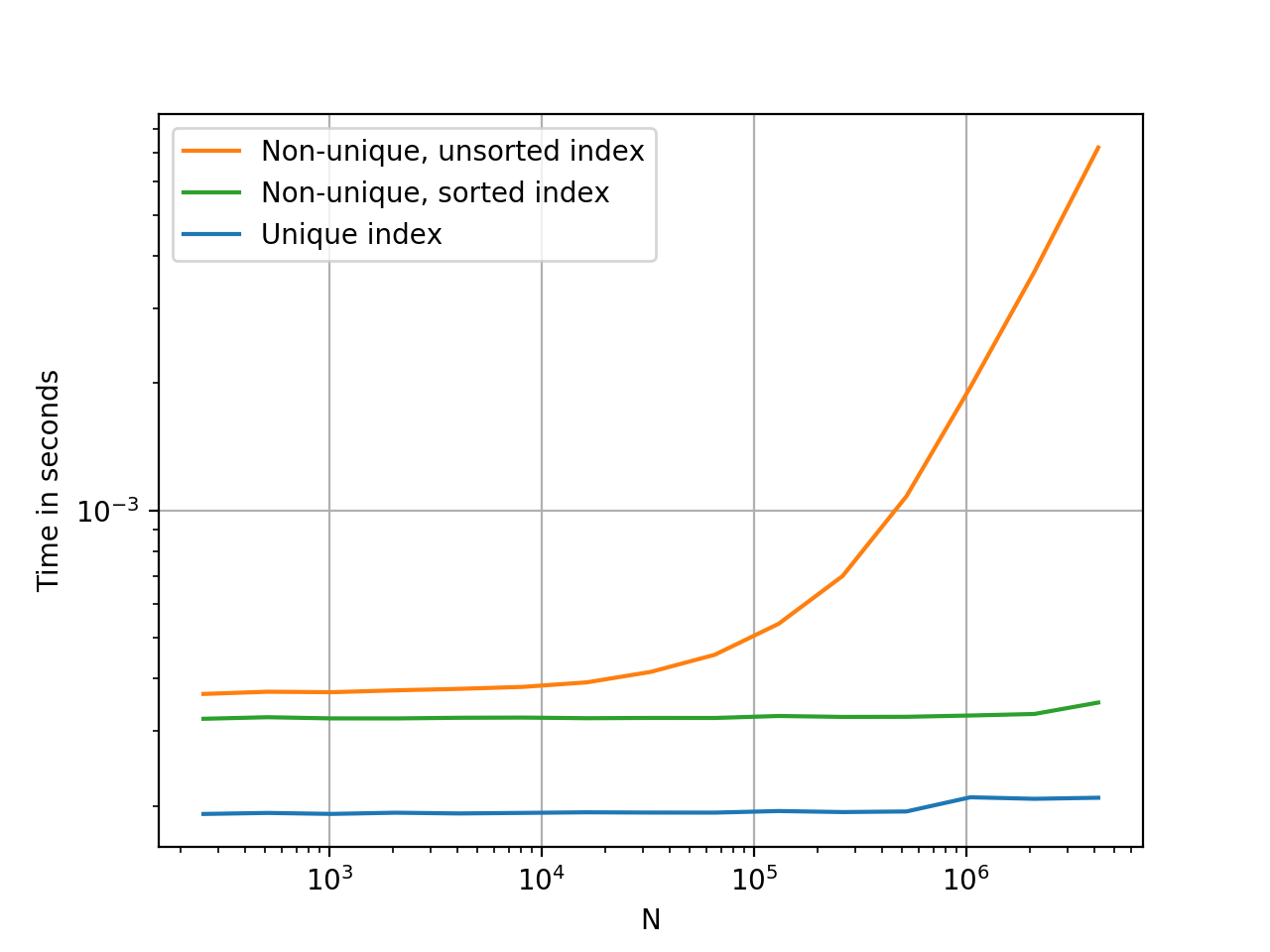
Plots were generated using perfplot. Code, for your reference:
import pandas as pd
import perfplot

_rnd = np.random.RandomState(42)

def make_data(n):
    x = _rnd.randint(0, 200, n)
    df1 = pd.DataFrame({'x':x})
    df2 = df1.set_index('x', drop=False)
    df3 = df2.sort_index()

    return df1, df2, df3

perfplot.show(
    setup=lambda n: make_data(n),
    kernels=[
        lambda dfs: dfs[0].loc[100],
        lambda dfs: dfs[1].loc[100],
        lambda dfs: dfs[2].loc[100],
    ],
    labels=['Unique index', 'Non-unique, unsorted index', 'Non-unique, sorted index'],
    n_range=[2 ** k for k in range(8, 23)],
    xlabel='N',
    logx=True,
    logy=True,
    equality_check=False)
All methods was sourced from stackoverflow.com or stackexchange.com, is licensed under cc by-sa 2.5, cc by-sa 3.0 and cc by-sa 4.0