I am trying to set the format to two decimal numbers in a matplotlib subplot environment. Unfortunately, I do not have any idea how to solve this task.
To prevent using scientific notation on the y-axis I used ScalarFormatter(useOffset=False) as you can see in my snippet below. I think my task should be solved by passing further options/arguments to the used formatter. However, I could not find any hint in matplotlib’s documentation.
How can I set two decimal digits or none (both cases are needed)? I am not able to provide sample data, unfortunately.
— SNIPPET —
f, axarr = plt.subplots(3, sharex=True)

data = conv_air
x = range(0, len(data))

axarr[0].scatter(x, data)
axarr[0].set_ylabel('$T_mathrm{air,2,2}$', size=FONT_SIZE)
axarr[0].yaxis.set_major_locator(MaxNLocator(5))
axarr[0].yaxis.set_major_formatter(ScalarFormatter(useOffset=False))
axarr[0].tick_params(direction='out', labelsize=FONT_SIZE)
axarr[0].grid(which='major', alpha=0.5)
axarr[0].grid(which='minor', alpha=0.2)

data = conv_dryer
x = range(0, len(data))

axarr[1].scatter(x, data)
axarr[1].set_ylabel('$T_mathrm{dryer,2,2}$', size=FONT_SIZE)
axarr[1].yaxis.set_major_locator(MaxNLocator(5))
axarr[1].yaxis.set_major_formatter(ScalarFormatter(useOffset=False))
axarr[1].tick_params(direction='out', labelsize=FONT_SIZE)
axarr[1].grid(which='major', alpha=0.5)
axarr[1].grid(which='minor', alpha=0.2)

data = conv_lambda
x = range(0, len(data))

axarr[2].scatter(x, data)
axarr[2].set_xlabel('Iterationsschritte', size=FONT_SIZE)
axarr[2].xaxis.set_major_locator(MaxNLocator(integer=True))
axarr[2].set_ylabel('$lambda$', size=FONT_SIZE)
axarr[2].yaxis.set_major_formatter(ScalarFormatter(useOffset=False))
axarr[2].yaxis.set_major_locator(MaxNLocator(5))
axarr[2].tick_params(direction='out', labelsize=FONT_SIZE)
axarr[2].grid(which='major', alpha=0.5)
axarr[2].grid(which='minor', alpha=0.2)
Answers:
Thank you for visiting the Q&A section on Magenaut. Please note that all the answers may not help you solve the issue immediately. So please treat them as advisements. If you found the post helpful (or not), leave a comment & I’ll get back to you as soon as possible.
Method 1
See the relevant documentation in general and specifically
from matplotlib.ticker import FormatStrFormatter

fig, ax = plt.subplots()

ax.yaxis.set_major_formatter(FormatStrFormatter('%.2f'))

Method 2
If you are directly working with matplotlib’s pyplot (plt) and if you are more familiar with the new-style format string, you can try this:
from matplotlib.ticker import StrMethodFormatter
plt.gca().yaxis.set_major_formatter(StrMethodFormatter('{x:,.0f}')) # No decimal places
plt.gca().yaxis.set_major_formatter(StrMethodFormatter('{x:,.2f}')) # 2 decimal places
From the documentation:
class matplotlib.ticker.StrMethodFormatter(fmt)
Use a new-style format string (as used by str.format()) to format the
tick.The field used for the value must be labeled x and the field used for
the position must be labeled pos.
Method 3
The answer above is probably the correct way to do it, but didn’t work for me.
The hacky way that solved it for me was the following:
ax = <whatever your plot is>
# get the current labels
labels = [item.get_text() for item in ax.get_xticklabels()]
# Beat them into submission and set them back again
ax.set_xticklabels([str(round(float(label), 2)) for label in labels])
# Show the plot, and go home to family
plt.show()
Method 4
In matplotlib 3.1, you can also use ticklabel_format. To prevents scientific notation without offsets:
plt.gca().ticklabel_format(axis='both', style='plain', useOffset=False)
Method 5
format labels using lambda function
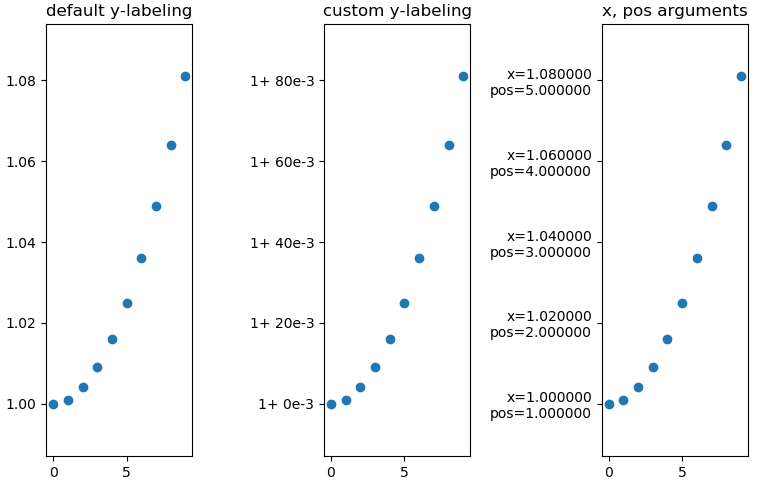
3x the same plot with differnt y-labeling
Minimal example
import numpy as np
import matplotlib as mpl
import matplotlib.pylab as plt
from matplotlib.ticker import FormatStrFormatter

fig, axs = mpl.pylab.subplots(1, 3)

xs = np.arange(10)
ys = 1 + xs ** 2 * 1e-3

axs[0].set_title('default y-labeling')
axs[0].scatter(xs, ys)
axs[1].set_title('custom y-labeling')
axs[1].scatter(xs, ys)
axs[2].set_title('x, pos arguments')
axs[2].scatter(xs, ys)


fmt = lambda x, pos: '1+ {:.0f}e-3'.format((x-1)*1e3, pos)
axs[1].yaxis.set_major_formatter(mpl.ticker.FuncFormatter(fmt))

fmt = lambda x, pos: 'x={:f}npos={:f}'.format(x, pos)
axs[2].yaxis.set_major_formatter(mpl.ticker.FuncFormatter(fmt))
You can also use ‘real’-functions instead of lambdas, of course.
https://matplotlib.org/3.1.1/gallery/ticks_and_spines/tick-formatters.html
All methods was sourced from stackoverflow.com or stackexchange.com, is licensed under cc by-sa 2.5, cc by-sa 3.0 and cc by-sa 4.0