I have a DataFrame df:
    A    B
a   2    2
b   3    1
c   1    3
I want to create a new column based on the following criteria:
if row A == B: 0
if rowA > B: 1
if row A < B: -1
so given the above table, it should be:
    A    B    C
a   2    2    0
b   3    1    1
c   1    3   -1
For typical if else cases I do np.where(df.A > df.B, 1, -1), does pandas provide a special syntax for solving my problem with one step (without the necessity of creating 3 new columns and then combining the result)?
Answers:
Thank you for visiting the Q&A section on Magenaut. Please note that all the answers may not help you solve the issue immediately. So please treat them as advisements. If you found the post helpful (or not), leave a comment & I’ll get back to you as soon as possible.
Method 1
To formalize some of the approaches laid out above:
Create a function that operates on the rows of your dataframe like so:
def f(row):
    if row['A'] == row['B']:
        val = 0
    elif row['A'] > row['B']:
        val = 1
    else:
        val = -1
    return val
Then apply it to your dataframe passing in the axis=1 option:
In [1]: df['C'] = df.apply(f, axis=1)

In [2]: df
Out[2]:
   A  B  C
a  2  2  0
b  3  1  1
c  1  3 -1
Of course, this is not vectorized so performance may not be as good when scaled to a large number of records. Still, I think it is much more readable. Especially coming from a SAS background.
Edit
Here is the vectorized version
df['C'] = np.where(
    df['A'] == df['B'], 0, np.where(
    df['A'] >  df['B'], 1, -1))
Method 2
df.loc[df['A'] == df['B'], 'C'] = 0
df.loc[df['A'] > df['B'], 'C'] = 1
df.loc[df['A'] < df['B'], 'C'] = -1
Easy to solve using indexing. The first line of code reads like so, if column A is equal to column B then create and set column C equal to 0.
Method 3
For this particular relationship, you could use np.sign:
>>> df["C"] = np.sign(df.A - df.B)
>>> df
   A  B  C
a  2  2  0
b  3  1  1
c  1  3 -1
Method 4
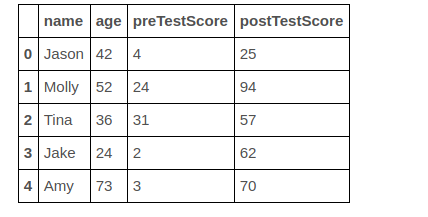
Lets say above one is your original dataframe and you want to add a new column ‘old’
If age greater than 50 then we consider as older=yes otherwise False
step 1: Get the indexes of rows whose age greater than 50
row_indexes=df[df['age']>=50].index
step 2:
Using .loc we can assign a new value to column
df.loc[row_indexes,'elderly']="yes"
same for age below less than 50
row_indexes=df[df['age']<50].index
df[row_indexes,'elderly']="no"
Method 5
When you have multiple if
conditions, numpy.select is the way to go:
In [4102]: import numpy as np
In [4098]: conditions = [df.A.eq(df.B), df.A.gt(df.B), df.A.lt(df.B)]
In [4096]: choices = [0, 1, -1]

In [4100]: df['C'] = np.select(conditions, choices)

In [4101]: df
Out[4101]:
   A  B  C
a  2  2  0
b  3  1  1
c  1  3 -1
Method 6
You can use the method mask:
df['C'] = np.nan
df['C'] = df['C'].mask(df.A == df.B, 0).mask(df.A > df.B, 1).mask(df.A < df.B, -1)
All methods was sourced from stackoverflow.com or stackexchange.com, is licensed under cc by-sa 2.5, cc by-sa 3.0 and cc by-sa 4.0