PyCharm’s autocomplete isn’t working for installed libraries. I have the following code:
from boto.emr.connection import EmrConnection
conn = EmrConnection(aws_keys.access_key_id, aws_keys.secret_key)
I want the editor to tell me what methods I have available to me when I press Ctrl+Space.
The boto library is installed in my environment, but it doesn’t seem to be detected by PyCharm. How can I set this up correctly?
Answers:
Thank you for visiting the Q&A section on Magenaut. Please note that all the answers may not help you solve the issue immediately. So please treat them as advisements. If you found the post helpful (or not), leave a comment & I’ll get back to you as soon as possible.
Method 1
You’ve installed the 3rd-party library into a virtualenv, but PyCharm doesn’t know about that by default. If nothing is specified, it will choose the system Python install as the interpreter. You need to go into the project settings and configure the interpreter to point at the virtualenv. PyCharm will then index the interpreter and allow you to autocomplete.
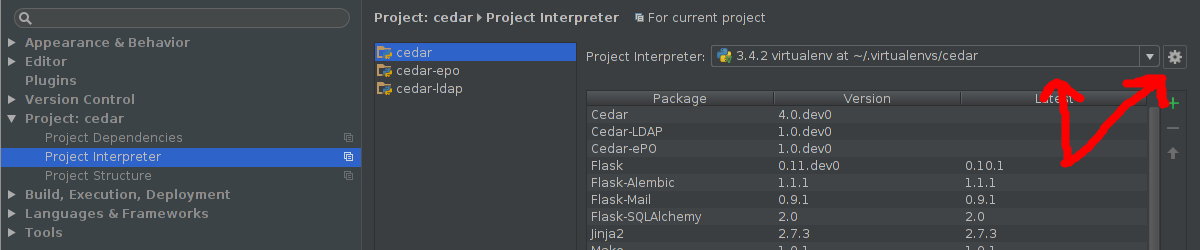
The virtualenv may be auto-detected in the dropdown menu on the left. If it is not, click the gear to the right, click “Add local”, and select /path/to/virtualenv/bin/python (or PathtovirtualenvScriptspython.exe on Windows).
Method 2
The above answer didn’t work for me, because I wasn’t able to find any project related setting in my setting,and the python Interpreter was empty.
The solution was to delete .idea file, from project root, close Pychram then go to project directory and open it with Pycharm:
$pycharm-professional or $pycharm-professional .
when it lunch a pop up window on the bottom right will appear and as you the following
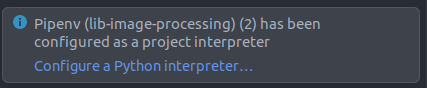
select configure python interpreter then a new window must appear:
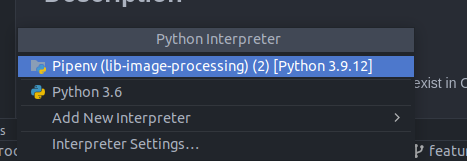
chose to use Pipenv as your interpreter or any other solution that is for your case.
Now the Project setting should appear again in Pycharm setting, and the recommendation must be already working.
All methods was sourced from stackoverflow.com or stackexchange.com, is licensed under cc by-sa 2.5, cc by-sa 3.0 and cc by-sa 4.0