I want to add meta fields for the sites in my network (such as a thumbnail and a category). I know how to do this using get/add/update_site_option, but I’m wondering where I could put the UI to manage those meta fields.
The best place would be in the Sites > Infos page, just after the site attributes, but I can’t find any hook to hang on. I can add those fields in the “Settings” tab of the same screen, but one has to scroll down a lot to find it, and it gets mixed with advanced settings.
Any suggestion ?
Answers:
Thank you for visiting the Q&A section on Magenaut. Please note that all the answers may not help you solve the issue immediately. So please treat them as advisements. If you found the post helpful (or not), leave a comment & I’ll get back to you as soon as possible.
Method 1
I finally found a way to add more lines to the Sites > Infos table :
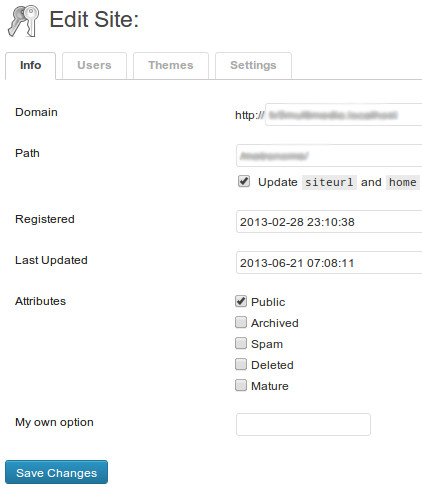
It’s a little bit ugly, but it works. I simply use the action admin_footer to add a bunch of HTML code at the end of the page, and then use jQuery to move it to the right place.
add_action('admin_footer', 'user16975_custom_options');
function user16975_custom_options(){
    global $pagenow;
    if( 'site-info.php' == $pagenow ) {
        ?><table><tr id="user16975_custom_options">
            <th scope="row">My own option</th>
            <td><input type="text"/></td>
        </tr></table>
        <script>jQuery(function($){
            $('.form-table tbody').append($('#user16975_custom_options'));
        });</script><?php
    }
}
The good part is that as soon as the hook will be available, I can use it without big changes in my code.
Method 2
First off all – I agreed, there is no specific hooks in this part of the core that allows to create custom setting fields there. But anyway it is possible.
WordPress has network_edit_site_nav_links filter hook which allows to create your custom tab.
But no hooks for the page for the new tab, but it is not a problem anyway because you can achieve the result with simple options page and a little CSS code.
In this tutorial everything is described by steps https://rudrastyh.com/wordpress-multisite/custom-tabs-with-options.html (I think it is no reason to copy all the code from there to this thread).
Method 3
The Site Info admin page’s code is here: http://core.trac.wordpress.org/browser/trunk/wp-admin/network/site-info.php
Unfortunately, there don’t appear to be any hooks or filters in the site-info.php code.
It looks like you’ll have to make your own administrative page — perhaps in the wp-admin Settings menu — to handle your {$verb}_site_option code.
All methods was sourced from stackoverflow.com or stackexchange.com, is licensed under cc by-sa 2.5, cc by-sa 3.0 and cc by-sa 4.0