Server: Raspberry Pi 3
OS: Dietpi – version 159
Geckodriver version: 0.22 for arm
Firefox version: 52.9.0
Python version: 3.5
Selenium version: 3.14.1
Gecko is executable, and is located in /usr/local/bin/
from selenium import webdriver
from selenium.webdriver.common.by import By
from selenium.webdriver.support.ui import WebDriverWait
from selenium.webdriver.support import expected_conditions as EC
from selenium.webdriver.firefox.options import Options
import time


options = Options()
options.set_headless(headless=True)
driver = webdriver.Firefox(firefox_options=options)

print('Need your login credential')
username = input('What is your username?:n')
password = input('What is your password?:n')
...
...
Output:
<a href="https://getridbug.com/cdn-cgi/l/email-protection" class="__cf_email__" data-cfemail="22504d4d566270724b11">[email protected]</a>:~# python3.5 ITE-bot.py
Traceback (most recent call last):
  File "ITE-bot.py", line 12, in <module>
    driver = webdriver.Firefox(firefox_options=options)
  File "/usr/local/lib/python3.5/dist-packages/selenium/webdriver/firefox/webdriver.py", line 174, in __init__
    keep_alive=True)
  File "/usr/local/lib/python3.5/dist-packages/selenium/webdriver/remote/webdriver.py", line 157, in __init__
    self.start_session(capabilities, browser_profile)
  File "/usr/local/lib/python3.5/dist-packages/selenium/webdriver/remote/webdriver.py", line 252, in start_session
    response = self.execute(Command.NEW_SESSION, parameters)
  File "/usr/local/lib/python3.5/dist-packages/selenium/webdriver/remote/webdriver.py", line 321, in execute
    self.error_handler.check_response(response)
  File "/usr/local/lib/python3.5/dist-packages/selenium/webdriver/remote/errorhandler.py", line 242, in check_response
    raise exception_class(message, screen, stacktrace)
selenium.common.exceptions.WebDriverException: Message: invalid argument: can't kill an exited process
Any idea what is wrong? I’ve tried google without luck.
Answers:
Thank you for visiting the Q&A section on Magenaut. Please note that all the answers may not help you solve the issue immediately. So please treat them as advisements. If you found the post helpful (or not), leave a comment & I’ll get back to you as soon as possible.
Method 1
If you are running Firefox on a system with no display, make sure you use headless mode.
from selenium import webdriver
from selenium.webdriver.firefox.options import Options

options = Options()
options.headless = True
driver = webdriver.Firefox(options=options)
Also, make sure you have compatible versions of Firefox, Selenium, and Geckodriver:
https://firefox-source-docs.mozilla.org/testing/geckodriver/Support.html
Method 2
Thumb rule
A common cause for Browsers to crash during startup is running WebDriver initiated Browsers as
rootuser (administrator) on Linux. While it is possible to work around this issue by passing--no-sandboxflag when creating your WebDriver session, such a configuration is unsupported and highly discouraged. You need to configure your environment to run Browser as a regular user instead.
This error message…
selenium.common.exceptions.WebDriverException: Message: invalid argument: can't kill an exited process
…implies that the GeckoDriver was unable to initiate/spawn a new WebBrowsing Session i.e. Firefox Browser session.
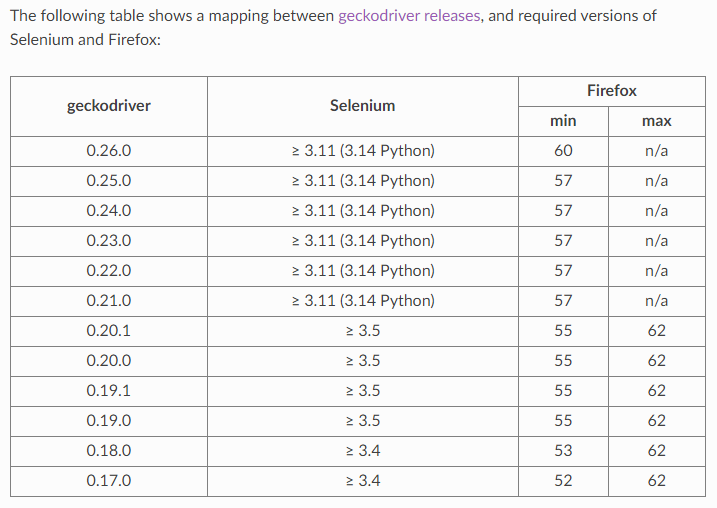
Your main issue is the incompatibility between the version of the binaries you are using as follows:
- Your GeckoDriver version is 0.22.0.
- Release Notes of GeckoDriver v0.21.0 (2018-06-15) clearly mentions the following:
-
Firefox 57 (and greater)
-
Selenium 3.11 (and greater)
- Your Firefox version is 52.9.0.
So there is a clear mismatch between GeckoDriver v0.22.0 and the Firefox Browser v57
Solution
- Upgrade GeckoDriver to GeckoDriver v0.22.0 level.
- GeckoDriver is present in the specified location.
- GeckoDriver is having executable permission for non-root users.
- Upgrade Firefox version to Firefox v62.0.2 levels.
- Clean your Project Workspace through your IDE and Rebuild your project with required dependencies only.
- If your base Web Client version is too old, then uninstall it through Revo Uninstaller and install a recent GA and released version of Web Client.
- Execute your Selenium Test as a non-root user.
GeckoDriver, Selenium and Firefox Browser compatibility chart
Method 3
I was on headless mode, using correct versions of everything, and the only way to get out of this error message was not to execute the selenium test as root
Method 4
Yes checked Start Xvfb before the build can fix the problem, but if you have a job like a pipeline or multibranch pipeline this option is not visible. In the node of your Selenium grid that you go to execute the test you need:
1- Install Xvfb: apt install xvfb
2- Execute Xvfb: /usr/bin/Xvfb :99 -ac -screen 0 1024x768x8 & export DISPLAY=":99"
3- Rerun your node, for example: java -jar selenium.jar -role node -hub http://#.#.#.#:4444/grid/register -capabilities browserName=firefox,plataform=linux -host #.#.#.# -port 1991
Method 5
This solution worked for me
from selenium import webdriver
from selenium.webdriver.firefox.options import Options

options = Options()
options.headless = True
driver = webdriver.Firefox(options=options)
Method 6
As there can be many different underlying causes for this error it is best to find the root cause setting selenium to use debug level logging. In my case, for Ruby with capybara I needed to set: Selenium::WebDriver.logger.level = :debug. And voilà, running the same spec I could see in the logs that a dependency was missing, in my case:
libdbus-glib-1.so.2: cannot open shared object file: No such file or directory
Couldn't load XPCOM.
After installing it all worked fine.
Method 7
I used:
- VS Code
- Linunx/Ubuntu:18.10
- Nightwatch.js
My problem was that I tried to run Nightwatch (which automatically starts GeckoDriver) from the VS Code terminal.
Method 8
I had the same problem, and realized that the real problem was some firefox dependencies not being installed inside the docker container I was testing in.
Try to initiate firefox and check if it returns an error.
Method 9
As Nico and jay have stated you need to check the logs to see the details of the error. As you might use different systems, you can specify the path where the log is stored (i.e. “/tmp/geckodriver.log”).
from selenium import webdriver
firefox_options = webdriver.firefox.webdriver.Options()
driver = webdriver.Firefox(log_path="/tmp/geckodriver.log",
                           options=firefox_options)
In my particular case, what the log said was:
Error: no DISPLAY environment variable specified
That was resolved adding in the options the headless mode before starting the driver. With the line:
firefox_options.set_headless()
Method 10
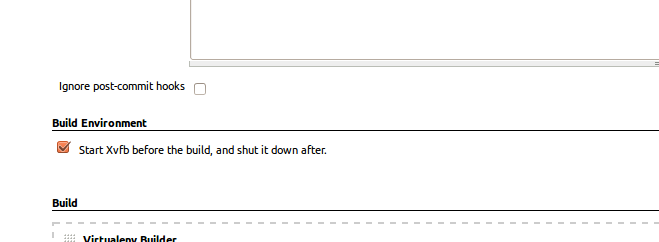
I was able to fix this by running my tests with Xvfb. I was running them on a remote server.
I was using Jenkins so I checked the box that looked like this:
Credit to https://www.obeythetestinggoat.com/book/chapter_CI.html
Method 11
in my case, I was running test cases as root
geckodriver.log
1576076416677   mozrunner::runner       INFO    Running command: "/usr/bin/firefox" "-marionette" "-foreground" "-no-remote" "-profile" "/tmp/rust_mozprofilenCbl2e"
Running Firefox as root in a regular user's session is not supported.  ($HOME is /home/seluser which is owned by seluser.)
1576077143004   mozrunner::runner       INFO    Running command: "/usr/bin/firefox" "-marionette" "-foreground" "-no-remote" "-profile" "/tmp/rust_mozprofile7wpSQ7"
1576077143689   <a href="https://getridbug.com/cdn-cgi/l/email-protection" class="__cf_email__" data-cfemail="5f3e3b3b30312c71283a3d3a272b3a312c363031712c3c2d3a3a312c37302b2c1f3230253633333e71302d38">[email protected]</a>     WARN    Loading extension '<a href="https://getridbug.com/cdn-cgi/l/email-protection" class="__cf_email__" data-cfemail="5221312037373c213a3d2621123f3d283b3e3e337c3d2035">[email protected]</a>': Reading manifest: Invalid extension permission: mozillaAddons
1576077143689   <a href="https://getridbug.com/cdn-cgi/l/email-protection" class="__cf_email__" data-cfemail="2f4e4b4b40415c01584a4d4a575b4a415c464041015c4c5d4a4a415c47405b5c6f4240554643434e01405d48">[email protected]</a>     WARN    Loading extension '<a href="https://getridbug.com/cdn-cgi/l/email-protection" class="__cf_email__" data-cfemail="2a5949584f4f445942455e596a4745504346464b0445584d">[email protected]</a>': Reading manifest: Invalid extension permission: telemetry
1576077143689   <a href="https://getridbug.com/cdn-cgi/l/email-protection" class="__cf_email__" data-cfemail="016065656e6f722f766463647975646f72686e6f2f72627364646f72696e7572416c6e7b686d6d602f6e7366">[email protected]</a>     WARN    Loading extension '<a href="https://getridbug.com/cdn-cgi/l/email-protection" class="__cf_email__" data-cfemail="7c0f1f0e1919120f1413080f3c1113061510101d52130e1b">[email protected]</a>': Reading manifest: Invalid extension permission: resource://pdf.js/
1576077143689   <a href="https://getridbug.com/cdn-cgi/l/email-protection" class="__cf_email__" data-cfemail="6a0b0e0e050419441d0f080f121e0f0419030504441909180f0f041902051e192a0705100306060b4405180d">[email protected]</a>     WARN    Loading extension '<a href="https://getridbug.com/cdn-cgi/l/email-protection" class="__cf_email__" data-cfemail="f6859584939398859e998285b69b998c9f9a9a97d8998491">[email protected]</a>': Reading manifest: Invalid extension permission: about:reader*
1576077145372   Marionette      INFO    Listening on port 35571
1576077145423   Marionette      WARN    TLS certificate errors will be ignored for this session
1576077200207   mozrunner::runner       INFO    Running command: "/usr/bin/firefox" "-marionette" "-foreground" "-no-remote" "-profile" "/tmp/rust_mozprofilenhoHlr"
Running Firefox as root in a regular user's session is not supported.  ($HOME is /home/seluser which is owned by seluser.)
i could get around by
cd /home
chown -R  root seluser
i woundnt say its correct but it got my job done
All methods was sourced from stackoverflow.com or stackexchange.com, is licensed under cc by-sa 2.5, cc by-sa 3.0 and cc by-sa 4.0