dataset: https://github.com/rashida048/Datasets/blob/master/StudentsPerformance.csv
from bokeh.models import Range1d #used to set x and y limits #p.y_range=Range1d(120, 230)

def box_plot(df, vals, label, ylabel=None,xlabel=None,title=None):


    # Group Data frame
    df_gb = df.groupby(label)
    # Get the categories
    cats = list(df_gb.groups.keys())

    # Compute quartiles for each group
    q1 = df_gb[vals].quantile(q=0.25)
    q2 = df_gb[vals].quantile(q=0.5)
    q3 = df_gb[vals].quantile(q=0.75)

    # Compute interquartile region and upper and lower bounds for outliers
    iqr = q3 - q1
    upper_cutoff = q3 + 1.5*iqr
    lower_cutoff = q1 - 1.5*iqr

    # Find the outliers for each category
    def outliers(group):
        cat = group.name
        outlier_inds = (group[vals] > upper_cutoff[cat])
                                     | (group[vals] < lower_cutoff[cat])
        return group[vals][outlier_inds]

    # Apply outlier finder
    out = df_gb.apply(outliers).dropna()

    # Points of outliers for plotting
    outx = []
    outy = []
    for cat in cats:
        # only add outliers if they exist
        if cat in out and not out[cat].empty:
            for value in out[cat]:
                outx.append(cat)
                outy.append(value)

    # If outliers, shrink whiskers to smallest and largest non-outlier
    qmin = df_gb[vals].min()
    qmax = df_gb[vals].max()
    upper = [min([x,y]) for (x,y) in zip(qmax, upper_cutoff)]
    lower = [max([x,y]) for (x,y) in zip(qmin, lower_cutoff)]

    cats = [str(i) for i in cats]
    # Build figure
    p = figure(sizing_mode='stretch_width', x_range=cats,height=300,toolbar_location=None)
    p.xgrid.grid_line_color = None
    p.ygrid.grid_line_width = 2
    p.yaxis.axis_label = ylabel
    p.xaxis.axis_label = xlabel
    p.title=title
    p.y_range.start=0
    p.title.align = 'center'

    # stems
    p.segment(cats, upper, cats, q3, line_width=2, line_color="black")
    p.segment(cats, lower, cats, q1, line_width=2, line_color="black")

    # boxes
    p.rect(cats, (q3 + q1)/2, 0.5, q3 - q1, fill_color=['#a50f15', '#de2d26', '#fb6a4a', '#fcae91', '#fee5d9'],
           alpha=0.7, line_width=2, line_color="black")

    # median (almost-0 height rects simpler than segments)
    p.rect(cats, q2, 0.5, 0.01, line_color="black", line_width=2)

    # whiskers (almost-0 height rects simpler than segments)
    p.rect(cats, lower, 0.2, 0.01, line_color="black")
    p.rect(cats, upper, 0.2, 0.01, line_color="black")

    # outliers
    p.circle(outx, outy, size=6, color="black")

    return p

p = box_plot(df, 'Total', 'race/ethnicity', ylabel='Total spread',xlabel='',title='BoxPlot')
show(p)
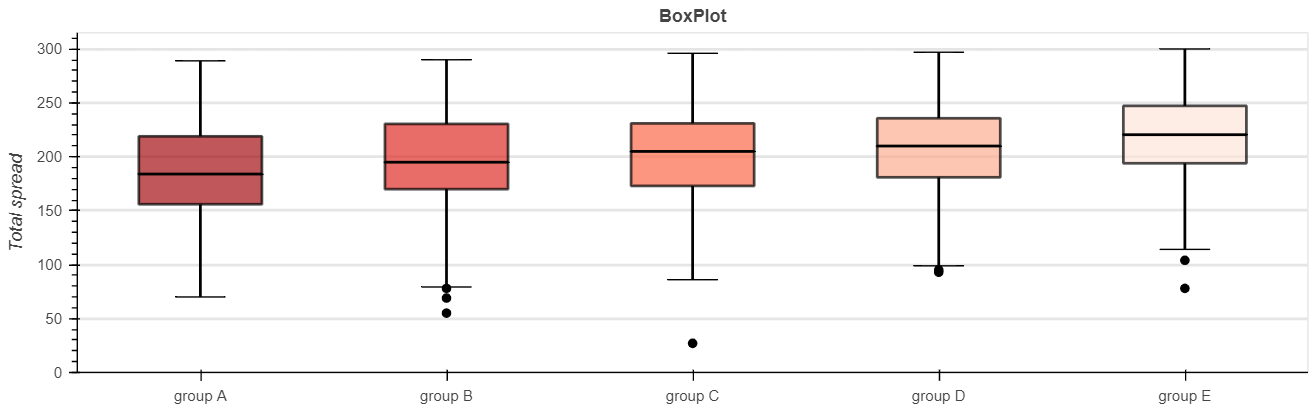
Hi there, from the code and dataset above I am able to produce a boxplot considering I pass through categorical variables. however I am unable to produce anything when I try to produce a boxplot for a single column. for example just checking the spread of the math scores. i tried to do
cats = df['math score']
but it didnt work. any suggestions?
Answers:
Thank you for visiting the Q&A section on Magenaut. Please note that all the answers may not help you solve the issue immediately. So please treat them as advisements. If you found the post helpful (or not), leave a comment & I’ll get back to you as soon as possible.
Method 1
I am not sute if this it is the best to implement this both in one function, but if this is your goal, one solution can be, to add a few if-else conditions.
Here is a description of the changes:
First give label a default.
# old
# def box_plot(df, vals, label, ylabel=None,xlabel=None,title=None):
# new
def box_plot(df, vals, label=None, ylabel=None,xlabel=None,title=None):
Then add a if-else part for the groupby section.
# old
# # Group Data frame
# df_gb = df.groupby(label)
# # Get the categories
# cats = list(df_gb.groups.keys())

# new
if label is not None:
    # Group Data frame
    df_gb = df.groupby(label)
    # Get the categories
    cats = list(df_gb.groups.keys())
else:
    df_gb = df[[vals]]
    cats = [vals]
Now the calculation for the outliners is a bit different, because we don’t have to loop over a number of columns. Only onw column is left.
if label is not None:
    out = df_gb.apply(outliers).dropna()
else:
    out = df[(df[vals] > upper_cutoff) | (df[vals] < lower_cutoff)]
The upper and lower part are now floats and not a list.
if label is not None:
    upper = [min([x,y]) for (x,y) in zip(qmax, upper_cutoff)]
    lower = [max([x,y]) for (x,y) in zip(qmin, lower_cutoff)]
else:
    upper =min(qmax, upper_cutoff)
    lower =max(qmin, lower_cutoff)
I also added (changed) the line below, to avoid a warning.
colors = ['#a50f15', '#de2d26', '#fb6a4a', '#fcae91', '#fee5d9'][:len(cats)]
p.rect(cats, (q3 + q1)/2, 0.5, q3 - q1, fill_color=colors, alpha=0.7, line_width=2, line_color="black")
With these changes the output for
p = box_plot(df, 'math score', 'race/ethnicity', ylabel='Total spread',xlabel='',title='BoxPlot')
is still the same, but
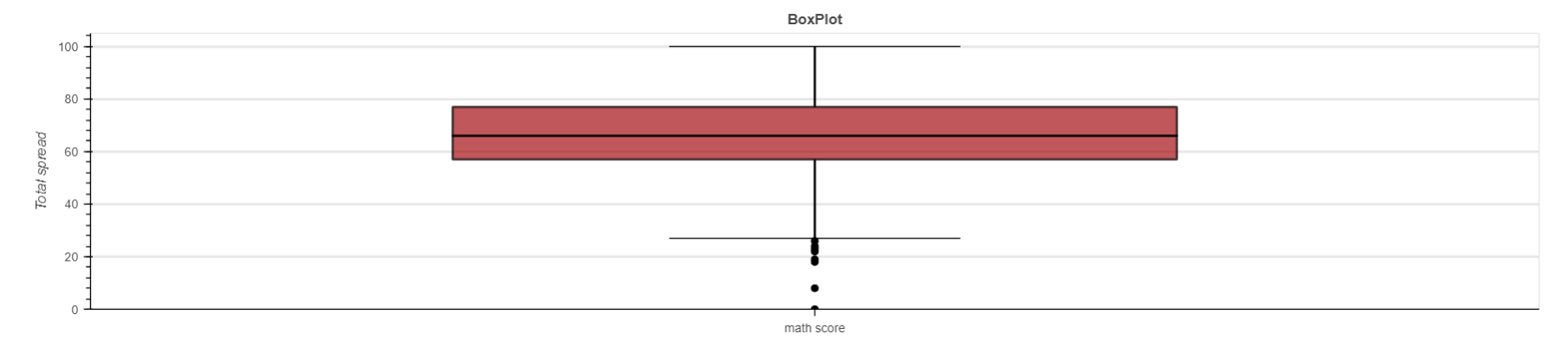
p = box_plot(df, 'math score', ylabel='Total spread',xlabel='',title='BoxPlot')
gives us now a boxplot.
All methods was sourced from stackoverflow.com or stackexchange.com, is licensed under cc by-sa 2.5, cc by-sa 3.0 and cc by-sa 4.0