Noob here but I’ve searched all over and cannot find any hints to help me with what I’m trying to do. I’ve written a python program to create a world ranking for marathon swimmers, and based on the database of results, a ranking can be generated for any given day. I want to create a not-crappy-looking chart showing a given athlete’s ranking progression over time with a step chart, and overlay points to represent days that they actually competed, and what the competition was.
Here’s what I have so far:
dates =
ranks =
race_dates =
race_date_ranks =
race_labels =

plt.step(dates, ranks, where="post")
plt.plot(race_dates, race_date_ranks, "o")
for i, label in enumerate(race_labels):
    plt.text(race_dates[i], race_date_ranks[i], label, rotation=25, fontsize="x-small")
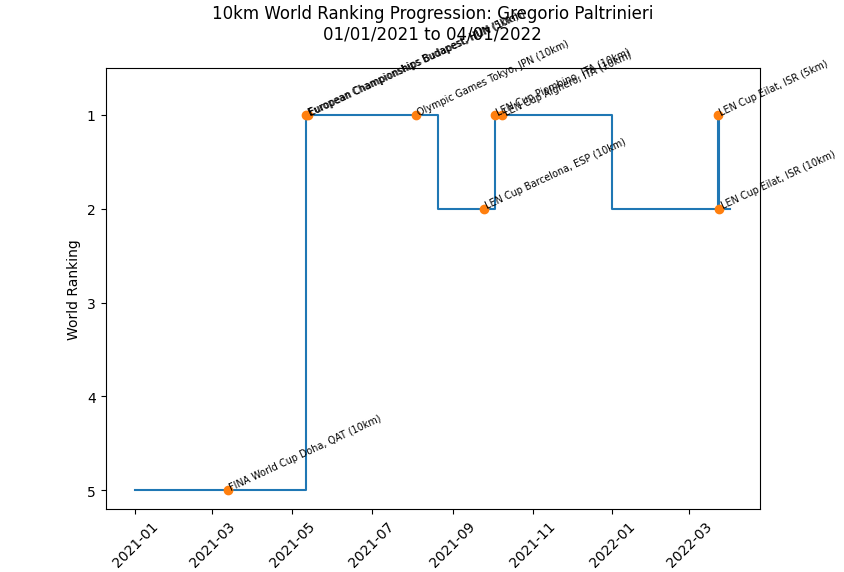
Problem is…it looks terrible and is illegible (sorry, don’t have enough status points or whatever on stackoverflow to embed… some day!). What I want is to kill the last two lines of code above, thereby removing the labels, and have each of the dots representing a race be a randomly colored dot with no label. Then, add a legend with the dot color and the corresponding race label. How can I do this? Help is appreciated!
Here’s more about my project if you’re interested:
https://www.marathonswimworldrankings.com
Answers:
Thank you for visiting the Q&A section on Magenaut. Please note that all the answers may not help you solve the issue immediately. So please treat them as advisements. If you found the post helpful (or not), leave a comment & I’ll get back to you as soon as possible.
Method 1
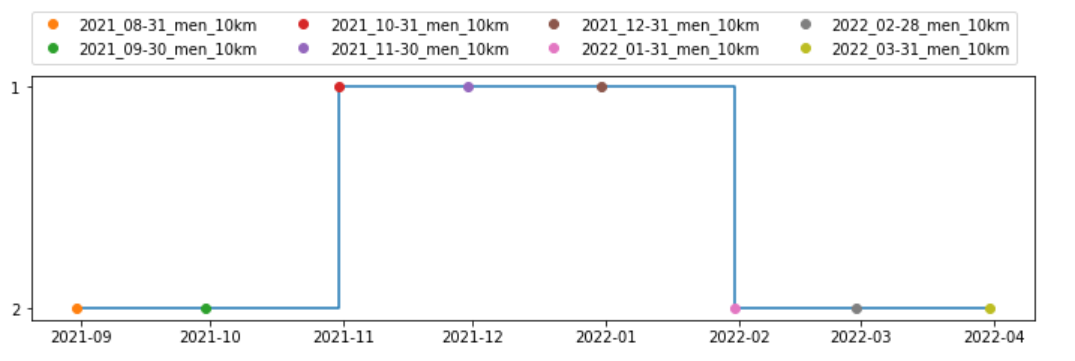
I understand that the intent at this time is to eliminate the overlapping of strings, change the color of each competition, and list the competition names in the legend. The data for the graphs I created was created by retrieving the data from the link in the question. Since the name of the competition was unknown, I used the name of the link in the archive. Also, as the legend may be overflowed from the graph if there are many competition names, I specified the number of columns and the location at the top of the legend. If you are concerned about the overlap with the title, please add multiple columns on the right.
In my personal opinion, while animated ranking is a good looking graph using web technology, matplotlib step graph is not so good looking, so it would be better to use ploty-dash, etc. for richer content.
import pandas as pd
import requests

urls = ["https://docs.google.com/spreadsheets/d/1G2xBxmuigH0AqUg4XnkW4HPTLKt9gj6P5fO9RZnir4w/edit?usp=drive_web",
        "https://docs.google.com/spreadsheets/d/1CWKeG7QeIMQTLzmvTqif__4huX2oSub-NWaoVZsthJw/edit?usp=drive_web",
        "https://docs.google.com/spreadsheets/d/1dykR2toCcFZoWV2ytQkoYZ5YCPnFBhDPCPWeXOp-fiU/edit?usp=drive_web",
        "https://docs.google.com/spreadsheets/d/1r8xy9SyaLExivaWLHJvQTtIUTibJO2HqxYoS_JPq_fY/edit?usp=drive_web",
        "https://docs.google.com/spreadsheets/d/18GMsfJot0nD0bw6J2Kc7tKJ3R4blrwUqNaNxuqJgmxw/edit?usp=drive_web",
        "https://docs.google.com/spreadsheets/d/1E_Aal5ze-lLu-tYvKCoq6iK_-TWlPLfquocH0BrU4d4/edit?usp=drive_web",
        "https://docs.google.com/spreadsheets/d/1IEADAPFv-LE4dQkqBb60NnxBNdhUcxVdh3V0M1_dGmQ/edit?usp=drive_web",
        "https://docs.google.com/spreadsheets/d/1FTrt7-2RUGZrXpXiFKjD6XfOu31lFRHNYJjjnt-8YXY/edit?usp=drive_web"
       ]
compe_names = ["2022_03-31_men_10km","2022_02-28_men_10km","2022_01-31_men_10km","2021_12-31_men_10km",
               "2021_11-30_men_10km","2021_10-31_men_10km","2021_09-30_men_10km","2021_08-31_men_10km"]

data = pd.DataFrame([], columns=['name', 'pagerank', 'rank', 'competition'])
for url, compe in zip(urls, compe_names):
    r = requests.get(url)
    df_list = pd.read_html(r.text, index_col=0)
    df = df_list[0]
    df = df.loc[2:, ['A','B','C']]
    df.columns = ['name', 'pagerank', 'rank']
    df['competition'] = compe
    data = data.append(df, ignore_index=True)

data['date'] = data['competition'].apply(lambda x:x.rsplit('_',2)[0])
data['date'] = data['date'].str.replace('_', '-')
data['date'] = pd.to_datetime(data['date'])
data.sort_values('date', ascending=True, inplace=True)

data = data[data['name'] == 'Gregorio Paltrinieri']

import matplotlib.pyplot as plt

fig = plt.figure(figsize=(12,3))

dates = data['date'].tolist()
ranks = data['rank'].tolist()

plt.step(dates, ranks, where="post")
for row in data.itertuples():
    plt.plot(row[5], row[3], "o", label=row[4])

plt.legend(ncol=4, loc=(0,1.05))
plt.show()
All methods was sourced from stackoverflow.com or stackexchange.com, is licensed under cc by-sa 2.5, cc by-sa 3.0 and cc by-sa 4.0