Please forgive the crude explanation but I’m unsure how to describe the issue and as they say, a picture says a thousand words, so what I am trying to achieve is to draw a graph in matplotlib that looks like the below:

whereby the scale of the color range is the same across all bars as the x limits of the x-axis.
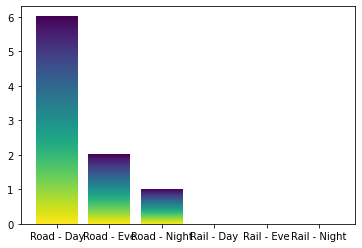
The closest I have got to so far is this (please ignore the fact it’s not horizontal – I was planning on editing that once I had figured out the coloring):
fig, ax = plt.subplots()
mpl.pyplot.viridis()
bars = ax.bar(df['Profile'], df['noise_result'])
grad = np.atleast_2d(np.linspace(0,1,256)).T
ax = bars[0].axes
lim = ax.get_xlim()+ax.get_ylim()
for bar in bars:
    bar.set_zorder(1)
    bar.set_facecolor('none')
    x,y = bar.get_xy()
    w, h = bar.get_width(), bar.get_height()
    ax.imshow(grad, extent=[x,x+w,y,y+h], aspect='auto', zorder=1,interpolation='nearest')
ax.axis(lim)
which only results in a graph like below:
Many thanks
Answers:
Thank you for visiting the Q&A section on Magenaut. Please note that all the answers may not help you solve the issue immediately. So please treat them as advisements. If you found the post helpful (or not), leave a comment & I’ll get back to you as soon as possible.
Method 1
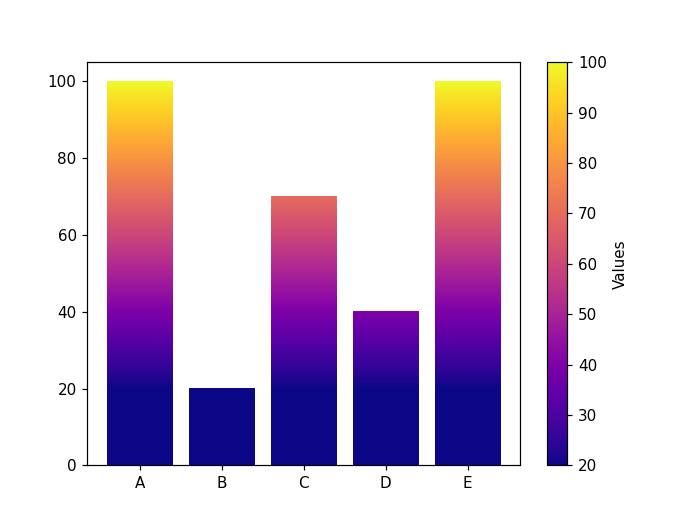
I’m going along with your approach. The idea is to:
- choose an appropriate colormap
- create a normalizer for the bar values.
- create a mappable which is going to map the normalized values to the colormap in order to create a colorbar.
import matplotlib.pyplot as plt
import matplotlib.cm as cm
from matplotlib.colors import Normalize
import pandas as pd
import numpy as np

df = pd.DataFrame({'key':['A', 'B', 'C', 'D', 'E'], 'val':[100, 20, 70, 40, 100]})

# create a normalizer
norm = Normalize(vmin=df['val'].min(), vmax=df['val'].max())
# choose a colormap
cmap = cm.plasma
# map values to a colorbar
mappable = cm.ScalarMappable(norm=norm, cmap=cmap)
mappable.set_array(df['val'])


fig, ax = plt.subplots()
bars = ax.bar(df['key'], df['val'])

ax = bars[0].axes
lim = ax.get_xlim()+ax.get_ylim()
for bar, val in zip(bars, df['val']):
    grad = np.atleast_2d(np.linspace(0,val,256)).T
    bar.set_zorder(1)
    bar.set_facecolor('none')
    x, y = bar.get_xy()
    w, h = bar.get_width(), bar.get_height()
    ax.imshow(np.flip(grad), extent=[x,x+w,y,y+h], aspect='auto', zorder=1,interpolation='nearest', cmap=cmap, norm=norm)
ax.axis(lim)
cb = fig.colorbar(mappable)
cb.set_label("Values")
Method 2
Using what you have, you could change line 12 to:
ax.imshow(grad, extent=[x,x+w,y,y+h], aspect=’auto’, zorder=1, cmap = plt.get_cmap(‘gist_heat_r’))
or some other color map from:
https://matplotlib.org/stable/tutorials/colors/colormaps.html
You could also change line 3 to start as:
bars = ax.barh
for horizontal bars.
All methods was sourced from stackoverflow.com or stackexchange.com, is licensed under cc by-sa 2.5, cc by-sa 3.0 and cc by-sa 4.0