i have default.aspx and index.html. I uploaded both to the server, but i want my first page start with index.html. What should I do?
Answers:
Thank you for visiting the Q&A section on Magenaut. Please note that all the answers may not help you solve the issue immediately. So please treat them as advisements. If you found the post helpful (or not), leave a comment & I’ll get back to you as soon as possible.
Method 1
If you do not have access to IIS, and you are hosted on IIS 7 (Windows Server 2008), you may want to put this into your web.config file:
<system.webServer>
    <defaultDocument>
        <files>
            <clear / >
            <add value="index.html" />
        </files>
    </defaultDocument>
</system.webServer>
Source: How to add a default document with IIS7 web.config
Method 2
You need to configure it in the properties of the virtual directory hosting the ASP.NET application. Put index.html before default.aspx
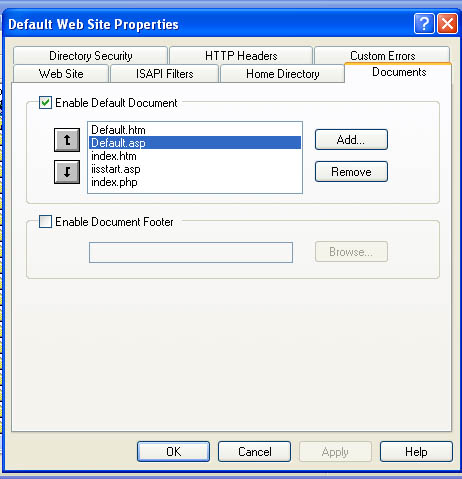
(source: plus2net.com)
Method 3
You need to change the order of default document list to bring index.htm to the top, on IIS6 this found on the Documents tab of Properties dialog on the site in IIS manager.
Method 4
You need to set this up in IIS. In the IIS manager, this will be under the Documents tab.
Method 5
in your default.aspx page write this in your code behind if you don’t have access to IIS.
Response.Redirect("index.htm");
All methods was sourced from stackoverflow.com or stackexchange.com, is licensed under cc by-sa 2.5, cc by-sa 3.0 and cc by-sa 4.0