Referring to this thread: Algorithm to count the time that occured on the same period, how to bind the dictionary to the GridView? Pls take a look to the answer.
I tried to add a GridView and then on the code-behind: GV.DataSource = timeRangeCounts and bind it, but in return:
The data source for GridView with id 'GV' did not have any properties or attributes from which to generate columns. Ensure that your data source has content.
How can I do that? Please take a look at the code below:
The first helper class is used to hold the counts of exact and sub range matches:
Public Class TimeRangeCounter
    Property ExactRangeMatch as Integer
    Property SubRangeMatch as Integer
End Class
The second helper class is used to help the dictionary know how one key (of type TimeRange) differs from another:
Public Class TimeRangeEqualityComparer
    Implements IEqualityComparer(Of TimeRange)

    Public Overloads Function Equals(left As TimeRange, right As TimeRange) _
            As Boolean Implements IEqualityComparer(Of TimeRange).Equals

        Return left.ToString = right.ToString
    End Function

    Public Overloads Function GetHashCode(range As TimeRange) _
            As Integer Implements IEqualityComparer(Of TimeRange).GetHashCode

        return range.ToString().GetHashCode()
    End Function

End Class
The Third helper class stores the start and end times of a range:
Public Class TimeRange
    Private readonly _start
    Private readonly _end

    Public Readonly Property Start
        Get
           return _start
        End Get
    End Property

    Public Readonly Property [End]
        Get
           return _end
        End Get
    End Property

    Public Sub New(start As String, [end] As string)
        Me._start = start
        Me._end = [end]
    End Sub

    Public Overrides Function ToString() as String
       Return String.Format("{0}-{1}", Start, [End])
    End Function

End Class
So using the above we should be able to write this algorithm:
Dim columnLength As Integer = 5
Dim timeStart() As String = {"08.00", "08.00", "10.00", "08.00", "08.00"}
Dim timeEnd() As String = {"08.50", "11.50", "11.00", "09.00", "08.50"}
Dim comparer As New TimeRangeEqualityComparer()
Dim timeRangeCounts As New Dictionary(Of TimeRange, TimeRangeCounter)(comparer)

'Count exact range matches while building dictionary
For i = 0 to columnLength - 1
  Dim key As TimeRange = New TimeRange(timeStart(i), timeEnd(i))

  If timeRangeCounts.ContainsKey(key)
      timeRangeCounts(key).ExactRangeMatch += 1
  Else
      Dim counter =  New TimeRangeCounter()
      counter.ExactRangeMatch = 1
      timeRangeCounts(key) = counter
  End If

Next

'Count sub ranges
For Each kvp in timeRangeCounts
    For Each key in timeRangeCounts.Keys
        If kvp.key.Start >= key.Start AndAlso _
           kvp.Key.End <= key.End AndAlso _
           kvp.key.ToString <> key.ToString then

            kvp.Value.SubRangeMatch += 1
        End If
    Next
Next

'Console.WriteLine(timeRangeCounts)
    GV.DataSource = timeRangeCounts
    GV.DataBind()
The gridview:
<asp:GridView ID="GV" runat="server">
    <Columns>
        <asp:BoundField DataField="Key" HeaderText="Dictionary Key" />
        <asp:BoundField DataField="Value" HeaderText="Dictionary Value" />
    </Columns>
</asp:GridView>
Then I tried to run it but the result is like:
Dictionary Key    Dictionary Value
08:00:00-08:50:00 TimeRangeCounter
08:00:00-09:40:00 TimeRangeCounter
10:00:00-11:40:00 TimeRangeCounter
...               ...
What’s wrong with the code?
Answers:
Thank you for visiting the Q&A section on Magenaut. Please note that all the answers may not help you solve the issue immediately. So please treat them as advisements. If you found the post helpful (or not), leave a comment & I’ll get back to you as soon as possible.
Method 1
Here is a Gridview
    <asp:GridView ID="GV" runat="server" AutoGenerateColumns="false">
        <Columns>
            <asp:BoundField DataField="Key" HeaderText="Dictionary Key" />
            <asp:BoundField DataField="Value" HeaderText="Dictionary Value" />
        </Columns>
    </asp:GridView>
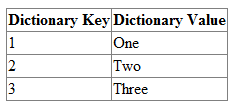
Here is code to bind a dictionary to that Gridview
Protected Sub Page_Load(ByVal sender As Object, ByVal e As System.EventArgs) Handles Me.Load
    Dim D As New Dictionary(Of Integer, String)
    D.Add(1, "One")
    D.Add(2, "Two")
    D.Add(3, "Three")
    GV.DataSource = D
    GV.DataBind()
End Sub
Here is the output
What if my Value of of some type “MyClass?”
The Gridview will execute the ToString function of MyClass, per “Value” cell.
In your example, Override the ToString function on this class
Public Class TimeRangeCounter
    Property ExactRangeMatch as Integer
    Property SubRangeMatch as Integer
End Class
This is necessary because your “Value” is of time TimeRangeCounter
Summary
The Author’s code had two problems.
- Problem 1 was generating an actual error and was solved by following my code example
- Problem 2 was the lack of a ToString function for the custom class used in the “Value” column of the Gridview
All methods was sourced from stackoverflow.com or stackexchange.com, is licensed under cc by-sa 2.5, cc by-sa 3.0 and cc by-sa 4.0