I am having issues attempting to replicate a chart that has been generated in Microsoft Excel 2007 by using the Microsoft Chart Control for .Net
The chart is showing the TOP 5 entries for each Month (each month could have a different 5 entries) of the year and then showing a breakdown of some metrics
I can get the data perfectly fine, the issue comes down to the fact that in the Excel chart it has formatted the X-Axis labels as shown in the following image:
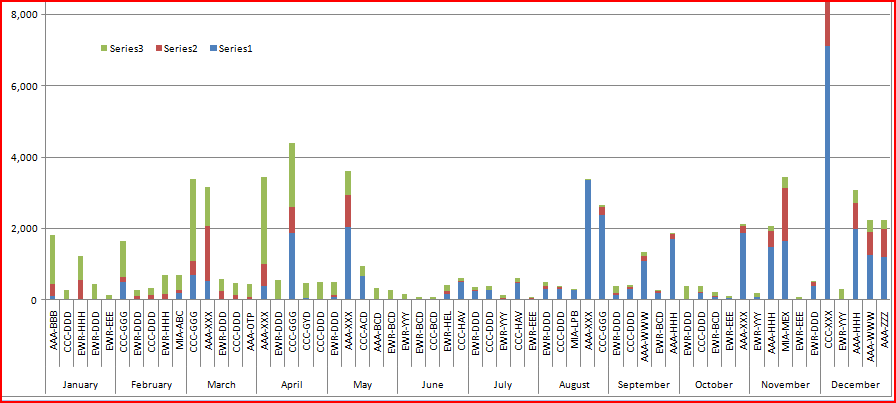
Which is how we want the axis formatted so that each Month name is only listed once for the 5 sub categories that are for that month.
But I do not know how to reproduce this using the Microsoft Chart Control, when I use the same data for the chart control it formats the X-Axis as (ignore colors and such):
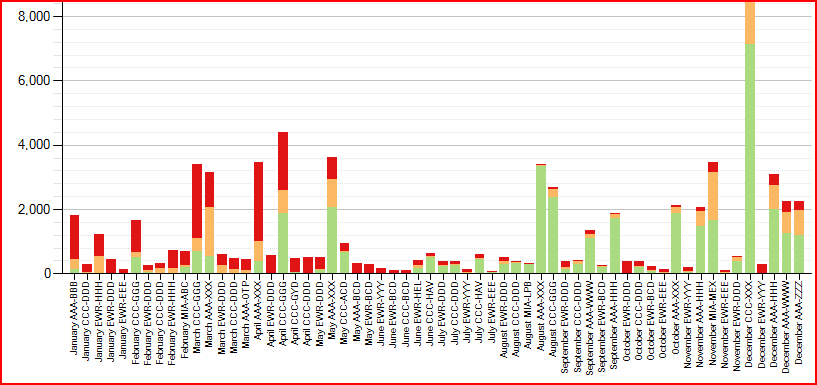
I have bound the data so that the XAxis value is “January AAA-BBB”, I’m thinking that maybe I need to separate out the Month portion into some other axis value that can be formatted/grouped separately.
Any help would be appreciated.
Answers:
Thank you for visiting the Q&A section on Magenaut. Please note that all the answers may not help you solve the issue immediately. So please treat them as advisements. If you found the post helpful (or not), leave a comment & I’ll get back to you as soon as possible.
Method 1
I have managed to use a series of CustomLabel’s that I manually position to be under the correct “sections”.
foreach (string monthName in monthNames)
{
    CustomLabel monthLabel = new CustomLabel(startOffset, endOffset, monthName, 1,     LabelMarkStyle.Box);
    theChart.ChartAreas["Default"].AxisX.CustomLabels.Add(monthLabel);
    //increment startOffset and endOffset enough to position the next label
    //under the correct "section"
}
All methods was sourced from stackoverflow.com or stackexchange.com, is licensed under cc by-sa 2.5, cc by-sa 3.0 and cc by-sa 4.0