I want to have a gridview with fixed header . I tried this link and this
I was able to do it all the time but there was problem with grid header width and columns width not being set equally. So it doesn’t look good but scroll and freeze does work properly.If i don’t use freeze logic then header width appears proper.
When i observed the code and compared with mine i found that they used to set columns in the design it self where as i don’t specify columns in design and I set SQL data source from code behind and column are set as a part of SQL data source.So in design i have
 <form id="form1" runat="server">
  <div>

  </div>

   <asp:GridView ID="GridView1" runat="server" Font-Size=12px CellPadding="4"
    ForeColor="#333333" GridLines="Vertical">

   <RowStyle BackColor="#F7F6F3" ForeColor="#333333" />
    <FooterStyle BackColor="#5D7B9D" Font-Bold="True" ForeColor="White" />
    <PagerStyle BackColor="#284775" ForeColor="White" HorizontalAlign="Center" />
    <SelectedRowStyle BackColor="#E2DED6" Font-Bold="True" ForeColor="#333333" />
    <HeaderStyle BackColor="#5D7B9D" Font-Bold="True" ForeColor="White" />
    <EditRowStyle BackColor="#999999" />
    <AlternatingRowStyle BackColor="White" ForeColor="#284775" />
   </asp:GridView>

</form>
here is a screenshot which shows the problem(You can observe the change in header width and columns)
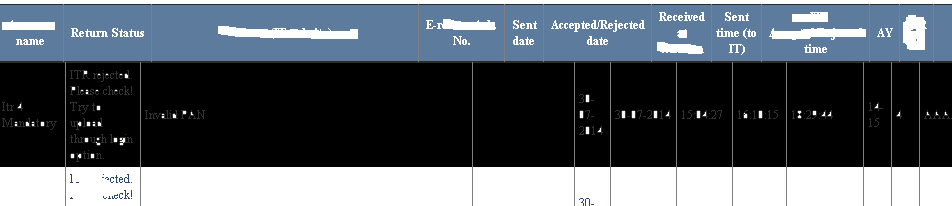
But the example given in those links have tags and column names specified. So is this the problem?
How can i solve my problem? How can i set header width to same as column width.
edit:
Below is the rendered HTML of the page (but this HTML shows some what different than what asp page shows in browser. 1st row shown like shifted in HTML,but proper in asp. But header issue still exists in both)
<!DOCTYPE html PUBLIC "-//W3C//DTD XHTML 1.0 Transitional//EN" "http://www.w3.org/TR/xhtml1/DTD/xhtml1-transitional.dtd">
<html xmlns="http://www.w3.org/1999/xhtml"><head><meta http-equiv="Content-Type" content="text/html; charset=UTF-8">
<script src="./Scrollable Gridview with Fixed Header_files/jquery-1.4.1.min.js" type="text/javascript"></script>
<script src="./Scrollable Gridview with Fixed Header_files/ScrollableGridPlugin.js" type="text/javascript"></script>
<title>
Scrollable Gridview with Fixed Header
</title>
<script type="text/javascript" language="javascript">
$(document).ready(function() {
$('#GridView1').Scrollable();
}
)
</script>
</head>
<body>
<form name="form1" method="post" action="./Scrollable Gridview with Fixed Header_files/Scrollable Gridview with Fixed Header.htm" id="form1">
<div>
<input type="hidden" name="__VIEWSTATE" id="__VIEWSTATE" value="/">
</div>
<div>
</div>
<div>
<div></div><div><table cellspacing="0" cellpadding="4" rules="cols" border="1" style="color: rgb(51, 51, 51); font-size: 12px; width: 900px; border-collapse: collapse;"><tbody><tr style="color:White;background-color:#5D7B9D;font-weight:bold;">
<th scope="col" style="width: 105px;">name</th><th scope="col" style="width: 241px;">Status</th><th scope="col" style="width: 59px;">Error</th><th scope="col" style="width: 96px;">No.</th><th scope="col" style="width: 37px;">date</th><th scope="col" style="width: 100px;">date1</th><th scope="col" style="width: 59px;">Received</th><th scope="col" style="width: 51px;">time1</th><th scope="col" style="width: 100px;">time2</th><th scope="col" style="width: 22px;">AY</th><th scope="col" style="width: 26px;">we</th><th scope="col" style="width: 84px;">Setft</th>
</tr></tbody></table></div><div style="overflow: auto; height: 200px; width: 917px;"><table cellspacing="0" cellpadding="4" rules="cols" border="1" id="GridView1" style="color:#333333;font-size:12px;width:900px;border-collapse:collapse;">
<tbody><tr style="color:#333333;background-color:#F7F6F3;">
<td style="width: 105px;">Sews</td><td style="width: 241px;">fggghtg</td><td style="width: 59px;">thtthgtrtht</td><td style="width: 96px;"> </td><td style="width: 37px;"> </td><td style="width: 100px;"> </td><td style="width: 59px;">17:52:53</td><td style="width: 51px;"> </td><td style="width: 100px;"> </td><td style="width: 22px;">14-15</td><td style="width: 26px;">1</td><td style="width: 84px;">sdgg</td>
</tr><tr style="color:#284775;background-color:White;">
<td>Ses</td><td>dffggg</td><td>Invalid </td><td> </td><td> </td><td> </td><td>18:00:31</td><td> </td><td> </td><td>14-15</td><td>1</td>
<td>DtyuFGtyuty</td>
</tr><tr style="color:#333333;background-color:#F7F6F3;">
<td>Ses</td><td>qwerty</td><td> </td><td> </td><td> </td><td> </td><td>18:03:42</td><td> </td><td> </td><td>14-15</td><td>1</td>
<td>yuutyutu</td>
</tr><tr style="color:#284775;background-color:White;">
<td>rttty N</td><td>dffggg</td><td>Invalid </td><td> </td><td> </td><td> </td><td>20:31:14</td><td> </td><td> </td><td>14-15</td><td>1</td>
<td>tyuutu</td>
</tr><tr style="color:#333333;background-color:#F7F6F3;">
<td>tyu tyu tyu</td><td>qwerty</td><td> </td><td> </td><td> </td><td> </td><td>17:37:02</td><td> </td><td> </td><td>14-15</td><td>2</td>
<td>tyutu</td>
</tr><tr style="color:#284775;background-color:White;">
<td>tyu tyu tyu</td><td>rerty tht.</td><td>Invalid</td>
<td>ytutyutu</td><td>13-08-2014</td><td>13-08-2014</td><td>11:43:23</td><td>10:37:26</td><td>10:37:26</td><td>14-15</td><td>2</td>
<td>tyuutyty</td>
</tr><tr style="color:#333333;background-color:#F7F6F3;">
<td>Testing</td><td>qwerty</td><td> </td><td> </td><td> </td><td> </td><td>11:45:34</td><td> </td><td> </td><td>14-15</td><td>1</td>
<td>tyutyu</td>
</tr><tr style="color:#284775;background-color:White;">
<td>Testing</td><td>qwerty</td><td> </td><td> </td><td> </td><td> </td><td>11:48:22</td><td> </td><td> </td><td>14-15</td><td>1</td>
<td>tyuutut</td>
</tr>
</tbody></table></div></div>
</form>
</body></html>
Answers:
Thank you for visiting the Q&A section on Magenaut. Please note that all the answers may not help you solve the issue immediately. So please treat them as advisements. If you found the post helpful (or not), leave a comment & I’ll get back to you as soon as possible.
Method 1
You can use another solution like this: http://www.dotnetbull.com/2011/11/scrollable-gridview-with-fixed-headers.html
It works for me.
Method 2
I’m using modified version of MakeStaticHeader function:
function MakeStaticHeader(gridId, hasFooter) {
var height = $('#' + gridId).height();
var tbl = document.getElementById(gridId);
if (tbl) {
    var headerHeight = $('#' + gridId + ' tr:first-child').height();
    var DivHR = document.getElementById(gridId + 'DivHeaderRow');
    var DivMC = document.getElementById(gridId + 'DivMainContent');
    var DivFR = document.getElementById(gridId + 'DivFooterRow');

    //*** Set divheaderRow Properties ****
    DivHR.style.height = headerHeight + 'px';
    //DivHR.style.width = (parseInt(width) - 16) + 'px';
    DivHR.style.position = 'relative';
    DivHR.style.top = '0px';
    DivHR.style.zIndex = '10';
    DivHR.style.verticalAlign = 'top';
    DivHR.style.marginRight = '17px';

    //*** Set divMainContent Properties ****
    //DivMC.style.width = width + 'px';
    DivMC.style.height = height + 'px';
    DivMC.style.position = 'relative';
    DivMC.style.top = -headerHeight + 'px';
    DivMC.style.zIndex = '1';

    //*** Set divFooterRow Properties ****
    //DivFR.style.width = (parseInt(width) - 16) + 'px';
    DivFR.style.position = 'relative';
    DivFR.style.top = -headerHeight + 'px';
    DivFR.style.verticalAlign = 'top';
    DivFR.style.paddingtop = '2px';

    if (hasFooter) {
        var tblfr = tbl.cloneNode(true);
        tblfr.removeChild(tblfr.getElementsByTagName('tbody')[0]);
        var tblBody = document.createElement('tbody');
        //tblfr.style.width = '100%';
        tblfr.cellSpacing = "0";
        tblfr.border = "0px";
        tblfr.rules = "none";
        //*****In the case of Footer Row *******
        tblBody.appendChild(tbl.rows[tbl.rows.length - 1]);
        tblfr.appendChild(tblBody);
        DivFR.appendChild(tblfr);
    }

    //****Copy Header in divHeaderRow****
    DivHR.appendChild(tbl.cloneNode(true));
}
All methods was sourced from stackoverflow.com or stackexchange.com, is licensed under cc by-sa 2.5, cc by-sa 3.0 and cc by-sa 4.0