I am trying to write my first ASP.NET website and I really want to use the Twitter Bootstrap but I’m failing at the first hurdle.
I downloaded the Zip file from here, unzipped it and added the files to my solution and the following lines to my _LAyout.cshtml file:
<link href="@Url.Content(" rel="nofollow noreferrer noopener" rel="nofollow noreferrer noopener" rel="nofollow noreferrer noopener" rel="nofollow noreferrer noopener"~/Context/bootstrap.css")" rel="stylesheet" type="text/css" />
<link href="@Url.Content(" rel="nofollow noreferrer noopener" rel="nofollow noreferrer noopener" rel="nofollow noreferrer noopener" rel="nofollow noreferrer noopener"~/Content/bootstrap.min.css")" rel="stylesheet" type="text/css" />
<script src="@Url.Content("~/Scripts/bootstrap.js")" type="text/javascript"></script>
<script src="@Url.Content("~/Scripts/bootstrap-min.js")" type="text/javascript"></script>
Here is a screenshot showing the above files in my solution:
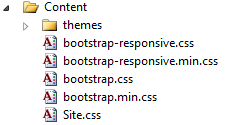
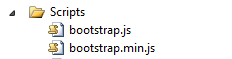
I am trying to create a menu bar across the top with this code which was taken from this turorial
<!DOCTYPE html>
<html>
<head>
    <meta charset="utf-8" />
    <title>@ViewBag.Title</title>
    <script src="@Url.Content("~/Scripts/jquery-1.5.1.min.js")" type="text/javascript"></script>
    <script src="@Url.Content("~/Scripts/modernizr-1.7.min.js")" type="text/javascript"></script>
    <link href="@Url.Content(" rel="nofollow noreferrer noopener" rel="nofollow noreferrer noopener" rel="nofollow noreferrer noopener" rel="nofollow noreferrer noopener"~/Context/bootstrap.css")" rel="stylesheet" type="text/css" />
    <link href="@Url.Content(" rel="nofollow noreferrer noopener" rel="nofollow noreferrer noopener" rel="nofollow noreferrer noopener" rel="nofollow noreferrer noopener"~/Content/bootstrap.min.css")" rel="stylesheet" type="text/css" />
    <script src="@Url.Content("~/Scripts/bootstrap.js")" type="text/javascript"></script>
    <script src="@Url.Content("~/Scripts/bootstrap-min.js")" type="text/javascript"></script>

</head>
<body>
    <div class="topbar">
        <div class="fill">
            <div class="container">
                <h3>Present Ideas</h3>
                <ul>
                    <li>Blog</li>
                    <li>About</li>
                    <li>Help</li>
                </ul>
                <ul class="nav secondary-nav">
                    <li class="menu">
                        <a href="#" rel="nofollow noreferrer noopener" class="menu">Account Settings</a>
                        <ul class="menu-dropdown">
                            <li>Login</li>
                            <li>Register</li>
                            <li class="divider"></li>
                            <li>Logout</li>
                        </ul>
                    </li>
                </ul>
            </div>
        </div>
        <div class="container-fluid">
            @RenderBody()
        </div>
        <footer>
        </footer>
    </div>
</body>
</html>
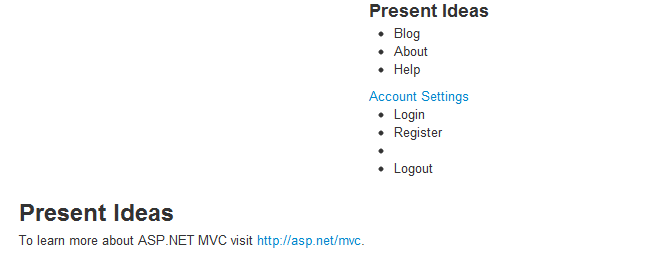
What I get, instead of the horizontal bar is this:
I would appreciate any help to get me started with what promises to be, an excellent framework.
Answers:
Thank you for visiting the Q&A section on Magenaut. Please note that all the answers may not help you solve the issue immediately. So please treat them as advisements. If you found the post helpful (or not), leave a comment & I’ll get back to you as soon as possible.
Method 1
You’re using Twitter Bootstrap 2.0, but the tutorial was written for Twitter Bootstrap 1.0, there has been quite a few changes to the markup you need to use to get the desired look.
It explains some of the changes to the navbar component in the changelog, there are also some basic examples of how it is done now:
http://getbootstrap.com/2.3.2/getting-started.html#examples
http://getbootstrap.com/2.3.2/components.html#navbar
Also (unrelated to the question), you’re including both the minified version and the standard version of the css/js, you only need to include one of each.
All methods was sourced from stackoverflow.com or stackexchange.com, is licensed under cc by-sa 2.5, cc by-sa 3.0 and cc by-sa 4.0