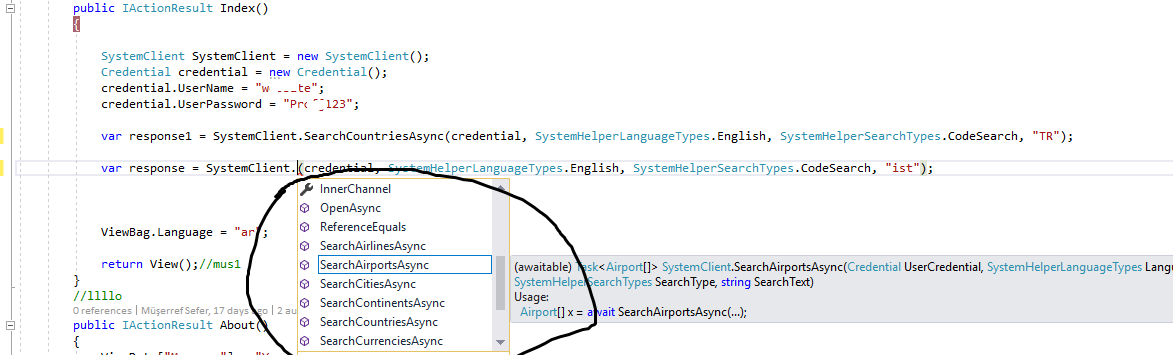
I added wcf services end point in asp.net core 2.0 to connected services and then I try to use that but with client there is only functions which ended with ..async
I don’t want to use …async.But there is no function without .async
What is problem with this?What should I do?
instead of using that
var response = SystemClient.SearchCountriesAsync(....
I want to use that
var response = SystemClient.SearchCountries(...
but it give that error
Error CS1061 ‘SystemClient’ does not contain a definition for ‘SearchCountries’ and no extension method ‘SearchCountries’ accepting a first argument of type ‘SystemClient’ could be found (are you missing a using directive or an assembly reference?)
Answers:
Thank you for visiting the Q&A section on Magenaut. Please note that all the answers may not help you solve the issue immediately. So please treat them as advisements. If you found the post helpful (or not), leave a comment & I’ll get back to you as soon as possible.
Method 1
Your client does not expose synchronous method but that shouldn’t be a problem for you.
Instead of asynchronously calling the method just do this:
response = SystemClient.SearchAirportsAsync(credentials, SystemHelperLanguageTypes.English, SystemHelperSearchTypes.CodeSearch, "ist").Result;
This will call the method synchronously as it will block the call. Check John Skeets answer here.
That being said I would recomend you use the async method that is provided. To support that you would have to change the Action signature to this:
public async Task<IActionResullt> Index()
{
   SystemClient SystemClient = new SystemClient();
   Credential credential = new Credential();
   credential.UserName = "username";
   credential.UserPassword = "****";

   var response1 = await SystemClient.SearchCountriesAsync(credentials, SystemHelperLanguageTypes.English, SystemHelperSearchTypes.CodeSearch, "TR");
   var response = await SystemClient.SearchAirportsAsync(credentials, SystemHelperLanguageTypes.English, SystemHelperSearchTypes.CodeSearch, "ist");

   //Do whatever you do with those responses

   ViewBag.Language = "ar";
   return View();
}
Method 2
There is a way to generate synchronous methods in your .NET core project in Visual Studio 2019.
Wizard that adds WCF web service reference to your .NET core project has an option Generate Synchronous Operations in the third step, Client Options:
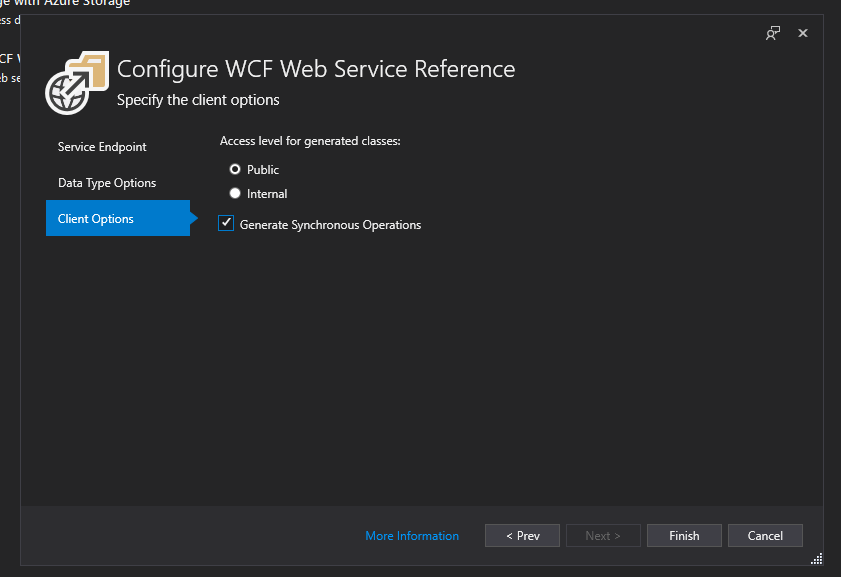
Make sure you check it as it is unchecked by default.
All methods was sourced from stackoverflow.com or stackexchange.com, is licensed under cc by-sa 2.5, cc by-sa 3.0 and cc by-sa 4.0