Hi have created a link that executes an ajax call to a controller in order to update a span with the id UpdateCart.The problem is that if the user is not authentificated he get’s sent to the Login page and this gets generated on the page:
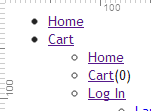
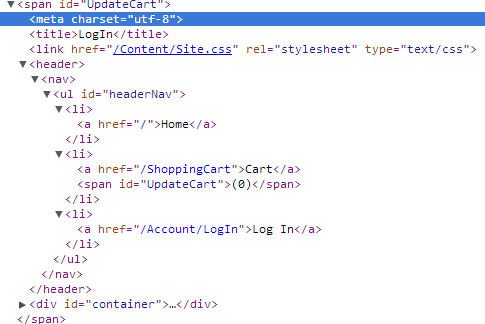
As it can be seen from the images some how my entire header tag gets duplicated and added inside the span tag.This is my code:
    @Ajax.ActionLink("Add To Cart" ,
                                 "AddToCart" ,
                                 "Products",
                                 new {
                                        ProductId = @products.ElementAt(0).Value
                                     },
                                 new AjaxOptions{

                                                   InsertionMode = InsertionMode.Replace,
                                                   UpdateTargetId = "UpdateCart",
                                                   HttpMethod = "GET"
                                                })
public ActionResult AddToCart(string ProductId)
        {
            if( User.Identity.IsAuthenticated ) {
                string username = User.Identity.Name;

                CartHelperClass.AddToCart(ProductId , username);
                ViewBag.ItemsInCart = CartHelperClass.CountItemsInCart(username);

                return PartialView("_AddToCart");
            } else {
                return RedirectToAction("LogIn" , "Account" , new {
                    returnUrl = "Products"
                });
            }
        }
How can I stop the creation of a duplicate header?
Answers:
Thank you for visiting the Q&A section on Magenaut. Please note that all the answers may not help you solve the issue immediately. So please treat them as advisements. If you found the post helpful (or not), leave a comment & I’ll get back to you as soon as possible.
Method 1
Take a look at the following blog post. In this post Phil Haack explains how you could configure the Forms Authentication module to stop redirecting to the LogOn page for non-authenticated users for AJAX requests. You could make it return a real 401 status code to the client for AJAX requests.
And this 401 could then be easily intercepted on the client and perform whatever action you want – such as manually redirecting the browser to the LogOn page using the window.location.href method.
So in your case you will simply subscribe to the ajaxComplete() handler and inside this handler you could test if the response status was 401, meaning that the user is not authenticated, and you will redirect him to the LogOn page.
So once you install the AspNetHaack NuGet (Install-Package AspNetHaack) all you have to do is to globally subscribe to the .ajaxComplete() handler in your page:
<script type="text/javascript">
    $(document).ajaxComplete(function (e, xhr, settings) {
        if (xhr.status == 401) {
            alert('Sorry you must be authenticated in order to use this action. You will now be redirected to the LogOn page');
            window.location.href = '@FormsAuthentication.LoginUrl';
        }
    });
</script>
Of course one you setup this you should stop redirecting from your AJAX controller action because this makes no sense. Your controller action will now simply look like this:
[Authorize]
public ActionResult AddToCart(string productId)
{
    string username = User.Identity.Name;
    CartHelperClass.AddToCart(productId , username);
    ViewBag.ItemsInCart = CartHelperClass.CountItemsInCart(username);
    return PartialView("_AddToCart");
}
TODO: I’d really recommend you refactoring this AddToCart action so that it stops using ViewBag but it passes a strongly typed view model to your partial view.
All methods was sourced from stackoverflow.com or stackexchange.com, is licensed under cc by-sa 2.5, cc by-sa 3.0 and cc by-sa 4.0