I wrote an asp.net application with default.aspx. When I hit this page It is asking me windows login popup window. My application should me windows authentication required but it should “Integrated Windows authentication”. If I enter login password I am able to see my page.
How can I automatically integrate this windows authentication?
I added below code in web.config. still doesn’t work.
<authentication mode="Windows"/>
    <identity impersonate="false"/>
    <authorization>
        <deny users="?"/>
    </authorization>
Answers:
Thank you for visiting the Q&A section on Magenaut. Please note that all the answers may not help you solve the issue immediately. So please treat them as advisements. If you found the post helpful (or not), leave a comment & I’ll get back to you as soon as possible.
Method 1
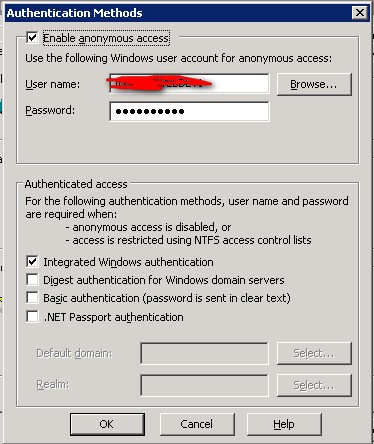
You would want to disable anonymous access and just use “Integrated Windows Authentication”.
Then in Internet Explorer go to Tools -> Internet Option -> Security -> Custom Level -> Scroll the whole way to the bottom and select “Automatic Login with current user name and password” -> OK -> OK -> Close and reopen browser.
This should allow an AD authenticated user to pass straight through to your page.
Method 2
I would turn off enable anonymous access and just use the “Integrated Windows authentication”. Also, if you are using FireFox the domain token for the logged in user is not available without some workarounds. So I would try to stick to using IE if you can too, to make it easier (no pop-ups).
Method 3
You can’t do much from the server-side. However, your clients (if they are members of your orgnaization for instance) can add your site to their Local Intranet security zone in IE.
Tools - Internet Options - Security - Local Intranet - Sites
Note this will probably only work for IE clients.
By default, IE automatically send current windows credentials to sites in the Local Intranet zone requesting for an authorization.
This way, they will not be prompted for their credentials each time they are accessing your site.
Method 4
You need to uncheck Enable anonymous access in IIS and you can also remove the identity and authorization nodes in your web.config. Keep in mind that not all browsers support this and most will still prompt you for authentication.
All methods was sourced from stackoverflow.com or stackexchange.com, is licensed under cc by-sa 2.5, cc by-sa 3.0 and cc by-sa 4.0