When I deploy asp.net application through visual studio I know I can just check Precompile during publish and uncheck Allow precompiled site to be updateable.
And I want to do the same with msbuild tool and I am using /p:MvcBuildViews=true /p:EnableUpdateable=false but when I go to IIS and open views they still have their content which means they are not precompiled, right?
They should have line This is a marker file generated by the precompilation tool as they do when publishing from VS. Am I missing something?
Answers:
Thank you for visiting the Q&A section on Magenaut. Please note that all the answers may not help you solve the issue immediately. So please treat them as advisements. If you found the post helpful (or not), leave a comment & I’ll get back to you as soon as possible.
Method 1
Precompile asp.net views with ms build
You should use the arguments /p:PrecompileBeforePublish=true instead of /p:MvcBuildViews=true.
MvcBuildViews is often mistakenly considered as something that when activated results in precompiled views. Actually. It is just a thing to include views to build process but it doesn’t compile these to project binaries folder.
When we check the checkbox Precompile during publish and uncheck the checkbox Allow precompiled site to be updateable on the file publish options, we will get following properties setting in our FolderProfile.pubxml file:
  <PropertyGroup>
    <PrecompileBeforePublish>True</PrecompileBeforePublish>
    <EnableUpdateable>False</EnableUpdateable>
  </PropertyGroup>
So if you want to do the same with msbuild tool, we should use the arguments:
/p:PrecompileBeforePublish=true;EnableUpdateable=false
Besides, since those arguments are stored in the .pubxml file(under the PublishProfiles in the Properties node in Solution Explorer). They are now designed to be checked in and shared with team members. These files are now MSBuild files and you can customize them if you wish. In order to publish from the command line just pass DeployOnBuild=true and set PublishProfile to the name of the profile:
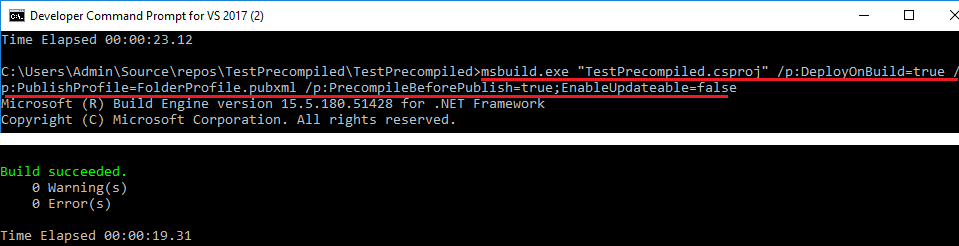
msbuild.exe "TestPrecompiled.csproj" /p:DeployOnBuild=true /p:PublishProfile=FolderProfile.pubxml
Of course, you can use the arguments and the .pubxml file at the same time, the arguments in the command line will overwrite the property in the .pubxml file:
msbuild.exe "TestPrecompiled.csproj" /p:DeployOnBuild=true /p:PublishProfile=FolderProfile.pubxml /p:PrecompileBeforePublish=true;EnableUpdateable=false
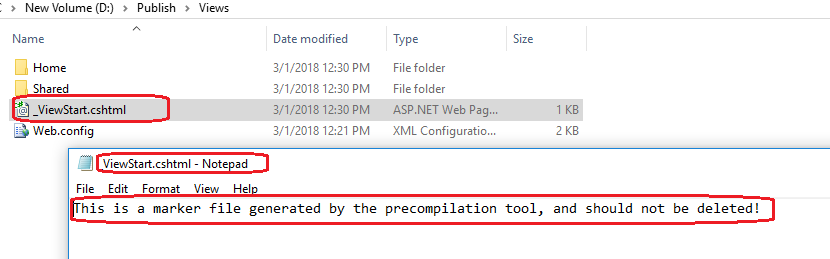
After publish completed, open the .cshtml file in the publish folder, we will get the line This is a marker file generated by the precompilation tool, and should not be deleted! as they do when publishing from VS:
See Precompiling ASP.NET WebForms and MVC Views with MSBuild for some more details.
All methods was sourced from stackoverflow.com or stackexchange.com, is licensed under cc by-sa 2.5, cc by-sa 3.0 and cc by-sa 4.0