I have added rows into gridview. There are 20 columns in gridview. How can i do a colspan-like feature in gridview which could show me 2-3 rows under 2-3 columns and remaining as a colspan.
Basically i wish to implement colspan in gridview on the rows of the gridview.
hence my present gv is like ;
Col 1 Col 2 Col 3 Col 4 …… Col 20
Cell1 Cell2 Cell3 Cell 4 …… Cell 20 (For Rows # 1)
I wish to have something like
Col 1 Col 2 Col 3 Col 4 …… Col 20
Cell1 Cell2 ...... Cell 20 (For Rows # 1)
Let me know for any query.
Thanks
Answers:
Thank you for visiting the Q&A section on Magenaut. Please note that all the answers may not help you solve the issue immediately. So please treat them as advisements. If you found the post helpful (or not), leave a comment & I’ll get back to you as soon as possible.
Method 1
You need to handle the OnRowCreated event of the GridView as follows:
 protected void grid_RowCreated(object sender, GridViewRowEventArgs e)
{
    if (e.Row.RowType == DataControlRowType.Header)
    {
        e.Row.Cells[2].ColumnSpan = 2;
        //now make up for the colspan from cell2
        e.Row.Cells.RemoveAt(4);
    }
}
Your markup should be something like this:
<asp:GridView runat="server" ID="grid" OnRowCreated="grid_RowCreated" >
On the above example, I populated the grid with this:
DataTable dt = new DataTable();
        for (int i = 0; i < 5; i++)
        {
            dt.Columns.Add("Col " + i);
        }
        for (int i = 0; i < 10; i++)
        {
            DataRow r = dt.NewRow();
            r.ItemArray=new object[]{"row "+i,"row "+i,"row "+i,"row "+i,"row "+i};
            dt.Rows.Add(r);
        }

        grid.DataSource = dt;
        grid.DataBind();
And it produces this:
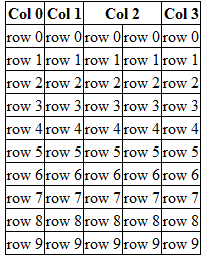
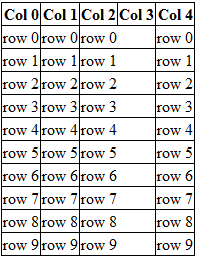
I just realized that you wanted to have the ROWS (not necessarily the header) to have certain colspan, in which case you can do:
 protected void grid_RowCreated(object sender, GridViewRowEventArgs e)
{
   if (e.Row.RowType == DataControlRowType.DataRow)
    {
        e.Row.Cells[2].ColumnSpan = 2;
        //now make up for the colspan from cell2
        e.Row.Cells.RemoveAt(4);
    }
}
And it will produce:
Method 2
BoundField and TemplateField tags has the property ItemStyle-Width=”22%” as you can see you can set it for each column with a percentage to be responsive
All methods was sourced from stackoverflow.com or stackexchange.com, is licensed under cc by-sa 2.5, cc by-sa 3.0 and cc by-sa 4.0